

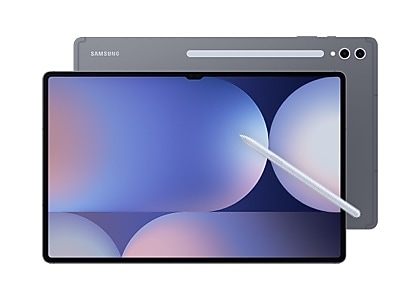
Looking for the best Samsung tablets 2026 has to offer? Samsung now fields the strongest Android tablet lineup of any manufacturer, and the 2026 range is unusually well segmented: an entry-level 8.7-inch reader starts around $150, while the 14.6-inch flagship competes with full laptops. Every model on this list was benchmarked by independent reviewers across battery, display, S Pen, and software support, so you can match a tablet to your budget and workload with confidence.
The real story this year is not raw speed. It is longevity: Samsung now promises up to seven years of OS updates on tablets across several price tiers, a commitment no rival matches at this breadth. If you also want the wider picture beyond Samsung, our guide to the top tablets of 2026 places these Galaxy Tabs side by side with the iPad Pro and other Android contenders.
Best Samsung Tablets 2026: Quick Picks at a Glance
In a hurry? Here is every standout model in the 2026 Galaxy Tab range, with the hard facts that define each one. Detailed breakdowns follow below.
- Galaxy Tab S11 Ultra: 14.6-inch Dynamic AMOLED 2X at 120Hz with anti-reflective coating, MediaTek Dimensity 9400+ chip, 12-16GB of RAM, 11,600mAh battery with 45W charging, and a measured 14.2 hours of video playback in independent testing. The most capable Samsung tablet you can buy.
- Galaxy Tab S11: the same flagship chip and 12GB of RAM in an 11-inch body with a 1,600-nit AMOLED panel and an 8,400mAh battery that tested at 12.75 hours. Full power in a travel-friendly size.
- Galaxy Tab S10+: 12.4-inch anti-reflective display, Dimensity 9300+ processor, 10,090mAh battery, and the S Pen included in the box. Launched at $999 but frequently discounted, making it a strong productivity buy.
- Galaxy Tab S10 FE+: the largest screen in the FE family at 13.1 inches, Exynos 1580 chip, up to 12GB of RAM, aluminum body with IP68 water and dust resistance, and a 10,090mAh battery.
- Galaxy Tab S10 Lite: 10.9-inch laminated 90Hz LCD, Exynos 1380, 8,000mAh battery with 25W charging, metal build, and the S Pen in the box from $349. Seven years of updates promised.
- Galaxy Tab A11+: 11-inch 90Hz display, 4nm octa-core processor, 6-8GB of RAM, microSD expansion up to 2TB, quad Dolby Atmos speakers, and a 7,040mAh battery with 25W charging. Seven years of software support at a budget price.
- Galaxy Tab A11: Samsung’s cheapest tablet at roughly $150, an 8.7-inch compact for reading, YouTube, and kids, with an 8-hour tested battery and the same 7-year update pledge.
Best Overall Samsung Tablet 2026: Galaxy Tab S11 Ultra
The Galaxy Tab S11 Ultra was released on September 4, 2025, and Samsung markets it as the thinnest and most AI-integrated tablet it has ever made. This generation switched the global Ultra lineup to a high-end MediaTek Dimensity 9400+ (3nm) chipset instead of the Qualcomm Snapdragon silicon used in earlier Ultras.
The hardware sheet reads like a no-expense-spared wishlist: a 14.6-inch Dynamic AMOLED 2X display at 2960 x 1848 and 120Hz with a new anti-reflective coating, up to 16GB of RAM, 256GB to 1TB of storage with microSD expansion to 2TB, and an 11,600mAh battery with 45W fast charging. Independent testing recorded 14.2 hours of YouTube playback at maximum brightness, among the longest runtimes ever measured on a tablet.
Durability and software backing are equally serious. The metal body carries IP68 dust and water resistance, the screen uses anti-glare armor glass, and the tablet ships with Android 16-based One UI 8.0 with a confirmed seven years of OS upgrades and eight years of security patches. Every Galaxy AI feature works the same way as on Samsung’s top phones, and the USB-C 3.2 adds external monitor support for DeX desktop workflows.
One caveat: the official keyboard covers for the S11 series do not include a touchpad, so you navigate by touching the screen. Street pricing sits around $985 to $1,399 depending on configuration and 5G options.
Best Compact Flagship: Galaxy Tab S11
If the Ultra’s 14.6-inch footprint is too much, the standard Galaxy Tab S11 keeps the flagship essentials in an 11-inch body. It uses the same Dimensity 9400+ processor and 12GB of RAM, paired with an 11-inch AMOLED panel at 2560 x 1600, 120Hz, and 1,600 nits of peak brightness.
Its 8,400mAh battery lasted 12.75 hours in independent video testing, beating the Ultra’s tested figure thanks to the smaller, more efficient screen. The S Pen ships in the box with ultra-low latency, the metal body carries IP68 protection, and the 7-year update promise applies in full. It earned a rare 10 out of 10 from one review outlet.
This is the pick for demanding professionals and portable gamers who want full DeX support, top-tier graphics (Fortnite runs at up to 120 FPS), and an 11-inch tablet that genuinely fits a small bag and one-handed couch reading.
Best Value with S Pen: Galaxy Tab S10 Lite
The Galaxy Tab S10 Lite is the cheapest Samsung tablet with a genuinely great pen experience. The 10.9-inch display is laminated, so there is no air gap between glass and panel: the pen tip feels like it writes directly on the screen instead of hovering above it. The panel runs at 2112 x 1320, 90Hz, and 600 nits.
The S Pen is included in the box, never needs charging, is pressure sensitive, and attaches magnetically to the tablet’s side. Paired with Samsung Notes, still the best handwriting app on Android and exclusive to Samsung devices, it makes the S10 Lite an outstanding note-taking machine for students. Build quality is a clear step up from the A series, with a metal body, Wi-Fi 6, and microSD expansion to 2TB alongside 128-256GB of built-in storage.
Inside is an Exynos 1380 with 6-8GB of RAM, an 8,000mAh battery with 25W charging that tested at 8 hours of video playback, and stereo speakers with Dolby Atmos. Samsung promises seven years of OS upgrades, and prices start at $349. Two honest limitations: there is no fingerprint reader and the USB-C port is 2.0, so no wired display output.
The official keyboard cover deserves a mention: it has a good keyboard and a decent touchpad, making the S10 Lite the first tablet at this price that works as a basic laptop replacement for notes, browsing, streaming, and office work.
Best Mid-Range Picks: Galaxy Tab S10 FE and FE+
The Galaxy Tab S10 FE (11 inches) and S10 FE+ (13.1 inches) sit above the S10 Lite with more power and extra features. The main difference between the two is screen size: the FE+ jumps to a 13.1-inch panel at 2880 x 1800, a full 12% larger than the previous S9 FE+, while the standard FE matches the Lite at 11 inches with a sharper 2560 x 1600, 90Hz, 800-nit laminated LCD.
The Exynos 1580 inside is roughly 35% faster in CPU and nearly double the GPU performance of the S10 Lite, paired with 8-12GB of RAM and 128-256GB of storage. Gaming, split-screen multitasking, and DeX all get meaningful headroom. Battery capacity is 10,090mAh, with tested runtimes of 8.5 hours on the FE and 9 hours on the FE+.
The bigger differentiators are features the Lite lacks: a fingerprint scanner and IP68 water and dust resistance. At this price point, no other tablet offers that level of sealing, and both include the S Pen and support solid keyboard covers. Software is Android 16-based One UI with seven years of updates.
Choose the FE if you want the fingerprint scanner and durability for less than flagship money; choose the FE+ if you also want the big 13-inch canvas for movies and laptop-style layouts. Launched in April 2025, both remain current through 2026.
Best Budget Samsung Tablets: Galaxy Tab A11 and A11+
The Galaxy Tab A11 is Samsung’s entry point at about $150. Its 8.7-inch TFT display runs at 1340 x 800 and 60Hz, driven by an entry-level MediaTek chip with 4GB of RAM and 64GB of storage. Battery life tested at a respectable 8 hours of video, and the 5,100mAh cell keeps things simple.
Expectations should stay modest: there is no S Pen support, no fingerprint scanner, and demanding games like Fortnite or Call of Duty are off the table. But you get clean One UI software, Wi-Fi 5, a 3.5mm-free compact body that is easy for kids to handle, and the same 7-year update pledge as Samsung’s pricier tablets. It is a small step over the older Tab A9 and only worth buying new, not as an upgrade from it.
The Galaxy Tab A11+ is a completely different animal. Its 11-inch 1920 x 1200 display runs at 90Hz, and the 4nm octa-core Dimensity 7300 is roughly 70% faster in CPU and double the GPU power of the A11, so Fortnite on low settings, Netflix, and casual multitasking all work. Memory stretches to 8GB of RAM with 128-256GB of storage and microSD expansion all the way to 2TB.
You also get quad Dolby Atmos speakers with a 3.5mm headphone jack, a 7,040mAh battery with 25W charging that tested at 8.15 hours, and Samsung’s new keyboard cover that turns the A11+ into a basic productivity device for email and documents. Samsung’s desktop mode is supported, though you cannot drive an external monitor. With seven years of updates, it is the best budget all-rounder in Samsung’s 2026 range.
Performance and Chipsets: How Future-Proof Each Galaxy Tab Is
Flagship S11 models pair 12-16GB of RAM with fast UFS storage and the top Dimensity 9400+ chip, a combination built to absorb five or more years of heavier apps and OS upgrades. The mid-range Exynos 1580 tier (S10 FE) with 8-12GB of RAM sits comfortably in the middle, while budget models with 4-8GB of RAM and slower storage are realistic three-to-four-year devices.
Screen size sets the first trade-off. The 14.6-inch S11 Ultra and 13.1-inch S10 FE+ are superb split-screen and movie canvases, but both feel cumbersome to hold for long reading sessions. The 11-inch models (S11, S10 FE, A11+) hit the sweet spot for handheld use and travel, while the 8.7-inch A11 is a pure reader-and-kid device.
Display and Media Experience: AMOLED vs LCD
Refresh rate is the next divider: 120Hz on the flagships makes scrolling, stylus input, and 120 FPS gaming feel dramatically smoother, 90Hz on the FE and A11+ tiers is a solid middle ground, and the A11’s 60Hz panel is fine only for basic use. Peak brightness follows price too, from 1,600 nits on the S11 flagships down to 800 nits on the FE line and 600 nits on the S10 Lite.
For pure media, the combination that matters most is screen plus speakers. Flagship and FE models pair their big panels with quad or high-quality stereo speakers tuned for Dolby Atmos, so movies carry real weight without headphones. Larger displays and high refresh rates cost battery, though, which is why the Ultra’s tested video runtime (14.2 hours) is closer than expected to the much smaller S11 (12.75 hours).
Software, One UI, and Update Support
One UI on tablets is no longer a stretched phone interface. On Android 16 with One UI 8, you get a persistent taskbar, reliable split-screen and floating windows, and drag-and-drop that behaves the same whether you are on a flagship or a Fan Edition. Galaxy AI features run identically across the S11 series, and they work much the same way as on Samsung’s top phones, which is why our guide to smartphone reviews 2026 is a useful reference for how real-world performance, camera, and battery testing should work.
The update policy is the headline advantage. The S11 Ultra carries seven years of Android OS upgrades and eight years of security patches. The S10 FE series, S10 Lite, and even the A11 and A11+ are promised seven years of updates, which keeps a budget tablet secure and compatible deep into the next decade.
Software also keeps improving the accessories you already own. S Pen handwriting recognition, note organization, and pen gestures get refinements across multiple One UI versions on S and FE models, and AI tools like Circle to Search come standard even on the $349 S10 Lite. Tablets without pen support, like the A11 line, miss these improvements entirely, which is another reason stylus users should start at the S10 Lite.
Samsung DeX, S Pen, and Productivity Features
DeX remains Samsung’s signature productivity trick. On the S11 and S10 series it delivers a desktop-style interface with resizable windows, a taskbar, and external display support over USB-C 3.2 on the flagships. In 2026 it feels mature rather than experimental: window management is stable and switching between tablet and desktop modes is seamless with a keyboard cover attached.
The S Pen is the other half of the story. It ships in the box with every S-series tablet including the FE models, needs no charging, and works with low latency and strong palm rejection across drawing and handwriting apps. Samsung Notes, Clip Studio Paint, and Adobe’s mobile tools all benefit, and the pen experience is remarkably consistent from the $349 S10 Lite up to the Ultra.
Keyboard ecosystems differ by tier, so check before you buy. The S10 Lite’s official cover includes a decent touchpad, the FE covers are solid, the A11+ keyboard is serviceable but lacks a touchpad, and the S11 series covers notably skip the touchpad entirely. Beyond the tablet itself, Samsung’s ecosystem integration has tightened: second-screen mode with Galaxy phones and Windows PCs, cross-device copy and paste, file sharing via Samsung Flow, and a Galaxy Store full of Samsung-optimized apps all make the tablet feel like part of a larger setup rather than an island.
Battery Life and Charging: What to Expect
Capacities range from 5,100mAh on the Tab A11 to 11,600mAh on the S11 Ultra, with the S10 FE line and S10+ at 10,090mAh, the S11 at 8,400mAh, and the S10 Lite at 8,000mAh. But capacity is only part of the story: processor efficiency and screen size decide real endurance, which is why the mid-range FE tablets can stretch to a day and a half or two of mixed note-taking and streaming on a single charge.
Charging tops out at 45W Super Fast Charging on the flagships and drops to 25W on the S10 Lite and A11+. No Galaxy Tab supports wireless charging, though they can reverse-charge a phone or earbuds over a wired USB-C connection. Samsung does not include a charger in the box, so budget for one: all models support standard USB-C Power Delivery, and actual refill times hover around two hours on the biggest batteries.
Independent testing gives the most useful numbers: 14.2 hours (S11 Ultra) and 12.75 hours (S11) of YouTube playback, 9 hours for the S10 FE+, 8.5 hours for the S10 FE, 8 hours for the S10 Lite and A11, and 8.15 hours for the A11+. Standby drain is consistent and predictable across One UI, and Samsung’s improved thermal management keeps battery drain linear rather than spiky under sustained workloads, which supports battery health over several years of ownership.
Best Samsung Tablets 2026 for Every Budget Tier
Samsung’s 2026 pricing makes each tier feel deliberate rather than compromised. Around $150, the Tab A11 covers reading, video, and kids’ use with long software support. Between roughly $230 and $380, the A11+ and S10 Lite split the budget crown: pick the A11+ for raw power and speakers, or the S10 Lite for the S Pen and laminated display.
The mid-range S10 FE and FE+ occupy the center, adding IP68 sealing, a fingerprint scanner, and stronger chips without flagship pricing. The S10+ at its $999 launch price is often found at steep discounts, which quietly makes it one of the best productivity buys of 2026. And the S11 Ultra’s $985 to $1,399 band is for buyers who will genuinely use the 14.6-inch canvas, the top chip, and DeX every day.
The pattern is simple: budget models deliver value through simplicity and update longevity, the mid-range delivers it through balance, and premium models only earn their price when their capabilities are fully exploited. Buy the tier that matches your habits, not your aspirations.
Best Samsung Tablets 2026: Key Factors to Consider Before Buying
Before you commit, run through the factors that actually separate these models in daily use:
- Screen size vs. mobility: 11-inch tablets balance handheld reading with travel. Screens of 13 inches and up excel at split-screen work and drawing but feel cumbersome to hold for long.
- Do you need the S Pen? Every S-series tablet including FE models ships with the pen in the box, saving you a separate purchase. A-series models neither include nor support it.
- Storage headroom: most models expand via microSD up to 2TB, so do not overpay for base storage you will not fill.
- Update lifespan: seven years of updates is now standard from the $150 A11 upward, so even budget buyers get long security coverage.
- Accessory costs: chargers are not in the box, and keyboard covers vary in quality and price, so budget for the full setup, not just the tablet.
- Ecosystem fit: Galaxy phone or Windows PC owners get extra value from second-screen mode, Samsung Flow file sharing, and cross-device copy and paste.
Which Samsung Tablet Should You Buy in 2026? Final Recommendations
Students should start with the S10 FE or the S10 Lite: the pen experience is nearly identical, both carry seven years of updates, and the FE adds durability and a fingerprint reader if the budget stretches. Professionals living in split-screen mode will get the most from the S10+ or the S11, depending on whether the 12.4-inch or 11-inch form fits their bag.
Creatives and illustrators should go straight to the S11 Ultra for the 14.6-inch AMOLED canvas, the lowest pen latency, and DeX with external monitor support, accepting the size and price as the cost of a true desktop-class tool. Casual users and families are best served by the A11+ for the money or the standard S11 if they want a premium media tablet without the Ultra’s bulk.
Whatever you choose, prioritize longevity over peak specs: Samsung’s extended support means a slightly higher upfront investment usually buys years of extra useful life.

Frequently Asked Questions
Does the S Pen come included with Samsung tablets?
Yes on every Galaxy Tab S-series model, including the flagships (S11, S11 Ultra) and the Fan Edition models (S10 FE, S10 FE+): the pen ships in the box at no extra cost, never needs charging, is pressure sensitive, and attaches magnetically to the tablet. Budget A-series models like the Tab A11 and A11+ neither include nor support an active S Pen.
Can a Samsung Galaxy Tab truly replace a laptop?
For web browsing, document editing, email, media creation, and multitasking, yes, especially with Samsung DeX’s windowed desktop environment and a keyboard cover. The S11 series even supports external monitors over USB-C 3.2. If your work needs specialized desktop-only software like full CAD or x86 development tools, a dedicated laptop is still necessary.
Do Samsung tablets support wireless charging?
No, Galaxy Tabs charge only over a wired USB-C cable, with up to 45W Super Fast Charging on the flagships and 25W on models like the S10 Lite and A11+. They can, however, reverse-charge accessories such as your phone or earbuds through a wired USB-C connection.
How long will Samsung support my 2026 Galaxy tablet with software updates?
Samsung promises up to seven years of major OS upgrades and security patches on the S11 flagships, the S10 FE series, the S10 Lite, and even the budget A11 and A11+, keeping devices secure and compatible into the early 2030s. The S11 Ultra additionally gets an eighth year of security updates.
The best Samsung tablet is the one that fits naturally into your routine, not the one with the longest spec sheet. Match the screen, pen support, and software lifespan to how you actually work and play, and any of these Galaxy Tabs can be a long-term companion that grows with your needs.
