

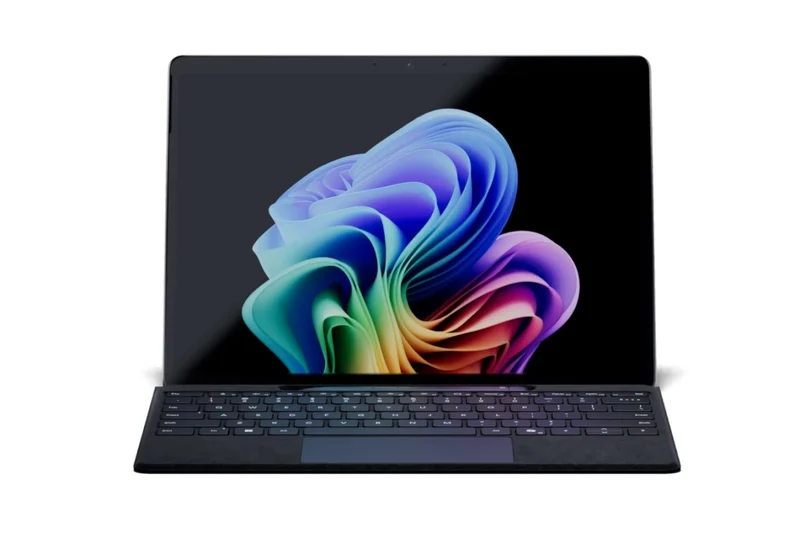
Windows tablets live in an awkward but useful space: they try to be both a laptop and a tablet, and the good ones run full desktop Windows instead of a mobile OS. That means real Office, real Chrome, real Adobe apps — no “mobile version” compromises. In 2026, the category is led by Microsoft’s Surface Pro 11 on Snapdragon X silicon, with strong business detachables from Lenovo and Dell and one unapologetic performance monster from ASUS.
The golden rule of Windows tablets: decide which mode you will actually live in. If 70% of your day is typing on your lap, buy a proper laptop. If your tablet mode is real — note-taking, reading, travel, presenting — a detachable earns its keep.
Quick Picks: The Best Windows Tablets of 2026
- Best overall: Microsoft Surface Pro 11 — the OLED Snapdragon X Elite model, the tablet-first 2-in-1 to beat.
- Best for business: Lenovo ThinkPad X12 Detachable Gen 2 — the best keyboard in the category plus enterprise security.
- Best for enterprise: Dell Latitude 7350 Detachable — Intel Core Ultra, superb webcam and conference-call polish.
- Best performance: ASUS ROG Flow Z13 — dedicated GPU options and a high-refresh display in tablet form.
- Best value Surface: Microsoft Surface Pro 9 — still the balanced all-rounder if you find it discounted.
- Best compact: Microsoft Surface Go 4 — full Windows 11 in a light, student-friendly 2-in-1.
Microsoft Surface Pro 11 — Best Overall Windows Tablet
The Surface Pro 11 is the one device here that is genuinely a tablet first: about 1.9 lb without the keyboard, light enough to actually hold and read. The configuration worth buying is the OLED model with Snapdragon X Elite — a 13-inch 2880 x 1920 PixelSense display at 120Hz that reviewers measured at 580 nits SDR with 98.9% P3 coverage.
Battery life is the surprise. Tom’s Guide measured 12 hours 10 minutes of web browsing at 150 nits, beating Microsoft’s own 10-hour claim. The Snapdragon X Elite chews through Word, Excel, Teams, Chrome and Slack simultaneously without complaint, and Copilot+ AI features add on-device transcription and noise isolation that remote workers will actually use.
The cost trap is the keyboard. Microsoft sells it separately — roughly $170 for the basic Type Cover up to $450 for the Flex Keyboard with Slim Pen — so the smart buy is the bundle: tablet plus Pro Keyboard and Slim Pen for around $1,600. One honest caveat: Windows on ARM in 2026 runs mainstream software fine, but kernel-level anti-cheat games (anything on Riot Vanguard) still refuse to run.
Lenovo ThinkPad X12 Detachable Gen 2 — Best Windows Tablet for Business
The ThinkPad X12 is the detachable for people who type for a living. Its keyboard feels closer to a traditional business laptop than any rival’s, which matters enormously after thousands of words of emails and reports. Intel Core processors, Windows 11 Pro, dTPM, a fingerprint reader and ThinkShield protections make it the corporate IT department’s favorite.
It is slightly heavier than the Surface and battery life is average rather than exceptional, but the typing experience and military-grade durability win for office-based professionals, financial analysts and project managers. At around $999 CAD it also undercuts the Surface Pro 11 significantly.
Dell Latitude 7350 Detachable — Best for Enterprise Users
Dell’s Latitude 7350 Detachable is built for the enterprise world: Intel Core Ultra processors, serious security tooling, and a webcam with background noise cancellation that genuinely impresses on video-heavy workdays. Sales professionals and remote teams who live in Teams and Zoom will notice the difference immediately.
Configuration prices climb fast and accessories add up, so this is a device to buy through business channels rather than as a casual consumer pick. But for managed fleets and security-conscious organizations, it is the most buttoned-up Windows tablet you can buy.
ASUS ROG Flow Z13 — Best Windows Tablet for Performance
The ROG Flow Z13 is not trying to be a typical tablet — it is a compact gaming laptop with a detachable keyboard. Dedicated GPU options, a high-refresh display and workstation-class thermals make it the only Windows tablet that handles AAA gaming and heavy creative workloads like rendering without breaking a sweat.
The trade-offs are obvious: battery life is mediocre under load, it is heavier and less “tablet-like” than a Surface, and it is expensive. But if raw power in a portable form is the entire point — gaming, 3D work, video editing on the move — nothing else in tablet form comes close.
Microsoft Surface Pro 9 — Best Value Windows Tablet
The Surface Pro 9 remains the most balanced Windows tablet for buyers who do not need the latest silicon. It defined the modern Surface formula — slim bezels, bright high-quality display, strong everyday performance — and in real use it is the closest a Windows tablet gets to replacing a laptop without feeling compromised.
The play here is price. With the Pro 11 on shelves, Pro 9 units (and the older Pro 8) appear at meaningful discounts, and for writing, browsing, Office work and light creative tasks the day-to-day difference is small. Just remember the keyboard-and-pen math applies here too: price the full bundle, not the tablet alone.
Microsoft Surface Go 4 — Best Compact Windows Tablet
Students and light users do not need a 13-inch flagship. The Surface Go 4 is a lightweight 2-in-1 with a built-in kickstand, support for a detachable Type Cover, and full Windows 11 on Intel processors. It is the easiest Windows tablet to carry all day and the cheapest route to the full desktop.
Expect modest performance — this is a note-taking, Office and browsing machine, not a multitasking powerhouse — but tight Microsoft 365 integration and strong pen support make it a genuinely useful student device rather than a toy.
If a traditional clamshell suits you better than a detachable, read our Dell XPS 14 (2026) review to see how the classic Windows laptop holds up this year.
Windows Tablets Buying Guide: What Actually Matters
Detachable or convertible? A detachable (Surface, X12) is superb on a desk and in the hand but wobbly on a lap — the kickstand is no hinge. If you type on the couch constantly, a 360-degree convertible wins. Buy for the mode you live in.
Price the whole kit. Keyboards and pens are usually sold separately, and a Surface keyboard-plus-pen set can add $450. Always calculate the full carry cost before comparing prices.
Get 16GB of RAM. Memory is soldered or on-package in every modern Windows tablet. For business multitasking — 20 browser tabs, Teams, Excel, PDFs — 16GB is the minimum that still feels fast in year three.
Check Windows-on-ARM compatibility. Snapdragon models run mainstream apps natively in 2026, but verify any niche x86 driver, peripheral or specialized software you depend on before committing.
Trust measured battery, not claimed. Makers quote video loops; real mixed work lands at half to two-thirds of the claim. Look for a reviewed mixed-use figure before believing any number over 15 hours.
For more productivity-focused slates, our best tablets for work roundup covers the top options across all platforms.

Frequently Asked Questions
Which is the best Windows tablet overall in 2026?
The Microsoft Surface Pro 11. The OLED Snapdragon X Elite model offers the best mix of display quality, battery life (over 12 hours of browsing in testing), performance and portability — and it is the only pick here you would genuinely hold like a tablet.
Can a Windows tablet replace a laptop?
For many people, yes. If your work is email, Office apps, web browsing and video meetings, a Surface Pro 11 or ThinkPad X12 with a keyboard handles it. Heavy workloads — compiling, 3D rendering, AAA gaming — still want a full laptop or the ROG Flow Z13.
Are Windows tablets good for gaming?
Most are not — integrated graphics and thin chassis are a bad combo for demanding games. The exception is the ASUS ROG Flow Z13 with its dedicated GPU options. For casual and cloud gaming (GeForce NOW, Xbox Cloud), any of these tablets works fine.
Do I need to buy the keyboard and pen separately?
Usually, yes. Microsoft, Lenovo and Dell all sell keyboards and styluses as accessories, and the combined cost can add $200-450 to the tablet price. Look for bundles (like the Surface Pro 11 keyboard-and-pen bundle around $1,600) to save money.
Is the Surface Pro 8 or 9 still worth buying?
Yes, at the right price. The Pro 9 remains a balanced, capable Windows tablet, and discounted Pro 8/Pro 9 units are often the smartest buy for Office work and browsing. Only step up to the Pro 11 if you want the OLED display, Snapdragon efficiency and Copilot+ features.
What about Windows on ARM app compatibility?
In 2026 it is mostly a solved problem for mainstream software — Office, Chrome, Slack, Adobe apps all run natively or emulate well. The remaining gaps are niche: kernel-level anti-cheat games, some specialized drivers and legacy enterprise tools. Check your must-have apps first.
Final Verdict
The Surface Pro 11 is the Windows tablet to buy in 2026 — the OLED model finally delivers the battery life and display to match the form factor’s promise. Typists should look at the ThinkPad X12’s superb keyboard, enterprises at the Latitude 7350’s security and webcam polish, and power users at the ROG Flow Z13’s GPU muscle. Whatever you choose, price the keyboard and pen into your budget from day one — the tablet alone is only half the purchase.
