

Finding the best AirPlay speakers in 2026 comes down to one question: how much of your listening happens at home, on Apple devices? AirPlay streams audio over your Wi-Fi network instead of Bluetooth, so it stays connected across rooms, keeps playing while you take a call, and lets you send the same song to several speakers at once.
This guide is about Wi-Fi, multi-room AirPlay streaming for the Apple ecosystem — iPhone, iPad, Mac and Apple TV. That is a different job from a voice-assistant speaker. If your priority is asking Alexa or Google questions, read our Best Smart Speakers 2026 roundup instead. Here, the focus is sound quality and seamless Apple integration.
Quick Picks: The Best AirPlay Speakers at a Glance
| Speaker | Best For | Approx. Price |
|---|---|---|
| Sonos Move 2 | Best overall | Premium portable |
| Apple HomePod (2nd Gen) | Best for Apple-first homes | ~$299–$349 |
| Sonos Era 100 | Best versatile pick for most people | ~$217–$249 |
| Apple HomePod mini | Best budget AirPlay speaker | ~$99–$149 |
| Brane X | Best for bass | $499.99 |
| Bose Smart Soundbar | Best for TV and music | $499 |
| Naim Mu-so 2 | Best premium all-in-one | Premium (£1000+) |
Why AirPlay, Not Just Bluetooth?
Bluetooth is built for convenience: quick pairing, no network needed, works anywhere. But it connects your phone to one speaker at a time, range is limited to a few metres, and dropouts creep in when a wall gets in the way.
AirPlay flips that trade-off. Because it rides your home Wi-Fi, the connection is far more stable, the range covers your whole network, and the higher bandwidth delivers finer detail and wider dynamics than narrow Bluetooth streaming. AirPlay 2 adds multi-room playback, so you can fill the kitchen, bedroom and living room with the same playlist — or control each room separately from your iPhone’s Control Center.
AirPlay is not lossless in every setup. Some speakers and multi-room configurations compress the signal slightly, so you will not always get bit-perfect audio. In most homes, though, it still sounds noticeably better than Bluetooth.
There is one honest caveat: AirPlay lives inside Apple’s ecosystem. iPhones, iPads and Macs speak it natively. Android users get nothing from the AirPlay part, so if your household mixes platforms, pick a speaker that also includes Bluetooth — most AirPlay speakers do.
Best AirPlay Speaker Overall: Sonos Move 2
The Sonos Move 2 is the easiest recommendation for most people because it refuses to pick between indoor and outdoor listening. It works as your main AirPlay speaker at home, then goes to the garden without you buying a second device.
Switching between Wi-Fi and Bluetooth is genuinely simple — stream over AirPlay indoors, walk outside and let Bluetooth take over without reconnecting drama. The included charging dock matters more than it sounds: you drop the speaker in place when you are done, and it is always charged when you pick it up.
Sound holds up for small-to-medium gatherings with strong, precise bass and clear vocals at higher volumes. The IP56 rating shrugs off dust and light rain. The only real downside is the price, which sits above most portable speakers — but if you want one speaker that covers the most use cases with zero setup friction, this is it.
Best for Apple-First Homes: Apple HomePod (2nd Gen)
If Apple already runs your home, the second-generation HomePod is the most natural-sounding choice. Apple controls the speaker, the software and the devices sending it audio, which gives an integration advantage no spec sheet fully captures.
The hardware is serious: a 4-inch high-excursion woofer with five horn-loaded tweeters, computational audio, and room-sensing that scans and optimises the sound for wherever the speaker sits. The S7 chip drives spatial audio with Dolby Atmos, and a stereo pair works with Apple TV 4K for both music and television.
It also doubles as a smart-home hub with temperature and humidity sensors, Thread networking and Siri. Just know its limits: Bluetooth hardware exists, but it is not a conventional Bluetooth speaker — audio sources centre on AirPlay and supported services. And music voice commands mostly favour Apple Music, so Spotify loyalists should weigh that before buying.
Best Versatile Pick: Sonos Era 100
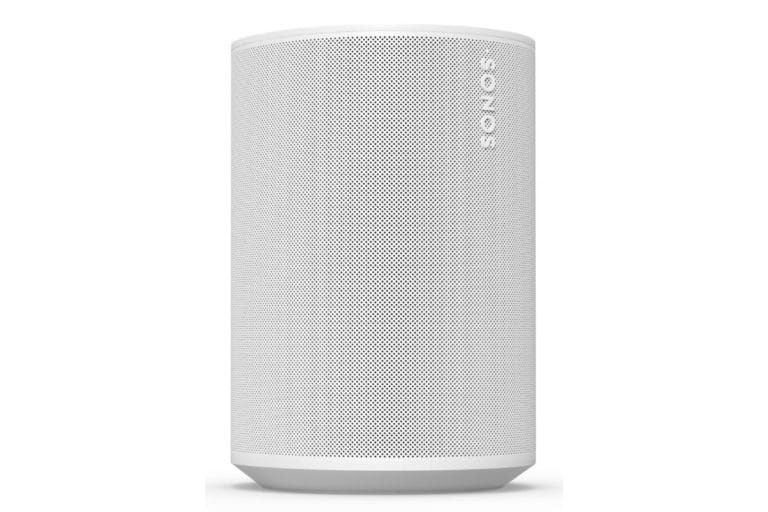
The Sonos Era 100 is the middle ground for Apple users who do not want to be locked entirely into Apple. It is compact enough for a bedroom, kitchen or office shelf, yet it brings Wi-Fi, AirPlay 2, Bluetooth and optional line-in (via Sonos’ adapter) to the table.
Two angled tweeters create stereo separation, Trueplay tuning adapts the sound to your room, and a second Era 100 forms a stereo pair — or joins a bigger Sonos multi-room system later. That upgrade path is the real selling point: start with one speaker, expand room by room. Just note that in surround-sound duty with a Sonos home theatre, AirPlay and Bluetooth get disabled.
Best Budget AirPlay Speaker: Apple HomePod mini
Sometimes you just want music in the kitchen, a podcast in the office, or Siri beside the bed — without spending hundreds per room. The HomePod mini is how Apple makes AirPlay affordable: at 8.4 cm tall it fits anywhere, and several of them spread AirPlay and Siri across a home for less than one flagship speaker.
Setup is as easy as bringing your iPhone near it. Sound comfortably outperforms the size and price, with surprising sophistication for such a small box — though it will not fill a large room or replace a bigger speaker. The trade-off is ecosystem lock-in: you need an iPhone or iPad to set it up, and Siri’s music brain works best with Apple Music.
Best for Bass: Brane X
The Brane X is for people who want low-end they can feel. A built-in subwoofer — rare in a box this size — delivers deeper, heavier bass than almost any all-in-one rival. It is the kind of bass you sense in your desk, not background decoration.
It streams over Wi-Fi for AirPlay, plus Bluetooth and wired aux, and an IP57 rating handles dust and water exposure. It is technically portable thanks to the handle, but it is heavy — expect it to live in one spot and turn up rather than travel. At normal volumes it keeps enough clarity to balance the low-end, though pushing it hard introduces distortion. Expensive, and only worth it if bass is the point.
Best for TV and Music: Bose Smart Soundbar
If your living room already revolves around the TV, a soundbar that also streams music over AirPlay beats buying a separate speaker. The Bose Smart Soundbar handles TV audio over HDMI eARC, then switches to AirPlay music when you are done watching.
It supports Dolby Atmos and an AI Dialog mode, and the Bose app makes input-switching and playback control painless. It also speaks Bluetooth and Chromecast, so non-Apple devices are not left out. For more dedicated home-cinema options, see our Best Soundbars 2026 guide.
The trade-off is size-class: as a compact soundbar it cannot match the bass depth or room-filling presence of a larger system with a subwoofer, and it will not move around like a portable. For a simple one-device living-room setup, though, it is one of the easiest recommendations.
Best Premium All-in-One: Naim Mu-so 2
For buyers who want one statement speaker and have the budget, the Naim Mu-so 2 remains the premium benchmark. A 450W system with AirPlay 2, Chromecast, Spotify and Tidal, internet radio and up to 24-bit/88kHz high-res audio — plus HDMI ARC so it can pull TV duty too.
The sound is sensational: rich, confident, detailed, with convincing bass that fills large rooms. The elongated aluminium design divides opinion, but if you like it, nothing else at this level quite looks — or sounds — like it. It is old enough to need a dedicated spot and heavy enough at 11.2 kg to stay there.
What to Look for in an AirPlay Speaker
Before buying, check the boxes that actually affect daily use:
- Ecosystem fit: How deeply are you into Apple? HomePods reward Apple loyalists; Sonos, Bose and Denon keep the door open for Android and other services.
- Multi-room plans: Nearly every modern speaker uses AirPlay 2, but mixing speaker families in one multi-room setup can cause glitches — pairing speakers from the same brand family (two HomePods, or Sonos Era 100 + Era 300) is the safer route.
- Room size and placement: Small speakers like the HomePod mini shine in bedrooms and kitchens; big open living rooms deserve something with real driver firepower.
- Inputs beyond AirPlay: Bluetooth for guests and portability, line-in for a turntable, HDMI ARC for the TV — most non-Apple AirPlay speakers bundle these; HomePods largely do not.
- Streaming services: AirPlay carries whatever your iPhone plays, but native Spotify Connect, Tidal Connect or Chromecast matter if other people in the house use Android.
- Budget: AirPlay 2 coverage starts under $100 with the HomePod mini and climbs past $1000 for premium all-in-ones — decide which features matter before you fall for the expensive ones.
Also note the 2026 pipeline: Denon’s refreshed Home wireless speaker range and Bose’s new Lifestyle Ultra Speakers are both arriving with AirPlay 2, so the field will only widen from here.

Frequently Asked Questions
Is AirPlay better than Bluetooth?
For home listening, usually yes. AirPlay uses Wi-Fi, so it offers higher bandwidth, more detail, better range and multi-room playback. Bluetooth wins on portability and universality — it needs no Wi-Fi network and works with any device.
Do I need an iPhone to use an AirPlay speaker?
For the best experience, yes. AirPlay is built into iPhones, iPads and Macs. Some Windows apps support it, but Android devices do not. Most AirPlay speakers also include Bluetooth, so Android users can still play audio through them — just without the AirPlay features.
Can I use AirPlay speakers in multiple rooms?
Yes. AirPlay 2 lets you stream to several speakers at once or control each one individually from your iPhone. For the smoothest results, stick to speakers from the same brand family.
How many AirPlay speakers can you connect at once?
With AirPlay 2 there is no official limit beyond “one or more,” but in practice performance holds up for around three to six speakers depending on your network and devices. Beyond that, dropouts become likely.
Which devices support AirPlay?
All Apple products support AirPlay, and many third-party speakers — Sonos, Bose, Denon, Naim, KEF — license AirPlay 2 from Apple. If it is a speaker made for the Apple ecosystem, it almost certainly supports AirPlay 2.
Can Android phones use AirPlay speakers?
Not via AirPlay itself. But nearly all AirPlay speakers (outside Apple’s HomePod line) also support Bluetooth, Spotify Connect or Chromecast, so Android devices can stream through those methods instead.
Does AirPlay support lossless audio?
Sometimes. AirPlay can carry lossless audio, but it depends on the source and the speaker — multi-room playback and some speaker firmware compress the signal slightly. It still beats Bluetooth quality in most home setups.
Are AirPlay speakers worth it?
If you use Apple devices and want reliable whole-home audio, yes. If you mainly listen on the go or use Android, a good Bluetooth speaker is the better value.
What should I look for when choosing one?
Match the speaker to your room size and ecosystem, check for multi-room support if you plan to expand, and make sure it has the inputs you need — Bluetooth, line-in or HDMI ARC — beyond AirPlay itself.
Can I pair two AirPlay speakers as a stereo pair?
Yes, many models support it: two HomePod minis, two HomePods, or two Sonos Era 100s can each form a stereo pair. Check the specific model’s documentation, since some speakers only pair within their own product line.
The Bottom Line
AirPlay speakers are the Apple home’s answer to whole-home audio: stable Wi-Fi streaming, multi-room control from your iPhone, and sound quality that Bluetooth cannot match. The Sonos Move 2 covers the most use cases for most people, the HomePod line is unmatched for Apple loyalists, and the Era 100 and Bose Smart Soundbar keep things flexible for mixed households. Pick the one that fits your rooms — and remember, you can always add another speaker later and let AirPlay tie them together.
