

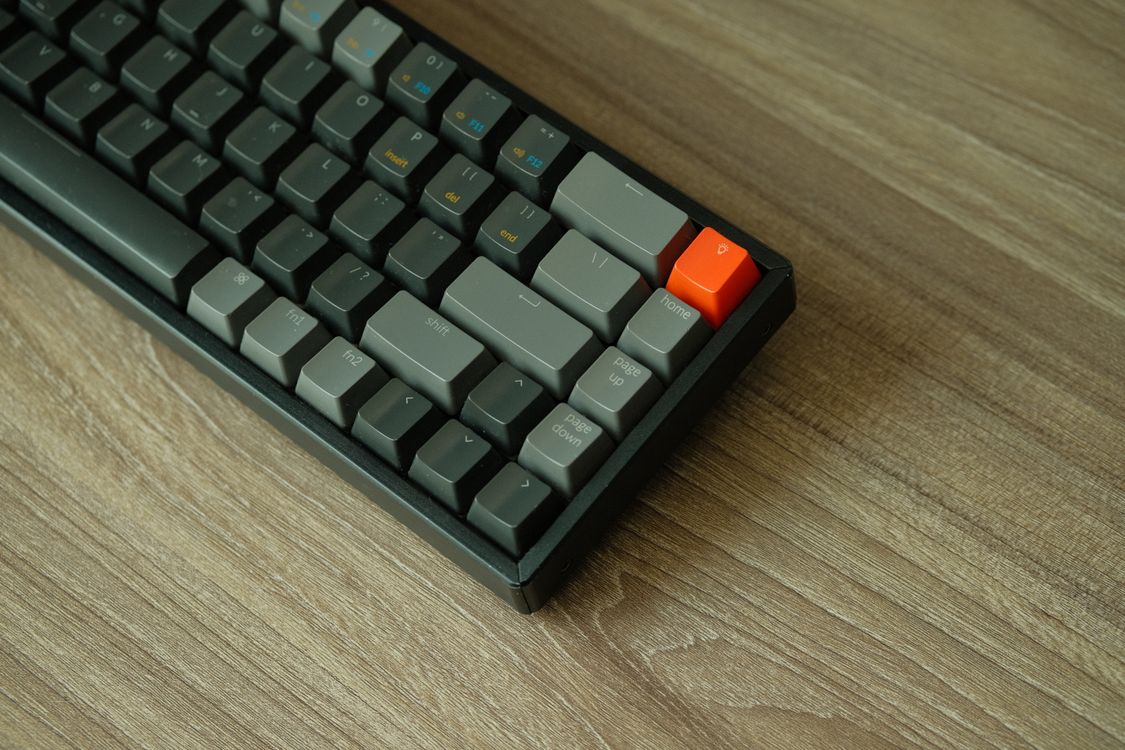
Finding the best mechanical keyboards in 2026 is no longer a hobby reserved for enthusiasts hunched over soldering irons. This year the market has genuinely changed: budget boards ship with gasket mounts and hot-swap sockets that once cost three hundred pounds, magnetic Hall Effect switches have taken over competitive gaming, and wireless performance finally rivals a cable.
We have studied the top ranking guides, meta-reviews and buyer feedback to merge the strongest recommendations into one list. Below you will find seven picks for different people — a writer, a competitive gamer, a budget student, someone with wrist pain — plus a plain-English buying guide and answers to the questions everyone asks before buying.
Best Mechanical Keyboards 2026: Top Picks at a Glance
| Pick | Best for | Size | Connection | Switches |
|---|---|---|---|---|
| Keychron Q1 Ultra 8K | Best overall | 75% | Bluetooth, 2.4GHz, USB-C | Hot-swap mechanical |
| Keychron C3 Pro 8K | Best value | Tenkeyless (TKL) | Wired USB-C | Hot-swap mechanical |
| Logitech G Pro X TKL Rapid | Best for gaming | Tenkeyless (TKL) | Wired USB-C | Hall Effect (magnetic) |
| Wooting 80HE | Best for competitive gaming | Tenkeyless (TKL) | Wired USB | Hall Effect (magnetic) |
| Keychron Q11 | Best ergonomic | Split 75% | Wired USB | Hot-swap mechanical |
| Lofree Flow 2 100 | Best premium low-profile | 96% | Bluetooth, 2.4GHz, USB-C | Low-profile mechanical |
| Keychron Q6 Ultra 8K | Best full-size with numpad | Full-size | Bluetooth, 2.4GHz, USB-C | Hot-swap mechanical |
Best Overall: Keychron Q1 Ultra 8K
This is the safest recommendation of the year if you want one keyboard that handles typing, programming and gaming without compromise. The aluminium case feels genuinely premium, the double-gasket construction gives keystrokes a soft, cushioned landing, and the 75% layout keeps arrow keys and a function row while freeing up desk space.
Connectivity is tri-mode: Bluetooth for up to three devices, 2.4GHz wireless and wired USB-C, all running up to 8,000Hz polling on the wireless and wired links. Switches are hot-swappable, the keycaps are double-shot PBT, and everything remaps in Keychron Launcher. Reviewers note battery life of up to 660 hours with the backlight off, which is generous for a board this feature-rich.
Worth knowing: you lose the number pad, so spreadsheet-heavy work may need a separate pad. The keycap legends do not let the backlight shine through, and Launcher configuration needs a wired connection. If you are kitting out a full desk setup, pair it with one of the best gadgets for everyday life for the rest of the workspace.
Best Value: Keychron C3 Pro 8K
Proof that the “mechanical feel” tax has collapsed. The C3 Pro 8K is a wired tenkeyless board with a gasket mount, acoustic foam, hot-swap sockets and 8,000Hz polling — a spec sheet that would have cost well over £100 just a few years ago, now sitting around the £50 mark.
Typing is the star here. Gasket mounting plus foam takes the hollow ring out of the plastic case, and reviewers consistently rate it among the best budget mechanical keyboards for feel and programmability. QMK-based firmware means full remapping in a browser, and Mac and Windows keycaps are included in the box.
Worth knowing: it is wired only, the case is plastic, and the original C3 Pro’s red-only backlight has been fixed in the 8K version but the keycaps remain the cheapest part of the package. For a student, a first mechanical board, or a second keyboard for the office, nothing touches it at this price.
Best for Gaming: Logitech G Pro X TKL Rapid
Instead of ordinary mechanical switches, this board uses magnetic Hall Effect switches with adjustable actuation and Rapid Trigger. You can set exactly how far a key travels before it registers, and a key can fire again the moment it starts moving back up — a genuine advantage in fast shooters, adjustable on the fly with Fn shortcuts.
Build quality is excellent, with dual-shot PBT keycaps, LIGHTSYNC RGB, dedicated media buttons and a volume roller. Logitech G HUB handles per-key commands and multi-layer macros. On Amazon it carries the highest buyer rating of the gaming picks in this guide, with reviewers repeatedly praising the fast, consistent Rapid Trigger switches.
Worth knowing: it is wired only, which is a deliberate choice — wired is simpler, never needs charging and never drops a connection mid-match. It is also aimed squarely at Windows PCs, with a list price around $189.99 that frequently dips lower.
Best for Competitive Gaming: Wooting 80HE
Wooting pioneered analogue Hall Effect keyboards, and the 80HE is the competitive benchmark other brands are chasing. Adjustable actuation from 0.1mm to 4.0mm, Rapid Trigger with 0.1mm sensitivity, and Wootility — widely considered the best keyboard configuration tool in the business.
In competitive shooters the advantage is real: counter-strafing with a 0.1mm reset point produces tighter movement than any traditional mechanical switch can manage. Pro players have been switching in droves, and every rival gaming keyboard in 2026 is measured against it.
Worth knowing: it is wired-only TKL with no wireless option, and the software-first approach means you should be comfortable tinkering in Wootility to get the most from it. At around $175 it is priced for gamers who will actually use the speed.
Best Ergonomic Pick: Keychron Q11
If your wrists ache after a full day of typing, a split keyboard is medicine — and the Q11 is the most accessible way to get one without giving up real mechanical switches. The 75% layout is divided into two halves that you angle and space to suit your shoulders, with a full CNC-machined aluminium frame on each side.
Both halves carry rotary knobs for quick volume or scroll control, switches are hot-swappable, and QMK/VIA support gives you full programmability with layers and macros. For office workers, writers and programmers who type for eight hours or more, it removes the posture compromise of a flat, single-piece board.
Worth knowing: expect a learning curve of a week or two as your muscle memory adapts, it is wired only, and the split halves take up more desk width than a standard board. At around $185 and up it is an investment, but a sensible one if typing is your job.
Best Premium Low-Profile: Lofree Flow 2 100
Not everyone wants a tall, chunky board. The Flow 2 100 pairs slim low-profile keys with a genuine aluminium body in a 96% layout — you keep the number pad while the whole keyboard is only a little thicker than a laptop. At 16.9mm tall it is the sleekest premium board in this guide.
The low-profile switches come in linear, tactile and quieter options, switches are replaceable, and VIA customisation is supported. Bluetooth, 2.4GHz and wired connections cover every setup, and Lofree claims up to 120 hours of battery with the lighting off. Independent testing praised the construction and the comfortable typing feel.
Worth knowing: the $169 price is premium for a plastic-switch board, battery life collapses to roughly 14 hours with lighting at full blast, and reviewers flagged some sound and touch-control compromises. It is a design-led choice for a permanent home or office desk — and it looks superb next to a slim machine like the Dell XPS 14 2026.
Best Full-Size with Numpad: Keychron Q6 Ultra 8K
For anyone who lives in spreadsheets, accounting software or CAD, the number pad is non-negotiable — and this is the best full-size board of 2026. The aluminium case is substantial at around 2.24kg, the full-size layout keeps every key, and switches are replaceable across Bluetooth, 2.4GHz and wired connections.
RTINGS praised its typing experience, build quality and responsiveness in independent testing. Keychron claims up to 660 hours of battery with the backlight off, dropping to 200 hours at the lowest lighting setting. Typing quality and customisation are the real reasons to buy it — the 8,000Hz polling is mostly a headline spec.
Worth knowing: the $239.99 price, tall profile and heavy weight are the trade-offs; a wrist rest genuinely helps. Also, independent testing found the 8,000Hz mode did not meaningfully improve latency, so buy it for the feel and the build, not the number.
How to Choose the Right Mechanical Keyboard
Layout sizes: full-size, TKL, 75% and 65%
Full-size boards include a number pad and are best for data entry, accounting and anyone who types numbers all day. Tenkeyless (TKL) drops the pad but keeps the function row and arrows, which pulls your mouse closer and eases shoulder strain. A 75% board squeezes the same keys into a laptop-like footprint, 65% goes further still, and 60% drops the arrows and function row entirely onto a function layer.
If you are unsure, TKL or 75% is the sweet spot for most people: compact enough to improve your mouse position, complete enough that you never hunt for a missing key. Gamers overwhelmingly prefer TKL because the extra mouse room allows lower sensitivity and wider arm sweeps.
Switch types: linear, tactile, clicky and Hall Effect
Linear switches press smoothly with no bump — fast and quiet, the default for gaming. Tactile switches add a small bump halfway through the press, giving feedback without much noise — the safe all-rounder for typing. Clicky switches add an audible click on top of the bump: satisfying if you type alone, a menace in a shared office.
Hall Effect switches are different technology entirely: magnets and sensors track each key’s position continuously, so you can choose the exact actuation point and get Rapid Trigger. They dominate competitive gaming in 2026, while traditional mechanical switches still feel better to most people for long typing sessions. If you can, try switch types before buying — comfort in a short test beats a feature list every time.
Wired vs wireless
Wireless is tidier and modern tri-mode boards hop between three Bluetooth devices plus a 2.4GHz receiver, with battery life measured in weeks or months at low brightness. Wired is simpler: no charging, no pairing, no latency questions, which is why the serious gaming picks in this guide still use a cable.
Detachable USB-C cables are worth insisting on — a broken cable should never mean a new keyboard. And note that high polling rates usually only apply to wired and 2.4GHz modes; Bluetooth typically runs at 125Hz.
Build quality and keycaps
Metal cases feel premium, resist flex and improve acoustics, but they add weight and cost. Plastic cases are lighter and cheaper; good ones with gasket mounting and foam can sound excellent. Gasket mounting — where the plate floats on rubber or silicone instead of being screwed down — is the single biggest reason budget boards feel so good in 2026.
Keycaps matter more than beginners expect. PBT plastic is thicker, resists shine and usually feels better; ABS is cheaper and wears faster, though it can look crisper. Double-shot keycaps have legends that never fade, and shine-through keycaps let RGB glow through the letters.
Special features: hot-swap, polling rate and software
Hot-swap sockets let you pull a switch out and press a new one in with no soldering — the easiest way to change how a board feels, and the best insurance against picking the wrong switch. Removable switches plus VIA/QMK support mean you can remap every key, build macros and stack function layers.
On polling rate: 8,000Hz boards report input more often than 1,000Hz boards, but independent testing found little practical latency improvement. Typing feel, build quality and connection reliability affect your daily experience far more. Competitive gamers should look at independently measured responsiveness, not the polling headline.

Frequently Asked Questions
Are mechanical keyboards better for typing than regular keyboards?
For most people, yes. Each key has its own switch rather than a shared rubber membrane, which gives more consistent feedback, faster response and far longer durability. Many people find them more comfortable over long sessions, and the variety of switch types means you can pick a feel that suits you. The main downside is noise — though linear and tactile switches are much quieter than clicky ones.
What is the best mechanical keyboard for typing?
For pure typing, a board with tactile switches in a solid, gasket-mounted build is the sweet spot — something like the Keychron Q5 Max or Q1 Ultra 8K with Brown-style switches gives excellent feedback without gaming-switch compromises. Typists who want the premium end should look at Topre boards like the HHKB Studio, famous for its deep, soft “thock”. The honest answer is that the best typing keyboard is the one whose switch feel and layout you personally enjoy for hours.
What does hot-swappable mean, and can I replace the switches?
Hot-swap sockets let you pull a switch straight out of the board and press a different one in, with no soldering iron required. It is the easiest way to change a keyboard’s feel — swap linear switches for tactile ones in minutes — and it makes repairs trivial if a single switch fails. Most boards in this guide are hot-swappable; it is one of the first features to check when buying.
Is PBT better than ABS for keycaps?
Generally yes. PBT keycaps are thicker, develop less shine over years of use and usually feel more premium. ABS keycaps are cheaper, can have crisper-looking legends and wear faster — though you can always replace them later, which is half the fun of a hot-swap board. Double-shot PBT is the combination most enthusiasts aim for.
Are mechanical keyboards louder than regular keyboards?
It depends entirely on the switch. Clicky switches like Cherry MX Blue are the loudest and will announce you to the whole office. Tactile switches such as Cherry MX Brown are moderate, and linear switches like Cherry MX Red are the quietest of the three. Most modern boards also add foam, gasket mounting and lubed stabilisers specifically to dampen unwanted noise.
How long do mechanical keyboards last?
Quality switches are rated for 50–100 million keystrokes each, which works out to well over a decade of normal use — dramatically longer than membrane keyboards. The keyboard is also repairable by design: hot-swap boards let you replace individual switches, and keycaps, cables and stabilisers are all replaceable parts rather than landfill.
Are mechanical keyboards good for gaming?
Yes — many are excellent for it. Faster response times, N-key rollover (every simultaneous press registering correctly) and features like adjustable actuation and Rapid Trigger give measurable advantages in fast games. Competitive players increasingly choose Hall Effect boards like the Wooting 80HE or Logitech G Pro X TKL Rapid specifically for these features.
Are Hall Effect keyboards better than traditional mechanical ones?
For competitive gaming, yes: adjustable actuation and Rapid Trigger deliver advantages no traditional switch can match. For typing and general use, traditional mechanical switches still feel better to most people — the magnetic switches are tuned for speed, not for the tactile satisfaction of a long typing session. Both technologies are mature and reliable; pick based on your main use.
Does an 8,000Hz polling rate actually matter?
Less than the marketing suggests. An 8,000Hz keyboard reports input to the computer more often than a 1,000Hz one, but independent testing found little practical latency improvement in real use. Typing feel, build quality, switch choice and connection reliability will affect your everyday experience far more. Treat 8K polling as a nice-to-have, not a buying criterion.
Should I get a full-size or tenkeyless (TKL) keyboard?
Get full-size if you use the number pad regularly — accounting, data entry, spreadsheets and CAD all justify it. Get TKL or 75% if you want more mouse room, a smaller desk footprint or less shoulder strain. Most gamers prefer TKL because it allows lower mouse sensitivity with wider arm sweeps, while most office workers are happiest with a full-size or 96% board.
Can I use a mechanical keyboard with a Mac?
Yes. Most modern boards, including all the Keychron picks here, include a physical Mac/Windows toggle or an Fn shortcut plus Mac-specific keycaps in the box, so the layout switches cleanly. Bluetooth models pair with Macs, iPads and iPhones with no fuss. The main exception is gaming-focused boards aimed at Windows, which may have limited Mac software support — the core typing and gaming functions still work fine.
