

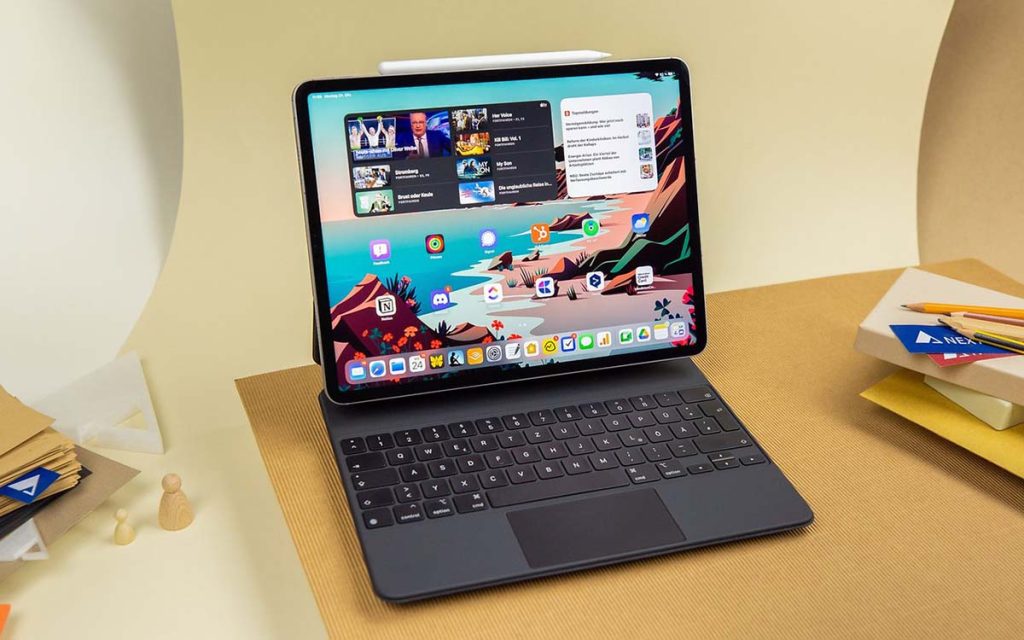
The best tablets for work 2026 have a serious claim on your desk. This year’s models ship with laptop-class chips, desktop-style multitasking and keyboard docks that actually feel good to type on. If your day is documents, calls, email and notes, several of these tablets can genuinely stand in for a laptop.
This guide rounds up the strongest work tablets of the year and shows you how to choose between them. Expect straight talk on displays, keyboards, styluses, battery life and the accessory costs nobody puts in the headline price.
The Best Tablets for Work in 2026: How to Read This List
Before the picks, know what separates a real work tablet from a media slate. The operating system sets the ceiling: iPadOS gives you the best tablet app library, Android offers flexibility and desktop-style modes, and Windows runs your legacy software natively. Match the OS to the apps you already live in.
Next, budget for the whole kit, not just the slab. A keyboard case and stylus can add up to $300, and several brands sell them separately. Look for at least 256GB of storage and 12GB of RAM if you multitask heavily. USB-C with DisplayPort output for an external monitor and Wi-Fi 7 for future-proofing are worth having.
Display technology shapes your daily experience more than raw specs. OLED panels deliver perfect blacks and vivid color, Liquid Retina-style LCDs give sharp text and accurate color, and standard LCDs are simply the best value. Battery claims deserve the same skepticism everywhere: plan for 10 to 12 hours of mixed real-world use, whatever the box promises.
Apple iPad Pro (M5, 2026 Model): The Closest Thing to a Laptop
Apple’s flagship pairs a 13-inch tandem OLED display with the M5 chip, hitting up to 1,600 nits of brightness that stays readable in harsh office lighting and works beautifully outdoors. With the Magic Keyboard attached, the whole package handles like a laptop replacement for document work, email and creative apps.
The 120Hz ProMotion panel and four-speaker setup make video calls and review sessions genuinely pleasant. iPadOS brings smarter multitasking windows and Stage Manager, so you can resize and arrange app windows more like you would on a Mac. Trade-in programs and multi-year software support help justify the premium price.
One honest warning: the tablet price is only the start. The Magic Keyboard and Apple Pencil Pro are separate purchases that push the real cost well past the $1,299 starting price. If you live in Final Cut Pro, Adobe apps or serious illustration work, though, nothing else in this guide is as polished.
Microsoft Surface Pro 12: Full Windows in Tablet Form
The Surface Pro 12 is the pick for anyone whose work depends on desktop Windows software. Its Snapdragon-class silicon delivers strong compatibility with x86 apps without the emulation slowdowns of older ARM attempts. You run the full Office suite and Photoshop natively, exactly as you would on a laptop.
The 13-inch 3:2 touchscreen is a great shape for document editing and web browsing, and the detachable keyboard plus built-in kickstand make it adaptable to desks, laps and tray tables. Thunderbolt 5 ports let you drive an external monitor and a dock, which turns this “tablet” into a proper workstation.
Copilot+ AI features enhance video calls with auto-framing and clean up photo edits on the fly. Battery life lands around 15 hours in manufacturer testing, so real-world days with calls and multitasking come in lower. Factor in the keyboard cost and this starts near $999 before accessories, but for Windows workflows it is the most honest laptop replacement here.
Samsung Galaxy Tab S12 Ultra: Best Android Tablet for Work in 2026
If you want the biggest canvas, the 14.6-inch Galaxy Tab S12 Ultra is unmatched. The 120Hz Dynamic AMOLED 2X panel at 2960×1848 resolution is superb for split-screen work, with a document on one side and your reference material on the other. The included S Pen, with its low latency, makes PDF annotation and handwritten notes feel natural.
Samsung’s DeX mode transforms the tablet into a full desktop environment when connected to a monitor, and Samsung now promises seven generations of Android updates with seven years of security support. The 11,600mAh battery and microSD expansion handle long travel days and big offline file libraries.
Two practical caveats: at $1,399.99 it is only $200 below nothing cheaper, and the 45W fast charger is not included in the box, so your advertised charge time depends on the adapter you buy. The giant screen is brilliant at a desk but awkward for one-handed commuting. Office users who mostly work in two apps at once will love the 12.6-inch Tab S12+ as a saner middle ground at $1,199.99.
Apple iPad Air 11 (M4): The Sweet Spot for Most Workers
The iPad Air is the balanced choice for most people buying a work tablet in 2026. The M4 chip with 12GB of memory is more than adequate for note-taking, large documents, creative apps and routine multitasking. The 11-inch Liquid Retina display is easier to hold and carry than a 13-inch panel, which matters on crowded trains.
It supports the same Apple Pencil Pro and Magic Keyboard as the Pro, giving you the haptic feedback and barrel-roll features that illustrators like. The current Apple listing sits at $749 for the 128GB Wi-Fi configuration, notably higher than the $599 launch price quoted in older coverage, so shop with live prices.
What you give up versus the Pro is straightforward: a conventional LCD instead of the 120Hz tandem OLED, and no macOS applications no matter which keyboard you attach. If your work is calls, documents, email and light creative tasks, the Air delivers the best balance of performance, features and value in Apple’s lineup.
Lenovo Tab Extreme 2: Best Value Big-Screen Work Tablet
Lenovo’s 14.5-inch OLED tablet is the value play for workers who want a large screen without a flagship price. The MediaTek Dimensity 9400 and 16GB of RAM keep heavy multitasking smooth, with room for a dozen browser tabs alongside your documents. Eight speakers deliver genuinely immersive sound for video calls and media.
The Lenovo Precision Pen 3 and a desktop-style mode cover note-taking and productivity basics. Storage is expandable all the way to 2TB, which is generous for offline project files. Battery life is rated around 15 hours, and the starting price of $799 undercuts the premium 14-inch class by a wide margin.
As with any Android tablet, weigh the software experience as much as the hardware: check the update policy and confirm your must-have apps are supported before buying. Pen and keyboard bundles vary by country, so verify exactly what is in the box. If the size appeals but the price does not, the Lenovo Idea Tab Pro Gen 2 offers a 13-inch 144Hz screen at an even friendlier price in supported markets.
Google Pixel Tablet 2: Budget Pick for Light Work
Not everyone needs flagship power. The Pixel Tablet 2 runs clean Android 16 on the Tensor G4 chip with AI features like real-time translation, which is handy for international teams. The 11-inch LCD is solid for indoor document work, and the hub mode doubles as smart-home control when you are off the clock.
With 256GB of base storage and around 12 hours of battery, it covers email, notes, video calls and streaming without complaint. At $599 it sits right at the threshold where casual use ends and pro workflows begin, and it is an honest option if your workload is light.
Stylus support handles quick notes, though serious handwriting users should look at tablets where the pen is central to the design. Buyers on an even tighter budget can also consider the entry-level iPad at $449, which gives you the iPad app library at the lowest price in Apple’s lineup. Either way, at this end of the market, longer software support matters more than raw speed.
How to Choose the Best Tablet for Work in 2026
Start with your apps, not the spec sheet. If you need desktop-only Windows software, the Surface Pro line is the only tablet that runs it natively. If your workflow is built on iPad apps and the Apple Pencil, stay in iPadOS. If you want desktop-style multitasking with Android flexibility, Samsung’s DeX is the most mature option.
Size your screen to your work style. Commuters and frequent flyers should favor 11-inch models that fit in any bag and can be held one-handed. Desk-bound workers and note-takers get more done on 12.6-inch and larger panels, where two apps genuinely fit side by side. Remember that the stylus story differs by brand: Samsung includes the S Pen free, while Apple sells the Pencil Pro separately.
Price the complete setup before you commit. Add the keyboard, pen, case and possibly a 45W charger to the headline figure, then compare. Check the exact seller, warranty terms and model number, since Wi-Fi and 5G variants often carry different identifiers and prices. And if possible, test the multitasking interface and keyboard in a store. A work tablet is a daily tool, and comfort is a spec too. For more context on the accessories side, browse our roundup of the top gadgets for your desk in 2026.
Productivity Features That Actually Matter
The features that replace a laptop are software, not silicon. Split-screen views, resizable windows and virtual desktops are the baseline now, and each platform implements them differently. Samsung’s One UI multitasking and DeX environment feel closest to a desktop, while Stage Manager gives iPads a Mac-like windowing layer. Cloud sync keeps files consistent across your phone, tablet and computer.
AI assistance is the real 2026 upgrade. Tablets now auto-transcribe calls, summarize meetings and suggest edits inside documents. Front cameras with 12MP sensors and AI framing keep you centered on video calls without you thinking about it. Security features like work-profile folders on Samsung devices help separate company files from personal ones.
Keyboard quality decides whether you enjoy typing all day. Apple’s Magic Keyboard remains the best typing experience with its built-in trackpad, while Samsung’s Book Cover keyboards integrate tightly with DeX. Whatever you choose, confirm the keyboard layout, backlighting and trackpad behavior in person before buying.
Battery Life, Accessories and Real-World Costs
Treat manufacturer battery figures as optimistic. Tablets typically deliver 10 to 12 hours of mixed use, while headline claims like “23-hour video playback” are controlled-condition numbers, not your workday. To stretch a charge, dim the screen, close background apps and use power-saving modes. A wireless charging dock on your desk keeps the tablet topped up between sessions.
Charging speed matters more than capacity for heavy users. Look for 45W or faster charging, and note that some brands no longer include the fast adapter in the box. Big batteries like the 11,600mAh cell in the Tab S12 Ultra or the 13,380mAh pack in the OnePlus Pad 4 are great, but a midday top-up at 80W does more for a travel day than an extra thousand milliamp-hours.
Finally, price the accessories honestly. Keyboards, pens, cases and chargers are often separate purchases that add $150 to $300 to your total. Trade-in programs from Apple and Samsung can offset upgrade costs, and multi-year update commitments mean a 2026 tablet should stay current well into the decade. Buy the configuration you need now, since storage and RAM cannot be upgraded later.

Frequently Asked Questions
Can a tablet really replace my laptop for work in 2026?
For most office-style work, yes. Document editing, email, video calls, note-taking and web apps all run well on modern tablets, especially paired with a keyboard. The Surface Pro 12 goes furthest by running full Windows software natively. If your job depends on specialized desktop applications, check app compatibility before you commit.
Which is better for work: iPad Pro, Samsung Galaxy Tab or Surface Pro?
It depends on your ecosystem. The iPad Pro M5 has the best tablet app library and the finest display, making it ideal for creatives and Apple users. The Galaxy Tab S12 Ultra offers the largest screen, a free S Pen and DeX desktop mode at a lower price than the iPad Pro. The Surface Pro 12 is the only one that runs full Windows, which settles it for anyone tied to legacy software.
How much should I spend on a work tablet in 2026?
Under $800 covers casual and light professional use, with strong options like the Pixel Tablet 2 and Lenovo Tab Extreme 2. Between $800 and $1,000 sits the iPad Air, the sweet spot for most workers. Over $1,000 buys flagship territory: the iPad Pro, Surface Pro 12 and Galaxy Tab S12 Ultra. Always add $150 to $300 for keyboards, pens and cases when budgeting.
Do I need to buy the keyboard and stylus separately?
Sometimes. Samsung includes the S Pen free with the Galaxy Tab S series, which is a genuine saving. Apple sells the Pencil Pro and Magic Keyboard separately, as do most other brands with their pens and keyboard covers. Before buying, check the exact bundle, since keyboard and pen inclusion varies by model and region.
Which work tablet has the best battery life?
Samsung’s flagships lead on paper, with the Tab S10 Ultra rated around 16 hours and the Tab S12 Ultra carrying an 11,600mAh battery. The Surface Pro 12 and Lenovo Tab Extreme 2 claim roughly 15 hours, while the iPad Pro lands near 14 hours. In practice, expect 10 to 12 hours of mixed work use from any of them, so charging speed and a good power adapter matter as much as raw capacity.
Is Samsung DeX mode as good as a real desktop?
DeX is the closest Android gets to a desktop, with resizable windows, a taskbar and good external-monitor support. It handles office apps, multitasking and file management well. It is not a full replacement for Windows or macOS if you need desktop-only software, but paired with the S Pen and a 14.6-inch screen, it is a convincing laptop stand-in for everyday productivity.
What screen size is best for a work tablet?
Eleven inches is the sweet spot for portability and travel, fitting any bag and working one-handed. Twelve to thirteen inches balances desk comfort with carry weight, and it is where the Surface Pro 12 and iPad Air Pro models sit. Fourteen inches and up, like the Galaxy Tab S12 Ultra, is best for desk-bound split-screen work but can feel unwieldy on the move.
The bottom line: the best tablet for work in 2026 is the one that matches your apps, your travel habits and your budget. Pick your OS first, price the full kit second, and you will end up with a machine that earns its place on your desk. For deeper verdicts on individual models, see our full tech reviews hub for 2026.
