

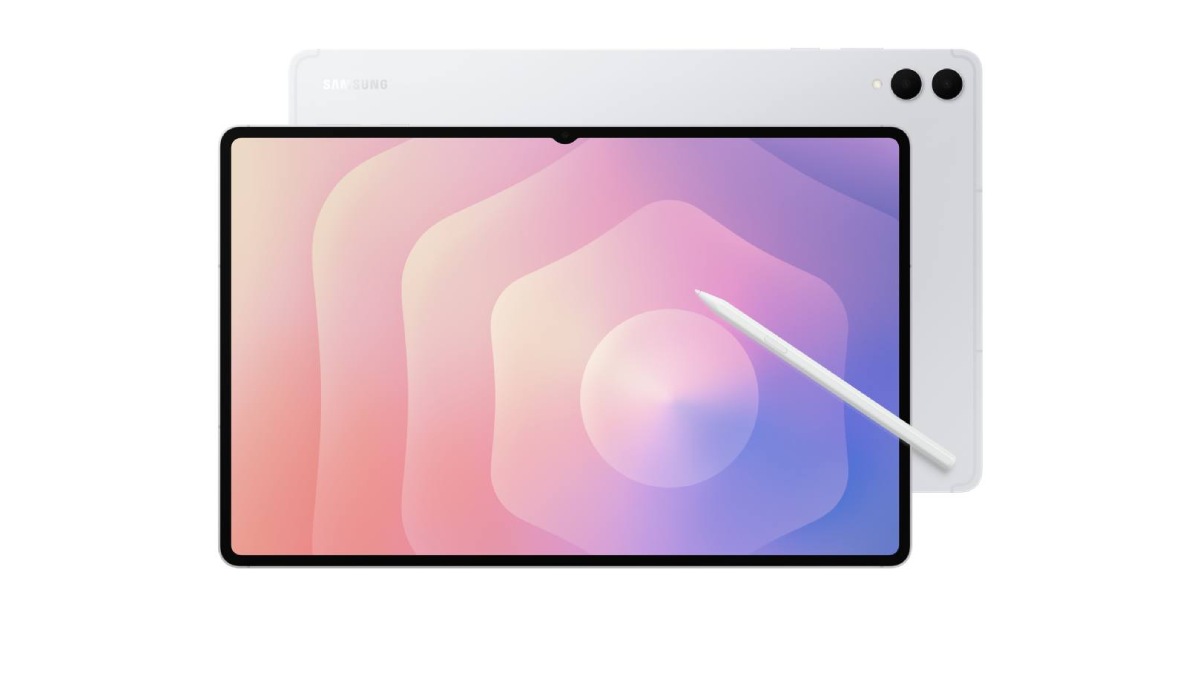
Introduction: The Apex of Android Tablets
Our Galaxy Tab S12 Ultra review puts Samsung’s biggest, boldest tablet of 2026 to the test. The largest tablet on the market has received its annual refresh, and the headline upgrade is exactly where last year’s model needed it most: performance. Where the Galaxy Tab S11 Ultra paired a gorgeous screen with a chip that felt a generation behind, the S12 Ultra’s new Dimensity 9500 finally gives the display the horsepower it deserves.
This is still a $1,399 device — $100 more than last year — and Samsung hasn’t reinvented the formula. The 14.6-inch Dynamic AMOLED 2X panel, the 5.1mm Armor Aluminum body, the included S Pen, and the IP68 rating all carry over. What changes is what matters most to power users: a faster chip with better cooling, Wi-Fi 7, quad speakers with four-channel spatial audio, and a bundle with Photoshop preloaded plus months of Google AI Pro, Goodnotes, and Notability.
After digging through five full reviews — GSMArena’s technical breakdown, Android Headlines’ three-week daily-driver test, Engadget’s 9/10 verdict, Expert Reviews’ UK testing, and Digbly’s analysis — one conclusion keeps surfacing: this is the best Android tablet you can buy right now. The real question is whether it’s worth $1,399 to you. Let’s find out.
Price and Configurations: What You Get for $1,399
The Galaxy Tab S12 Ultra starts at $1,399 for the 12GB RAM / 256GB base model, with 512GB and 1TB (16GB RAM) options costing more. That gets you the tablet and the S Pen — but not the keyboard, sold separately from $299 for the Slim or $399 for the Pro Keyboard. In the UK, the base model is £1,399, with the keyboard pushing the total to £1,798.
Samsung also dropped the base Galaxy Tab S12 entirely this year; the lineup is now just the Plus and Ultra. Compared to its chief rival, the S12 Ultra is actually the better value: the 13-inch iPad Pro starts at £1,499 with 256GB, includes neither stylus nor 5G, and an equivalent package with Pencil and keyboard pushes past £2,100. Against similarly sized laptops, the math gets uncomfortable — a Dell XPS 13 undercuts it by $400. If you’re still weighing Samsung’s lineup, our roundup of the best Samsung tablets for every budget puts the Ultra in context.
Samsung Galaxy Tab S12 Ultra: Full Specs at a Glance
| Spec | Details |
|---|---|
| Display | 14.6″ Dynamic AMOLED 2X, 2960×1848, 120Hz, HDR10+, 1,000 nits HBM / 1,600 nits peak |
| Chipset | MediaTek Dimensity 9500 (3nm), 1×4.21GHz + 3×3.5GHz + 4×2.7GHz |
| Memory / Storage | 12GB + 256/512GB, 16GB + 1TB; microSD up to 2TB |
| Rear cameras | 13MP wide (f/2.0, AF) + 8MP ultrawide; 4K@30fps video |
| Front camera | 12MP ultrawide (120°) in display notch; 4K@30fps |
| Battery | 11,600mAh, 45W wired (full charge ≈ 95 min) |
| Body | 326.3 × 208.5 × 5.1mm, 692g; Armor Aluminum; IP68 |
| Connectivity | Wi-Fi 7, Bluetooth 6.0, USB-C 3.2 Gen 1, optional 5G |
| Audio | Quad speakers, 4-channel spatial audio, Dolby Atmos |
| Software | Android 17, One UI 9, 7 years OS + security updates |
Design and Build Quality
This is the most iterative-looking part of our Galaxy Tab S12 Ultra review — and that’s not really a criticism. Samsung kept the exact 5.1mm thickness, 692-gram weight, and footprint of the S11 Ultra. It’s genuinely absurd engineering: a 14.6-inch slab thinner than most phones, yet stiff and rigid. The matte Armor Aluminum finish stays cool to the touch and shrugs off fingerprints.
The notch is still here — Samsung was rumored to move to a punch-hole camera and didn’t. In practice, every reviewer stopped noticing it within a day. The IP68 rating remains rare at this size; you’re probably not taking a 14.6-inch tablet swimming, but spill insurance on a $1,400 device is welcome. The S Pen docks magnetically on the back, though several reviewers found the magnets weak — fine in a backpack, risky on a bumpy train without the Book Cover. One genuine gripe: a single USB-C port on a device pitched as a productivity powerhouse. A second port would go a long way toward making it feel like a real laptop replacement.
Display: Still the Best Screen on Any Tablet
The 14.6-inch Dynamic AMOLED 2X display is the reason this tablet exists, and it remains the best panel on any tablet reviewers have tested. Resolution holds at 2960×1848 with a 120Hz adaptive refresh rate, HDR10+ support, and 1,600-nit peak brightness. Vision Booster adjusts contrast outdoors, and the consensus is unanimous: perfect blacks, colors that pop without going cartoonish, and razor-sharp text at 239ppi.
It isn’t the brightest on paper — the iPad Pro’s tandem OLED wins the spec-sheet battle — but nobody complained in person. One calibration note: out of the box, colors lean vivid. Switch to Natural mode if you’re doing photo work in Photoshop; everyone else can leave Vivid on. The panel is covered in scratch-resistant Gorilla Glass 5.
Performance: The Dimensity 9500 Delivers
This is the upgrade that justifies the S12 Ultra’s existence. The MediaTek Dimensity 9500, built on TSMC’s third-generation 3nm process, uses an all-big-core design (one 4.21GHz core, three at 3.5GHz, four at 2.7GHz) paired with a Mali-G1 Ultra GPU and the NPU 990. Samsung claims 19% faster CPU, 17% faster GPU, and 61% faster NPU performance over the S11 Ultra — and reviewers found those numbers tracked in real use.
Benchmarks back it up: Geekbench 7 posted 2,840 single-core and 9,447 multi-core — the latter beating a Dell XPS 13’s Intel Core 5 in the same test. AnTuTu hit 3,537,051, near Snapdragon 8 Elite Gen 5 territory. Sustained-load testing showed 84.7% stability thanks to the redesigned vapor chamber, where last year’s model managed only 68.7%. Day to day, three-way split-screen multitasking stayed smooth and background apps rarely reloaded. The one quibble: at $1,400, 16GB of RAM as standard would have been fairer than the base model’s 12GB.
S Pen and Accessories: The Stylus Is Included, the Keyboard Isn’t
Every Galaxy Tab S12 Ultra comes with the S Pen in the box — no separate purchase, no charging needed. It uses EMR technology like a classic Wacom pen, with a hexagonal shaft that feels like a #2 pencil, a softer nib than Apple Pencil tips, and a handy eraser button. It’s IP68-rated like the tablet itself.
The catch: to get the full laptop-replacement experience, you need a keyboard, and none is included. The $399 Pro Keyboard adds a dedicated touchpad, backlit keys, and a kickstand — Expert Reviews found it as good to type on as Apple’s Magic Keyboard, though the viewing angle isn’t adjustable and the whole package weighs a hefty 1.36kg.
Samsung sweetens the deal with a generous software bundle: four months of Adobe Photoshop, six months of Google AI Pro, two months of Lightroom, and a full year of Goodnotes. If you’re considering the Ultra as a work machine, our guide to the best tablets for work in 2026 shows how this bundle stacks up against the competition.
Samsung DeX: As Close to a Laptop as Android Gets
DeX remains the lynchpin of the S12 Ultra’s productivity story. Samsung’s desktop mode switches Android into a windowed, taskbar-driven interface that reviewers describe as genuinely close to a traditional PC — especially with the Pro Keyboard attached and DeX running on an external monitor. Three-way split-screen, floating windows, and drag-and-drop between apps all worked as they should.
But DeX hasn’t changed much in years, and it still isn’t a complete laptop replacement: on an external monitor it’s a convincing desktop, but as a standalone tablet the experience feels constrained. And Android apps optimized for a giant 14.6-inch display still lag far behind iPadOS. Google’s rumored Googlebook OS could change that — but it’s not here yet.
Software, Galaxy AI, and Seven Years of Updates
The S12 Ultra ships with Android 17 and One UI 9, and Samsung promises seven years of OS upgrades plus seven years of security patches — updates through September 2033, the best policy of any Android tablet. That matters: people keep tablets far longer than phones. One UI 9 on this huge canvas is the most polished Samsung software reviewers have used, with a persistent taskbar and multitasking that finally feels designed for the screen size.
The 61% faster NPU shows up in Galaxy AI features: Note Assist summaries generate faster, on-device Gallery photo edits process noticeably quicker, and Gemini responses feel snappier. Photoshop comes preloaded for the first time on any Android tablet, and the mobile versions of creative apps feel right at home on the 14.6-inch canvas.
Audio and Speakers: An Entertainment Powerhouse
The quad speakers with four-channel spatial audio are one of this year’s biggest real-world upgrades — doubling the two-channel setup of the S11 Ultra. Reviewers called them excellent: loud, clear, with genuine stereo separation in landscape. Dolby Atmos content on Netflix sounded genuinely immersive, and while the iPad Pro still digs deeper on bass, for a 5.1mm chassis this is about as good as tablet speakers get.
Camera: Fine for a Tablet, and That’s Enough
Tablet cameras will never be phone cameras, but the S12 Ultra’s are as good as Android tablets get. The rear dual setup — 13MP wide with autofocus and 8MP ultrawide — shoots 4K@30fps and handles document scanning and the occasional photo. The 12MP ultrawide front camera with its 120° field of view is the more important one, capturing 4K video for calls and fitting multiple people in frame. They get the job done, which is all the category demands.
Battery Life and Charging: Charge It Every Other Day
The 11,600mAh battery is a stamina monster. Samsung claims up to 23 hours of video playback; independent rundown tests landed at 19 hours 39–44 minutes — two and a half hours longer than the S11 Ultra. In mixed real-world use, reviewers ended full workdays in DeX with 42% remaining and settled into a charge-every-two-days rhythm even as their primary device.
The compromise is charging speed. 45W wired charging fills the enormous battery in about 95 minutes — faster than the iPad Pro’s 40W, but slow by phone standards — and there’s no charger in the box. At $1,399, including one would have been a nice touch. The box holds just the tablet, a USB-C cable, and the S Pen.
Pros and Cons
| Pros | Cons |
|---|---|
| Stunning 14.6″ 120Hz AMOLED display, 1,600 nits peak | $1,399 price is $100 more; no cheaper base model |
| Dimensity 9500 is a real performance upgrade | Identical design to the S11 Ultra — same notch |
| ~19.7-hour video battery life | 95-minute charging, no charger in the box |
| S Pen included, IP68-rated, no charging needed | S Pen lacks Bluetooth — no Air Actions |
| Seven years of OS + security updates | iPad Pro with M5 is faster and lighter |
| Quad speakers with 4-channel spatial audio | Keyboard costs extra ($299–$399) |
| Wi-Fi 7, Bluetooth 6.0, microSD up to 2TB | Single USB-C port only |

Frequently Asked Questions
How much does the Samsung Galaxy Tab S12 Ultra cost?
It starts at $1,399 (£1,399 in the UK) for the 12GB RAM / 256GB model, including the tablet and S Pen. The 512GB and 1TB (16GB RAM) versions cost more, and the keyboard is sold separately from $299.
Is the S Pen included with the Galaxy Tab S12 Ultra?
Yes. Every Galaxy Tab S12 Ultra comes with the S Pen in the box at no extra cost. It uses EMR technology so it never needs charging, and it’s IP68-rated like the tablet.
Is a keyboard included with the Galaxy Tab S12 Ultra?
No. Samsung sells the Book Cover Keyboard Slim and the $399 Pro Keyboard separately. Factor this in if you want the full laptop-replacement experience with DeX mode.
Can the Galaxy Tab S12 Ultra replace a laptop?
For many people, yes — especially with the Pro Keyboard and DeX on an external monitor. But it has a single USB-C port, a more limited OS than Windows or macOS, and Android apps still lag behind iPadOS on large screens. Close, but not a complete replacement.
How long does the Galaxy Tab S12 Ultra battery last?
Video rundown tests measured 19 hours 39–44 minutes against Samsung’s 23-hour claim — 2.5 hours longer than the S11 Ultra. In real mixed use, reviewers charged it roughly every two days. Intensive web surfing drained it in about 11.5 hours.
Does the Galaxy Tab S12 Ultra come with a charger?
No. The box contains the tablet, a USB-C cable, and the S Pen. It supports 45W wired charging — about 95 minutes for a full charge of the 11,600mAh battery — so you’ll need your own adapter.
Is the Galaxy Tab S12 Ultra better than the iPad Pro?
The iPad Pro with M5 is faster in raw benchmarks and lighter, with better-optimized tablet apps. But the S12 Ultra costs less as a complete package (S Pen included), lasts longer on battery, offers microSD expansion, and includes seven years of updates. It’s the better value; the iPad Pro is the more powerful machine.
How many years of updates does the Galaxy Tab S12 Ultra get?
Seven years of OS upgrades and seven years of security patches — through September 2033. That’s the longest update commitment of any Android tablet.
Does the Galaxy Tab S12 Ultra have a headphone jack?
No. Like recent Ultra tablets, it relies on USB-C or Bluetooth audio. The quad speakers with spatial audio do an excellent job when you don’t want headphones.
Is the Galaxy Tab S12 Ultra waterproof?
It’s IP68-rated (up to 1.5 meters for 30 minutes), and the S Pen carries the same rating. Protected against spills and rain — but we wouldn’t take it swimming.
Verdict: The Gold Standard of Android Tablets
This Galaxy Tab S12 Ultra review ends where every competitor’s did: this is the apex Android tablet, full stop. Samsung is the only company left making a proper rival to the iPad Pro, and the S12 Ultra finally pairs its peerless 14.6-inch AMOLED display with performance that lives up to it. The Dimensity 9500, redesigned cooling, four-channel speakers, Wi-Fi 7, and that marathon battery make this a genuinely complete flagship.
Should you buy it? If you want the largest, most capable Android tablet and $1,399 plus accessories doesn’t scare you, there’s no better option — Engadget gave it 9/10, GSMArena 4.5/5, and every reviewer crowned it the best Android tablet available. If you own the S11 Ultra, the identical design makes this a harder sell unless you need the performance. And if your budget tops out lower, the Galaxy Tab S12 Plus — or a proper laptop — deserves a look.
For creators, road warriors, and anyone whose tablet is their main screen, the S12 Ultra is the one to beat in 2026.
