

Picking the best e-readers 2026 has to offer comes down to how you read, not which spec sheet looks longest. We studied the leading expert comparisons and hands-on reviews, merged everything they cover, and rebuilt it into one complete guide — top picks for every reader and budget, a plain-English buying breakdown, and honest answers to the questions shoppers actually ask.
Best E-Readers of 2026 at a Glance
The short answer: the Kindle Paperwhite (12th Gen) is the best e-reader for most people, the basic Kindle (2024) is the budget gateway at around $110, the Kobo Clara BW is the best pick outside Amazon’s ecosystem, the Kobo Libra Colour is the color e-reader worth buying, and the Kindle Scribe is the one for note-takers. Prices run from about $110 to $400 and up.
Best Overall: Kindle Paperwhite (12th Gen)
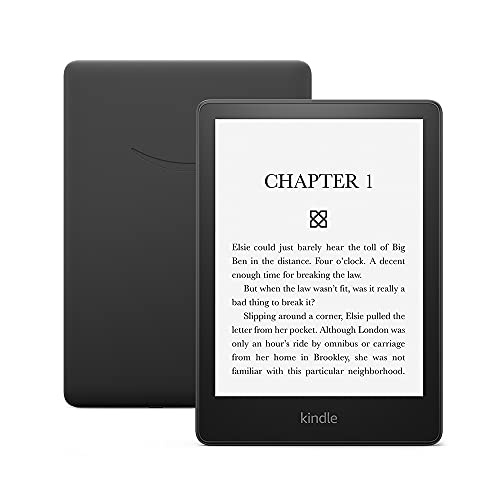
The Paperwhite remains the consensus pick across nearly every ranking, and it is easy to see why. The 7-inch 300 ppi E Ink display renders text as sharply as a printed page, the adjustable warm light shifts from cool white to amber for night reading, and IPX8 waterproofing means the bath, beach, and pool are all fair game. Battery life stretches up to 12 weeks under typical conditions.
Page turns are 25% faster than earlier generations, USB-C charging is finally standard, and Bluetooth support means one device handles both ebooks and Audible audiobooks. It supports multiple library cards through Libby — a genuine advantage over Kobo’s one-card limit. For deeper context on how it earned its reputation, see our best tech reviews of 2026.
Best Budget: Kindle (2024)
The entry-level Kindle got a serious upgrade and is no longer the compromise it used to be. The 6-inch display jumped to 300 ppi — the same sharpness as the Paperwhite — with USB-C charging and a faster processor for snappier page turns, all for around $109–129. It slips into a jacket pocket and holds thousands of books in 16GB of storage.
What you give up is clear: no waterproofing, no warm light (cool white only), and a 6-week battery instead of 12. For daytime readers and anyone unsure whether e-ink reading will stick, those are painless sacrifices. It is the cheapest way into serious e-reading that does not feel like settling.
Best Non-Amazon Pick: Kobo Clara BW
If you would rather not live inside Amazon’s ecosystem, the Clara BW is the answer. Its 6-inch E Ink Carta 1300 display matches the Paperwhite at 300 ppi with adjustable color-temperature lighting, it carries the same IPX8 waterproof rating, and it reads EPUB natively — no conversion dance. At around $139–159 it even undercuts the Paperwhite.
The killer feature is library integration: native OverDrive support lets you link your library card in settings, browse the catalog on the device, and borrow with one tap. No phone app, no extra steps. The trade-offs are a smaller 6-inch screen, shorter battery life, and a smaller bookstore — but if free library books are your main reading source, nothing else comes close.
Best Color E-Reader: Kobo Libra Colour
Color E Ink finally grew up, and the Libra Colour is the first color e-reader worth recommending without heavy caveats. The 7-inch Kaleido 3 display keeps full 300 ppi sharpness for black-and-white text while rendering covers, comics, and illustrations in muted but genuinely useful color. For manga and graphic novels, it transforms the experience.
The asymmetric design with physical page-turn buttons is a masterclass in ergonomics — one-handed reading without touchscreen precision, a blessing for anyone with arthritis or hand tremors. It is waterproof, holds 32GB, and integrates with OverDrive. Battery lasts about 5 weeks rather than 12, and colors will never match a tablet — but for illustrated reading under $250, this is the pick. Amazon’s Colorsoft is the alternative for Kindle loyalists, with slightly more vivid color at a higher price.
Best for Note-Taking: Kindle Scribe
The Scribe is a different animal: a 10.2-inch 300 ppi canvas with an included stylus that needs no charging, pressure sensitivity, and AI features that summarize notes and convert handwriting to text. Students annotating textbooks and professionals marking up PDFs get real, daily value from it. The large screen shows full document pages without reflowing text.
As a pure e-reader it is overkill — bulky, not waterproof, and $324–419 with occasional UI lag when switching modes. The reMarkable 2 writes even better but is a worse e-reader (no backlight, no bookstore, 226 ppi), and the Boox Tab Ultra C runs full Android for maximum flexibility at $600 with sluggish software. Buy the Scribe for the pen; buy the Paperwhite for the books.
E-Ink vs Tablets: Why the Screen Technology Matters
This is the physics that makes e-readers worth owning. Tablets and phones use LCD or OLED screens that shine light directly into your eyes — fine for video, fatiguing for a three-hour novel. E-Ink reflects ambient light the way paper does, so reading for hours feels no more tiring than reading a physical book. That is not marketing; it is how the technology works.
The side effects are just as important. E-Ink sips power, so batteries last weeks instead of hours — charge monthly, not nightly. The matte, glare-free surface stays readable in direct sunlight where tablets wash out. If your reading happens in long sessions, outdoors, or before sleep, a dedicated E-Ink device beats even the best tablet for the job.
Display Quality: PPI, Warm Light and Frontlight
Pixel density is the number that decides text sharpness, and 300 ppi is the standard worth demanding — it matches print quality, and even the $109 basic Kindle now offers it. Below that, text looks visibly fuzzy. Screen size is the real choice: 6 inches is pocketable, 7 inches fits more text per page and suits most readers, and 10+ inches is for PDFs and note-taking, not novels.
The frontlight deserves as much attention as the panel. Adjustable warm light — shifting from cool white to amber — makes evening reading comfortable and is gentler on sleep than blue-heavy light. Every mid-range and up model offers it now; its absence on the basic Kindle is the main reason night readers should step up to the Paperwhite. For a broader look at display tech across gadgets, see our top gadgets of 2026 buying guide.
Are Color E-Readers Worth It?
It depends entirely on what you read. For comics, manga, magazines, cookbooks, and children’s books, color E Ink is transformative — covers and illustrations finally look right without switching to a backlit tablet. The Kobo Libra Colour and Kindle Colorsoft both deliver genuinely useful color at 150 ppi, with the Colorsoft slightly more vivid.
For novels and text-heavy nonfiction, color adds nothing: black text on white looks identical, while you pay more, lose battery life (5–8 weeks versus 12), and occasionally see flicker during color transitions. Be honest about your library. If 90% of your reading is prose, buy the sharper, longer-lasting monochrome reader and never look back.
Waterproofing: Who Actually Needs It?
IPX8 — submersion in 2 meters of water for up to an hour — is now standard on the Paperwhite, the Colorsoft, and Kobo’s Clara and Libra lines. If you read in the bath, by the pool, or on rainy commutes, it is genuine peace of mind on a $160+ device. For older readers, that protection against one accident matters more than any spec.
If you only read on the couch or in bed, treat it as a nice-to-have rather than a requirement — the basic Kindle and the Scribe skip it entirely and their owners do fine. But note the pattern: every mid-range and premium e-reader includes it, and its absence is one of the clearest markers of a budget device.
Battery Life: Weeks, Not Hours
This is the e-reader’s superpower over tablets. Amazon rates the Paperwhite and Scribe at up to 12 weeks — measured at 30 minutes of daily reading with Wi-Fi off. Real-world heavy readers with Wi-Fi on should expect two to three weeks, which is still an order of magnitude better than any tablet’s 10 hours.
Kobo’s color models trade some endurance for their displays (5–8 weeks), and the basic Kindle manages about 6 weeks. The practical upshot: charging becomes a monthly habit you can forget about, not a nightly ritual. For anyone who has ever picked up a dead tablet before a flight, that alone justifies the dedicated device.
Library Borrowing: Kobo vs Kindle
Your local library probably lends thousands of ebooks for free through Libby (by OverDrive) — and your e-reader choice decides how painless that is. Kobo devices integrate OverDrive natively: link your library card once, browse and borrow directly on the device, books return themselves automatically. It is the smoothest free-reading pipeline in the business.
Kindle supports Libby too, but Amazon’s 2023 changes made the connection clunkier, requiring extra steps. Kindle’s counter-advantage: it supports multiple simultaneous library cards, while Kobo allows only one active card at a time. Heavy multi-library borrowers may still prefer Kindle; everyone else who lives on library books should buy Kobo.

Design and Comfort for Long Sessions
An e-reader lives in your hands for hours, so ergonomics matter more than benchmarks. Weight is the first filter: 5–7 ounces (lighter than a paperback) is the comfort zone; the Scribe’s 10-inch bulk belongs on a desk or lap, not held aloft in bed. The Kobo Libra’s asymmetric design with a thicker grip edge is the best one-handed shape in the category.
Physical page-turn buttons deserve more love than they get. Touchscreens demand precise swipes; buttons need only a thumb press — a real difference for arthritis, tremors, or simply reading one-handed on a train. Adjustable font sizes up to very large (24pt+) help aging eyes, and a warm frontlight keeps late sessions comfortable. Try devices in hand when you can; comfort is personal.
How to Choose: A Five-Question Filter
Answer these and the decision makes itself. Budget: under $120 means the basic Kindle; $130–160 the Clara BW or Paperwhite; $200–280 the Libra Colour, Sage, or Colorsoft; $400+ the Scribe or Boox. Book source: Amazon purchases point to Kindle, library borrowing to Kobo, sideloaded EPUBs to Kobo or Boox.
Then: do you want color (comics and manga say yes, novels say no)? Do you need waterproofing (bath and beach say yes)? Do you take notes (students and professionals say Scribe)? For most people the Paperwhite remains the safest single answer — but there has never been a better time to be a Kobo reader either.
Frequently Asked Questions
What is the best e-reader for most people?
The Kindle Paperwhite. It has the best combination of screen quality, battery life, waterproofing, price, and book selection. Unless you specifically need EPUB support or deep library integration, it is the safest pick.
Are color e-readers worth it in 2026?
For comics, manga, and magazines, yes — the Kobo Libra Colour and Kindle Colorsoft offer genuinely useful color. For regular book reading, monochrome screens still look sharper and last longer on a charge.
Which e-reader is best for graphic novels and manga?
The Kobo Libra Colour for most buyers — 7-inch Kaleido 3 color, ergonomic buttons, and a fair price. Kindle loyalists should look at the Colorsoft Signature instead.
Can I borrow library books on a Kindle?
Yes via Libby, but the integration is clunkier than Kobo’s since Amazon’s 2023 changes. If you borrow frequently, the Kobo Clara BW or Libra Colour handles it far more smoothly.
Is the Kindle Scribe worth it for students?
Yes, if you annotate PDFs regularly or want handwritten notes alongside your reading. If you mostly read regular books, the Paperwhite is better value.
How long does e-reader battery life actually last?
Amazon’s 12-week rating assumes 30 minutes of daily reading with Wi-Fi off. With heavier use and Wi-Fi on, expect two to three weeks on a Paperwhite — still vastly better than any tablet.
Can I read EPUB files on a Kindle?
Yes — Kindle has supported EPUB natively since a 2022 firmware update. Kobo has always supported it. Heavily formatted layouts may still render better on Kobo.
Do I need a waterproof e-reader?
If you read at the pool, beach, or in the bath, absolutely — the Paperwhite and Kobo Clara are both IPX8 rated. If you only read on the couch, it is a nice-to-have, not essential.
What is the best e-reader for kids?
The Kindle Paperwhite Kids: waterproof, with parental controls, a protective cover, and a six-month Kids+ subscription included. It is the worry-free choice for young readers.
Should I buy an e-reader or just use a tablet?
For serious reading, buy the e-reader. E-Ink causes far less eye fatigue than LCD/OLED, works in sunlight, and lasts weeks on a charge. Tablets win only when you need apps, video, and the web alongside your books.
The Bottom Line
Buy the Kindle Paperwhite if you want the best all-around e-reader with the least hassle. Buy the basic Kindle if $110 is the budget and you read mostly novels. Buy the Kobo Clara BW if library books are your lifeblood, the Libra Colour if comics and manga fill your shelves, and the Scribe if a pen matters as much as the page. Match the device to your reading habits first — the spec sheet will follow.
