

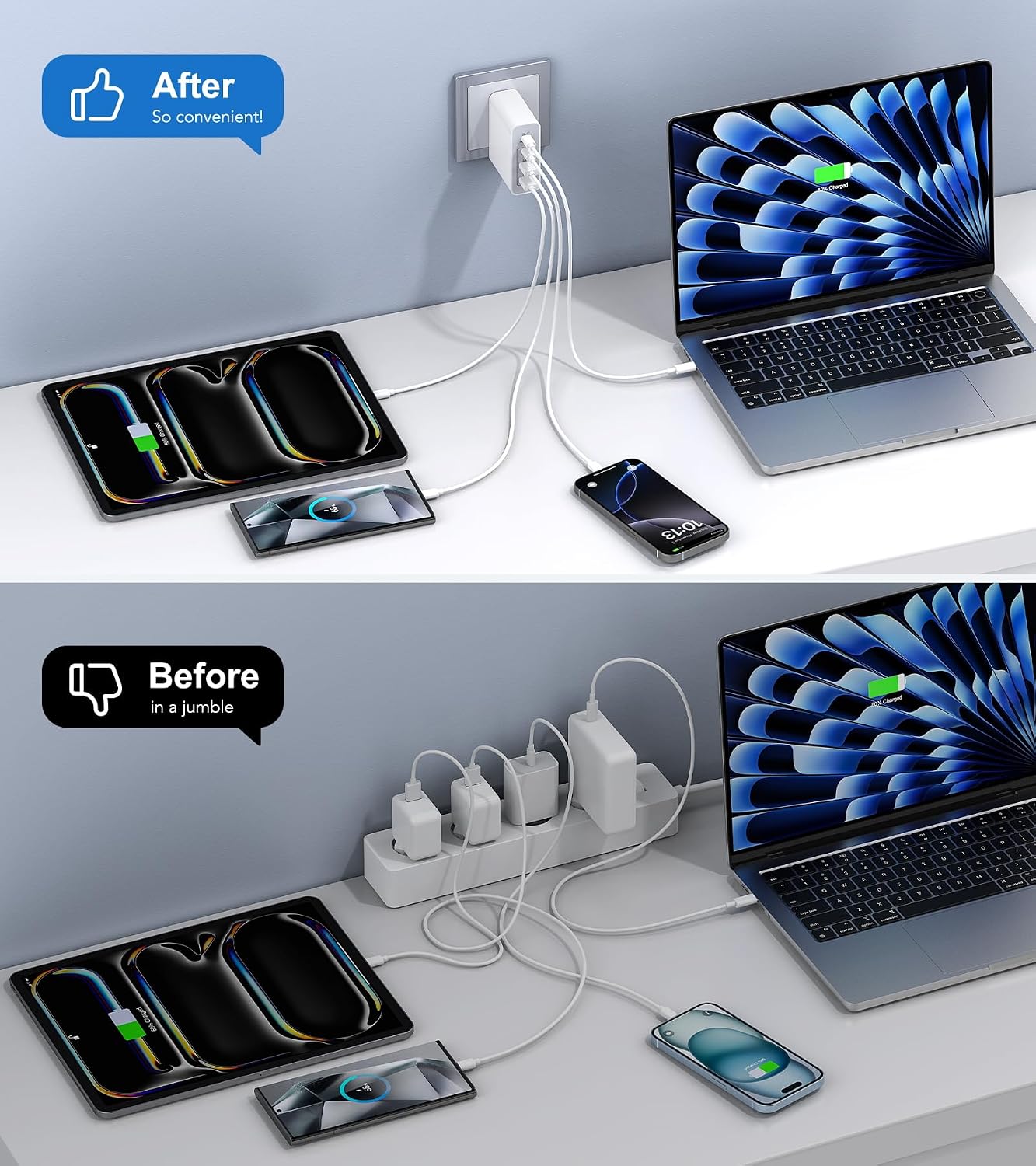
The best GaN chargers 2026 buyers can choose from have collapsed the old charger pile — laptop brick, phone adapter, something for earbuds, and a mystery adapter nobody can identify — into single units smaller than a deck of cards. Gallium nitride semiconductors switch power at higher frequencies than the silicon in traditional wall chargers, so a 100W charger now fits in a jacket pocket instead of demanding its own bag compartment.
This guide distills five in-depth reviews — weeks of multi-device charging sessions, thermal checks under sustained load, and real travel trials across countries — into clear picks for every setup. Every recommendation below is matched to a job, so you pay for capability you will actually use.
Best GaN chargers 2026: our top picks at a glance
Most people need only one decision: match the wattage to their laptop. A 100W multi-port charger covers a MacBook Air, a 14-inch MacBook Pro, most Windows ultrabooks, and still has room for a phone on a second port. That single purchase replaces the laptop brick, the phone adapter, and the power strip you used to need for all three.
Travelers who repack their bags at dawn should look for foldable prongs and a retractable built-in cable, which removes the most commonly forgotten item from the packing list entirely. International road warriors want swappable plug heads and 140W on the primary port, so one unit handles outlets in four regions and a power-hungry laptop.
Two-laptop desks are the one scenario where 100W runs out: a dedicated 200W charging station with dynamic power sharing keeps both machines at full speed while phones top up alongside. And if all you charge is a phone, a $15–$20 single-port 30W brick does the job — anything bigger is money and bulk for no gain.
How we chose the best GaN chargers
Rather than ranking headline wattage, the sources behind this guide treated each charger as a tool for a specific device mix. Test protocols included multi-device sessions run daily over several weeks — laptop and phone combinations at a desk, multi-hour overnight sessions, and deliberate attempts to push each charger’s port distribution against its published limits.
Certification and thermal behavior carried real weight. Every recommended charger comes from a brand with formal support channels and real-time protection systems — over-voltage, over-current, over-temperature — that throttle output before critical heat rather than cutting power abruptly after it. For more lab-tested verdicts across the gear in your bag, see our tech reviews of 2026.
Best overall compact pick: 100W multi-port GaN chargers
The sweet spot of this category is a 100W charger with two USB-C ports and a USB-A port in a housing 43% smaller than Apple’s 96W MacBook brick. Full 100W lands on either USB-C port solo, covering a 14-inch MacBook Pro at full speed, and the USB-A port handles legacy cables with Quick Charge 4.0 support.
Active thermal monitoring that adjusts output continuously based on real-time readings keeps the housing touchable after 90 minutes at full load — measurably cooler than budget GaN bricks at the same output. Foldable prongs engineered against micro-bending survive years of bag-packing, and a 24-month warranty backs it up.
Best for travel: retractable cables and foldable plugs
The traveler’s charger solves a different problem than the desk charger: bag space. The standout design here builds a 75cm retractable USB-C cable directly into the housing, rated for 10,000 pull-and-retract cycles — more than five years of daily use — with four preset length locks so the cable never creeps back mid-charge.
Two additional USB-C ports and one USB-A join the built-in cable for four total outputs, with the retractable line prioritized at 100W while the laptop charges. The foldable prongs sit completely flush when closed, the cable coils in under two seconds, and nothing protrudes to snag on bag fabric or security trays.
Best for international travel: 140W+ with swappable plug heads
When your itinerary crosses outlet standards, the adapter bag becomes the problem. The travel-pro pick ships with plug heads for US, UK, EU, and Australian outlets that swap via a release button into an included mesh pouch — no third-party voltage converter needed, since GaN bricks accept 100–240V input natively.
PD 3.1 on the top two USB-C ports supports up to 140W on a single connection, covering gaming laptops and power-hungry ultrabooks that drain faster than a 100W supply can replenish under load. Four USB-C ports distribute 145W in a dropping hierarchy with the most demanding device on the primary port, and graphene heat insulation keeps the unit touchable during sustained two-laptop sessions.
Best desk hub: 200W multi-port charging stations
One hundred watts sounds adequate until two people share a desk. The desk-hub class exists for exactly that scenario: four USB-C ports with PD 3.1 on every one of them, a 200W shared budget, and 140W available on a single connection for a 16-inch MacBook Pro under load.
Dynamic power sharing redistributes wattage as devices approach full charge — a nearly-full phone releases its allocation back into the pool for the laptop still mid-charge, with no user action. The 5-foot detachable power cord keeps the 650-gram unit on the desk instead of torquing a wall outlet, and a $2,500 connected-equipment warranty covers repair or replacement of devices damaged by an electrical fault while properly connected.
Best budget pick: the 30W phone charger
If all you charge is a phone, stop at 30W. A compact GaN brick in this class fast-charges an iPhone to around 50% in 25 minutes and handles Samsung’s PPS fast charging, Pixel, and legacy Quick Charge devices — all for under $20 with foldable prongs that vanish into a pocket or nightstand.
The one thing 30W cannot do is run a laptop at speed, so be honest about your device mix. For students, nightstand duty, or a cheap backup brick, nothing else in this guide offers more value per dollar. If you are kitting out a new phone from scratch, browse our roundup of the best accessories of 2026 for the cables and cases that pair with these bricks.
What is GaN, and why does it matter?
Gallium nitride is a wide-bandgap semiconductor that switches at higher frequencies with lower losses than silicon. Smaller magnetic components, higher conversion efficiency, and less waste heat follow — the practical result is a charger roughly half the size of an equivalent silicon unit from five years ago.
Not all GaN builds are equal. Current-generation chips claim up to 95% conversion efficiency, while older silicon ran at 80–85% — at a 100W load, that gap is roughly 10W of extra heat. Budget GaN units with older chips can still run uncomfortably warm, which is why reviewers check surface temperature under sustained load rather than trusting the semiconductor label alone.
PD 3.0, PD 3.1, and PPS: the protocols that decide your speed
Wattage is what a charger can output; Power Delivery is how it communicates that output with the device. PD 3.0 handles up to 100W and covers the full charging range for most laptops and every phone. PD 3.1 extends the ceiling to 240W and adds 28V, 36V, and 48V Extended Power Range levels for gaming laptops and workstations that draw more than 100W under active load.
PPS — Programmable Power Supply — is the subset that matters for phones. It allows variable voltage in 20mV increments instead of fixed steps, which is what Samsung’s Super Fast Charging 2.0 and similar proprietary standards negotiate. A charger listing PD 3.0 + PPS covers virtually every fast-charging standard on the market; without PPS, those phones charge quickly but never at their maximum advertised speed.
How much wattage do you actually need?
The device sets the ceiling, not the charger. Twenty watts tops out an iPhone, 30W covers Pixel and Samsung phones at close to full speed, and 45W unlocks Samsung’s fastest tier. Sixty-five watts charges a MacBook Air or light ultrabook at full speed; 100W covers a 14-inch MacBook Pro; a 16-inch MacBook Pro wants 140W for full speed under load.
Higher wattage never charges a phone faster — the phone requests only what its battery management system allows. Buy wattage for your laptop first, then treat everything else as a bonus that the extra headroom makes possible.
The headline-wattage trap: port count and power distribution
A charger’s total wattage never splits evenly. The highest-wattage port takes priority when a laptop connects, and secondary ports share what remains according to the firmware’s logic — a 100W charger might deliver 65W + 30W the moment a second device plugs in. Port labeling conventions differ across brands, so checking the manual’s priority chart takes two minutes and prevents real confusion.
Dynamic allocation in premium models goes further, continuously redistributing freed wattage as devices approach full charge. The practical rule: a charger’s headline number only describes one device on one port. Read the per-port and combined-output tables for the exact combination you will actually plug in, and remember that adding or removing a device can make the laptop briefly pause and renegotiate.
Safety certifications and protection systems
FCC and UL certifications confirm a charger passed minimum regulatory safety thresholds, but they say nothing about behavior under normal heavy use. The protection systems in the spec sheet — ThermalGuard, ActiveShield, BCT graphene cooling, intelligent power sharing — describe real-time behavior during everyday sessions: temperature scanning hundreds of times per second, over-voltage cutoffs before battery controllers get stressed, and output throttling before critical heat.
Physical build quality matters just as much. Reviewers check for thick prong bases that resist micro-bending, clean port entries that don’t nick cable tips, and housing joints with no seam flex under plugging torque. Established brands with formal warranty processes beat anonymous listings every time — a fake adapter can fry a thousand-dollar laptop during a voltage spike, and no certification logo on a no-name box is worth trusting.
The cable is the hidden bottleneck
A 60W-rated USB-C cable limits a 100W charger to 60W regardless of the brick’s capability. Cables for high-wattage charging need a 100W rating with an e-marker chip — required for anything above 60W — or 240W for PD 3.1 Extended Power Range, and the cable’s data speed says nothing about its charging capacity.
One charger with a live wattage display makes this invisible problem visible: a “100W” cable delivering 50W due to poor conductors shows up on screen immediately. When buying a new multi-port charger, pair it with a verified 100W or 240W USB-C cable rather than an older bundled cable, and match the cable to the power bank or device input if you charge on the go.
Travel vs desk: form-factor trade-offs
Travel chargers prioritize bag space above everything: foldable plugs, compact housings, and sometimes included international adapter kits that eliminate separate voltage converters. At 130–170 grams, the best 100W travel bricks disappear into a laptop bag and replace the laptop adapter and phone charger simultaneously.
Desktop chargers reverse those priorities. Detachable power cords replace foldable prongs because a 650-gram unit would torque a wall outlet loose over months, and the mass becomes an asset — a permanent charging station that handles a two-person workspace for months without moving. Decide whether one adapter can genuinely serve both places, or keep a small charger in the bag and a high-output unit at the desk.

Best GaN chargers 2026: frequently asked questions
What is GaN, and why does it matter?
Gallium nitride is a semiconductor that runs cooler and switches faster than the silicon in traditional chargers. That lets manufacturers pack far more wattage into far smaller housings — a 100W GaN charger can be roughly half the size of an equivalent silicon brick from a few years ago. Pay the small premium for GaN every time.
What’s the difference between PD 3.0, PD 3.1, and PPS?
PD 3.0 supports up to 100W and covers virtually every consumer laptop, tablet, and phone. PD 3.1 extends the ceiling to 240W with new 28V, 36V, and 48V levels for gaming laptops and workstations. PPS is the variable-voltage extension that Samsung’s Super Fast Charging and similar proprietary standards need for their fastest speeds.
How much wattage do I actually need?
Twenty watts for iPhones, 30W for Pixel and Samsung phones, 45W for Samsung’s fastest tier, 65W if you also charge a laptop, 100W for a 14-inch MacBook Pro, and 140W for a 16-inch MacBook Pro at full speed. Higher wattage never charges phones faster — the phone sets its own ceiling.
Will a high-wattage charger damage my phone?
No. USB-C chargers only send the power a device requests, so a 67W or 100W charger will not overpower a phone that only needs 20W. The device’s battery management controller regulates the charging rate based on temperature and state of charge regardless of how much wattage the brick offers.
Will fast charging damage my battery over time?
Modern battery controllers request only what they determine is safe, so charging speed itself is well managed. Sustained overnight charging at high temperatures matters more for long-term health — a charger that runs cool under load is better for battery longevity than a slower charger that generates heat.
Is it safe to charge a laptop and phone from the same multi-port GaN charger?
Yes, provided the charger comes from a reputable manufacturer with proper safety certifications. USB Power Delivery handshaking negotiates the correct voltage and current for each device independently — a phone receives only what it requests, not the charger’s full output. The risk is lower than using two separate uncertified chargers.
Can one charger power a laptop and phone at full speed at once?
Yes, but total wattage splits between devices, so each typically charges slower than it would alone. Check the per-port and combined-output chart for your exact port combination — port count alone never tells you how much power each device receives. Dynamic models redistribute freed wattage automatically as devices fill up.
Does the USB-C cable matter for maximum wattage?
Significantly. A cable rated for 60W caps a 100W charger at 60W. For high-wattage charging you need a 100W cable with an e-marker chip (required above 60W) or a 240W cable for PD 3.1. Pair any new multi-port charger with a verified cable rather than an older bundled one.
Is 30W enough for a phone in 2026?
For most phones, yes. It fast-charges iPhones, Pixels, and Galaxy phones at close to their maximum, though it will not max out the largest flagships’ fastest tiers or run a laptop at speed. As a dedicated phone brick, it is all most people need.
Are cheaper off-brand chargers safe to use?
Not always. Avoid the cheapest option when safety is central: look for over-current, over-voltage, and over-heat protection from established brands with real warranty support. A fake adapter can damage a battery or device during a voltage spike, and no printed certification on a no-name box is trustworthy.
Can a 65W GaN charger charge my laptop?
It can if your laptop supports USB-C charging at 65W or below — MacBook Air, light ultrabooks, and most 13-inch Windows machines qualify. Check the computer’s specifications first: some laptops charge slowly under heavy use on a 65W adapter, and multi-port models divide that power further when a phone is connected.
Should I choose a 140W or 160W charger over a compact 65W model?
Choose by your laptop’s requirements and simultaneous charging habits, not the wattage gap alone. Higher-output models give headroom for demanding laptops and several devices, but they are larger and more complex. If you mainly charge a phone and tablet, the bigger units add little practical value.
Do I need a charger with a display?
A live wattage, voltage, and temperature display is genuinely useful for diagnosing slow charging — a faulty cable shows up on screen immediately. But it is a convenience, not a measure of charging quality. Port sharing behavior and protocol compatibility still matter more than the screen.
Is a two-pack charger bundle a good choice?
It can suit someone who wants separate adapters for two locations or two workspaces. Check the per-port output of each block rather than the bundle’s combined headline number, and confirm the port layouts fit your devices. A single higher-output multi-port charger is simpler if everything stays in one place.
Is the Apple 140W charger worth it over third-party options?
For most people, a quality third-party 140W charger works equally well and adds multi-port functionality for less money. The Apple adapter is worth it if you want official Apple-certified hardware, the retractable plug design, or a single dedicated MacBook Pro 16 charger with no compromises.
Which charger works best for travel versus a home desk?
For one laptop and a phone on the move, a 100W brick with a retractable built-in cable eliminates the most forgotten packing item. For international trips, pick a 140W+ model with swappable plug heads. At a desk, a 200W station is a permanent installation for two-laptop setups the portable bricks cannot serve at full speed.
How much should I spend?
Spend enough to solve the actual problem reliably, but do not pay for a premium feature you will not use. A $15–$20 single-port 30W brick covers phones; $25–$60 buys an excellent 65–100W multi-port GaN charger; $80+ buys 140–200W territory for demanding desks. Include cables and likely replacement costs in the ownership decision.
The bottom line
Match the wattage to what you are actually charging and you cannot go wrong. The 100W multi-port GaN charger is the right answer for most people — laptop at full speed, phone on the second port, half the price of flagship bricks. Travelers should prioritize foldable plugs and retractable cables; two-laptop desks should step up to 200W.
