

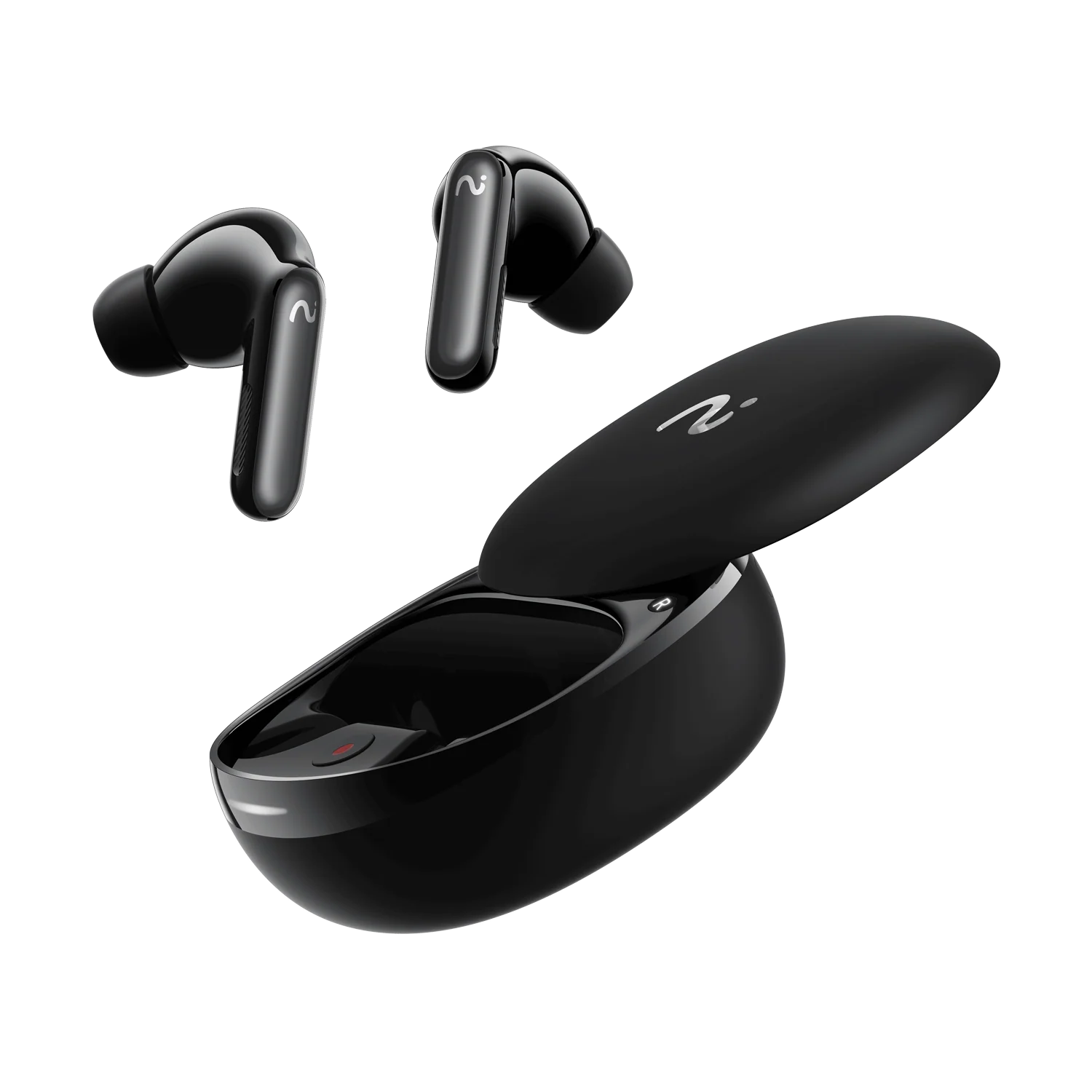
This Viaim RecDot review covers the most unusual pair of earbuds of 2026: true wireless buds that don’t just play sound — they record it, transcribe it, summarise it and even translate it. Press one button and a meeting, lecture or phone call becomes a searchable transcript with action points before you’ve left the room.
So do they actually work, or is this a gimmick wearing an AI badge? We pulled together findings from five independent review sessions — three weeks of daily wear, lab-grade sound measurements, and accuracy testing in two languages — to give you the full picture: sound, noise cancellation, calls, battery, the app, the pricing tiers and who should genuinely buy a pair.
Quick verdict: the headline numbers
| Detail | Specification |
|---|---|
| Product | Viaim RecDot — AI recording true wireless earbuds |
| Drivers | 11mm titanium-coated dynamic drivers |
| Bluetooth | 5.2 / 5.3 with multipoint (two devices at once) |
| Noise cancellation | Smart ANC up to 48dB, auto / low / mid / high modes |
| Battery life | 9 hours per charge, 36 hours total with case |
| Charging | USB-C plus wireless charging |
| Water resistance | IPX5 (sweat and rain safe) |
| Weight | Around 4.8–4.9g per earbud |
| AI features | Live transcription, summaries, to-do lists, mind maps, translation |
| Free AI tier | 600 transcription minutes per month |
| Price | $199.99 retail (MSRP $249.99, often discounted) |
The bottom line up front: the recording and transcription genuinely work, the battery life is excellent, and the sound is far better than a “tech first, audio second” product deserves. The ANC is only average, the plastic build feels cheaper than the price suggests, and the subscription model needs a careful look before you commit.
Viaim RecDot review: design, build and comfort
The earbuds
The RecDot follows the long-stem template Apple made famous, so nothing about the silhouette will surprise you. They’re a touch chunkier than AirPods 4 or AirPods Pro, which makes sense once you know the extra bulk houses recording hardware. Up close, the finish is functional plastic rather than premium — consistent, but not luxurious.
At around 4.8–4.9 grams per bud they disappear in your ears, and the shape is close enough to AirPods Pro that most people get a familiar, secure fit. The company behind them is Viaim, a Hong Kong firm founded by Hu Yu, a veteran of the automatic transcription industry — which explains why the audio and AI sides of this product both feel thought through.
Charging case and the red record button
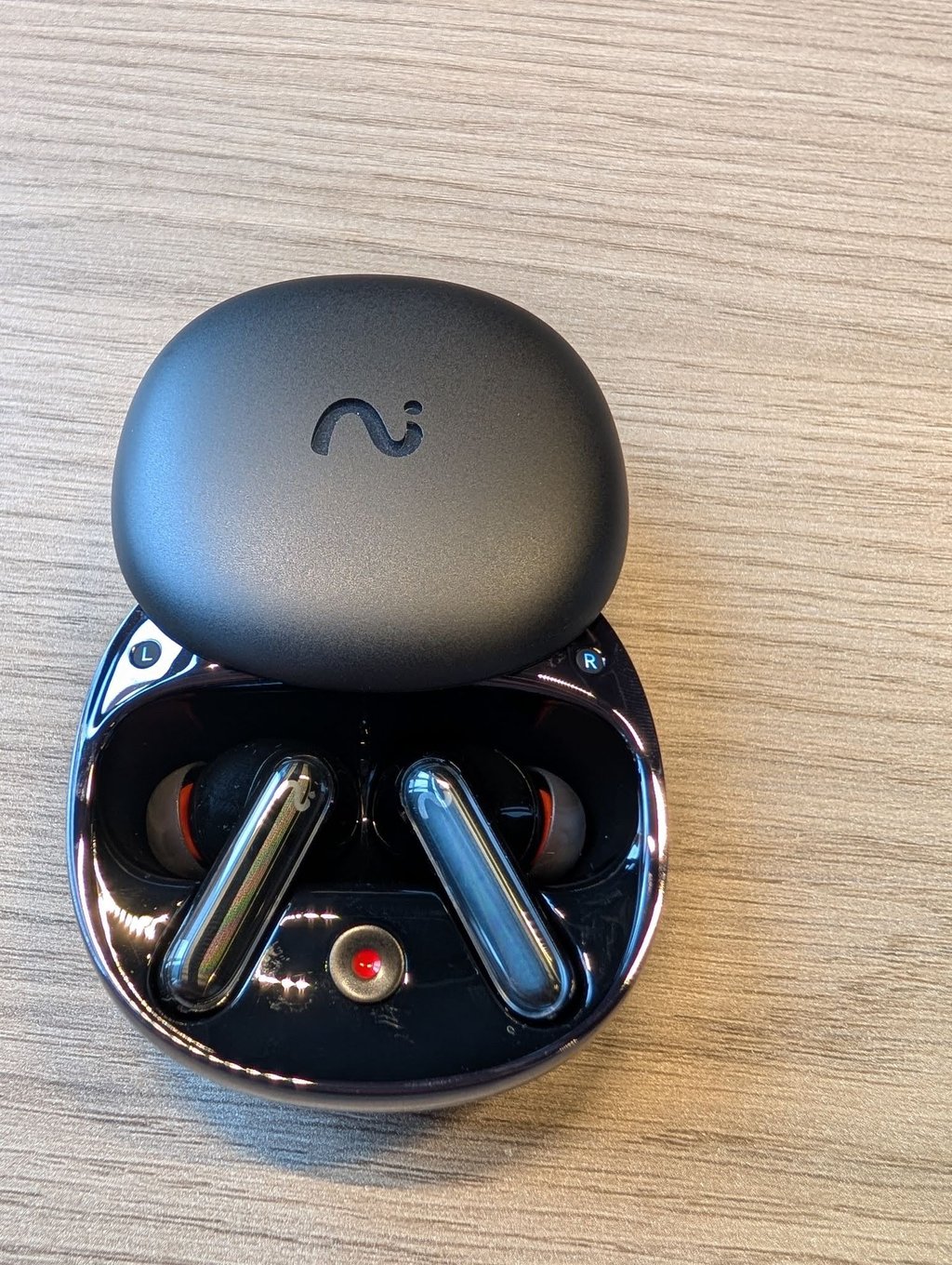
The case is a round, pebble-like silver puck with a slide-open lid, and it hides the product’s signature feature: a small red record button inside. Press it with the case open and recording starts immediately — no phone, no app, no fumbling. Set the case on a conference table, walk to the whiteboard, grab a coffee, and it captures everything.
One design quirk drew criticism across reviews: it’s not always obvious the recording mode is on. The status light signals aren’t the most intuitive, and the tiny blinking indicator is hard to see in direct sunlight. The lid’s sliding mechanism also feels flimsier than the rest of the package.
Controls, gestures and fit
Music controls live on a touch sensor on the stem — play, pause, volume slides and track skips — but there’s no haptic confirmation, so you sometimes can’t tell whether a tap registered. A triple-press jumps back a track, and the sequence takes practice to memorise.
The saving grace is configurability. The app lets you assign pinch, pinch-and-hold and slide gestures independently per earbud, and there’s full voice command control for playback and calls — a fallback that genuinely works when you don’t want to touch the stems. Wear detection auto-pauses when a bud comes out and resumes on reinsertion.
You get multiple eartip sizes in the box, and the in-app fit test plays a tone and checks your seal acoustically — a feature every ANC earbud should have. Several reviewers had to size up from their usual medium to get a proper seal, which matters for both bass and noise cancellation. One caution repeated everywhere: the fit isn’t tight enough for running or hard training. These are desk, commute and meeting buds, not gym buds.
AI recording and transcription: the headline act
This is why the RecDot exists, and it’s where the product earns its name. There are three ways to record: call recording that transcribes system or VoIP calls in real time with both sides captured; audio or video clip recording; and live recording for face-to-face conversations and small meetings. You start by pressing the case button, long-pressing an earbud, or holding the stem until you hear “recording start”.
Even offline, you’re covered: each bud stores roughly 69 minutes of conversation internally, for over two hours of total recording time that syncs to the app later. You can also set every call to auto-record, in which case both parties hear a voice announcement that the call is being recorded.
The marketing emphasises recording on the buds, but one thing to be clear about: transcription and the AI tools live in the Viaim app. The app is not optional — you have to use it. Everything lands there, organised and searchable.
Accuracy is where independent testing got specific. One team ran a 127-word English sample through the transcription engine and found only two words missed — 98.4% accuracy. A Lithuanian sample dropped to 84.6%, which is typical of AI transcription: less popular languages get less training data. Speaker separation proved reliable in multi-person conversations in most testing, though one reviewer found it inconsistent — nailing it in some sessions and merging voices in others.
Two small quirks showed up. A long pause can make the software insert a full stop or start a new sentence, so expect light cleanup. And recording conversations carries legal obligations that vary by location — several US states require all-party consent, where quietly recording a call can be a crime even as a participant. Know your local rules before you hit record.
Summaries, to-do lists and mind maps
Once audio is in the app, the AI does the work. The meeting assistant produces concise summaries and pulls out actionable to-do items — quickly, and with surprising accuracy about who owns what. There’s even a mind-map view that visualises the conversation, which is genuinely useful when you’re tracking a business process or reviewing dictated creative work.
The customisation goes deeper than most AI recorders. The app offers professional summary templates — medical, legal, meeting notes, interview formats, lecture recaps — and lets you build your own templates for niche fields. One reviewer counted 24 built-in professional templates. Several reviewers also noted that the AI models under the hood are the big names — ChatGPT, Gemini and Claude class systems — so the summarisation quality inherits from some of the best language models available.
Transcripts export easily to formats like TXT and PDF, and you can tag recordings and search them by keyword. One frustration to flag: sharing a full package of transcription, summary, to-do list and mind map wasn’t as smooth as it should be, and could use refinement.
Vitana: the AI assistant inside the Viaim app
Every RecDot review worth reading eventually lands on Vitana — the AI assistant built into the Viaim app — and it’s the feature that separates this product from a simple voice recorder. Vitana works as a meeting assistant and AI agent across all your recordings, not just the most recent one.
What makes it different is what it pulls from: not the internet, but your own recordings, notes and documents. You can upload old meeting audio, PDFs and notes from other apps, and Vitana processes everything with the same engine. Recordings are organised into Spaces — project folders you create per client or workstream — and Vitana uses that context to give more accurate answers.
Ask it “What did my client say about the budget?” or “What were my action items from Tuesday’s call?” and it searches across your library and answers from your own knowledge base. If an answer isn’t up to par, a single gesture regenerates it. For anyone who references past meetings regularly or connects dots across conversations over time, this is a meaningful advantage over rivals whose apps just store files.
The app itself is one of the most feature-complete companion apps at any price. The home screen shows battery levels per earbud, Bluetooth connection state and quick noise-control switching, and firmware updates install cleanly in-app with version details.
Live translation
The RecDot also does live translation — translated audio plays back directly in your ears during the conversation. Transcription covers dozens of languages (one comparison counted 78), with translation offered in more than a dozen, including English, Chinese, French and German.
In practice, translation lags slightly behind real time, much like it does on rival systems from Apple and Samsung. That said, real-world testing was impressive: one reviewer spent time outside Tokyo relying on the RecDot for Japanese speech recognition and English translation, and it handled the task with accuracy that genuinely surprised them. It’s not flawless, and it won’t deliver true two-way simultaneous interpretation unless the other person owns a pair too — but for understanding the gist of a conversation or announcement in an unfamiliar language, it works.
The microphone hardware deserves credit here. Each bud uses three standard microphones plus a bone-conduction microphone that picks up jaw and skull vibration directly, helping the device separate your voice from ambient noise. That separation is doing the heavy lifting in noisy environments, and it showed in both call quality and transcription accuracy under background noise.
Sound quality
For a product built around AI, the RecDot sounds better than expected. The 11mm titanium-coated drivers deliver a vibrant, detailed and crisp presentation that leans balanced rather than bass-heavy — vocals come through clearly, and the soundstage runs surprisingly wide for earbuds. Sparser genres like acoustic, singer-songwriter, soul and ambient electronic are where these buds shine.
Dense, heavy music is the weak spot. Rock tracks can turn muddy and cluttered at times, the loudest sections sounding squashed rather than powerful, and bass occasionally feels short on depth with percussion leaning tinny. Independent lab measurements confirmed the out-of-the-box signature has a significant sub-bass and mid-bass elevation above the Harman target, plus a dip in the 500–800Hz midrange that pushes vocals slightly back.
The good news: the app’s equaliser fixes most of it. You get 18 presets covering everything from pop and electronic to podcast and gaming modes, plus a full 8-band custom EQ. Pulling down the lowest bass bands and bumping the mids slightly transforms the sound into something genuinely well-controlled. The default balanced profile is the safest starting point, and measurements showed the custom EQ makes these considerably more listenable.
One reviewer rated the RecDot’s sound better than AirPods overall, and several noted it’s tuned well for its primary use case — dialogue, calls and conversations sound excellent. If you want to see how they stack up against a more traditional music-first pair, our Anker Soundcore Liberty 5 Pro review covers a strong all-rounder at a similar price.
Active noise cancellation
Viaim’s Smart ANC claims up to 48dB of reduction. In daily use it does a decent job of quieting an office or a commute, landing roughly on par with AirPods 4 in most situations. Put the RecDot side-by-side with the best buds at this price, though, and it lets more low-frequency rumble through — jet-engine noise on a long-haul flight would test its limits.
There are low, mid and high manual modes, but none stayed reliable as environments changed, so the auto setting is the one to use. Auto occasionally colours the sound slightly, but that beats fiddling with presets every time you move rooms. A transparency mode is also on hand, boosting important sounds without amplifying background static. For our broader take on what’s best in this category, see our guide to the best noise-cancelling headphones of 2026.
Verdict on ANC: good, not great — perfectly fine for offices and commutes, but not the reason to buy these.
Call quality
Call quality is clear and dependable. Testers on the other end of calls reported clean voice with only slight fuzziness on sharp sibilant sounds, and the microphones keep background noise off the line. In busy environments, callers’ words still come through without straining.
The bone-conduction microphone earns its keep here: call quality in an open-plan office was noticeably cleaner than most true wireless earbuds the reviewers had tested. It’s not the best on the market, but it’s perfectly reliable for meetings and the vast majority of calls you’ll make.
Battery life and charging
Battery life genuinely surprised every reviewer, given all the recording and processing happening in the background. You get up to nine hours from the buds themselves and an extra 36 hours from the case as a charger — comfortably outlasting AirPods Pro and Samsung’s Galaxy Buds. In real-world testing, eight hours of listening drained the buds to about 80%, and a full week of heavy meetings was easy to cover without hunting for a charger.
The case charges over USB-C or wirelessly, which is a nice convenience at this price. Cheaper rivals push past 40 hours of total playback, but for a pair doing this much processing, the RecDot’s endurance is more than competitive. Bluetooth pairing was quick and the multipoint connection — two devices simultaneously, like a phone and a laptop — switched seamlessly between audio sources.
Privacy, plans and pricing
Any device that records conversations has to answer hard questions about data, and Viaim’s answer is reassuring. The privacy policy is GDPR compliant, recordings aren’t sent for transcription automatically — the app asks permission each time — and recording is set to a loud, clear alert tone by default. The company doesn’t train its models on your recordings, and it holds serious certifications: ISO 27001, ISO 27701, SOC 2 Type II, HIPAA and EN 18031. Encryption is AES-256 with TLS end-to-end.
On pricing, the RecDot retails at $199.99, with the official MSRP listed at $249.99 but frequent retail discounts bringing it into the $179–$219 range. What you need to understand is the subscription layered on top:
- Basic (free): 600 transcription minutes per month (about 10 hours) — most people won’t use it up. The free plan also includes AI summary templates, workspaces and standard AI models.
- Pro ($9.99/month or $79.99/year): 1,800 minutes per month, more templates and workspaces, plus access to premium AI models for summarisation.
- Ultra ($19.99/month or $159.99/year): unlimited minutes and the most capable AI models.
Bundles are available if you want the premium plan at a discount, including combinations with the NoteKit accessory. The sensible advice from reviewers: start with the free tier and track whether you approach the monthly ceiling in your first few weeks before committing to a paid plan. Heavy meeting users will likely hit it.
Viaim RecDot vs the competition
Apple AirPods Pro remain the pick for anyone in the Apple ecosystem who cares most about noise cancellation, fit and easy device switching, and they now do basic live translation. But they can’t come close to matching the RecDot’s structured summaries and to-do lists.
Samsung Galaxy Buds are the equivalent choice for Galaxy owners, with strong ANC and longer battery than Apple, costing only a little more than the RecDot.
Plaud Note ($160) is the RecDot’s true rival as a dedicated AI note-taker. It’s a credit-card-sized MagSafe recorder with 300 free transcription minutes per month and standby measured in weeks — but it only records ambient audio, so call recording depends on speaker volume, and you have to remember to carry it. The RecDot costs about $40 more but does more, gives you 600 free minutes, captures both sides of calls natively, and solves the “I left it at home” problem because you’re already wearing earbuds. Other alternatives worth knowing: the Plaud NotePin, Hidock, Ticnote, Umevo and the app-only Otter.ai.
The RecDot’s whole argument is that it does both jobs — everyday earbuds and AI note-taker — in one device, and for the right person that combination justifies the price.
Who should buy the RecDot — and who shouldn’t
The RecDot is a great fit if you:
- Attend frequent meetings you want recorded and summarised
- Need a dictation device that transcribes and organises your thoughts
- Want live translation for travel or international work
- Want an AI assistant that queries across your own recordings and notes
- Are a journalist, student, content creator or professional drowning in conversations
It might not be the best choice if you:
- Want audiophile-level sound quality — get dedicated music buds or over-ears
- Use earbuds primarily for media consumption and gaming
- Need class-leading noise cancellation for flights and trains
- Train hard or run — the fit isn’t secure enough
- Attend very few meetings you’d actually want recorded
Verdict: should you buy the Viaim RecDot?
The Viaim RecDot is a forward-looking pair of earbuds that does the one thing it set out to do extremely well. Recording and transcription are fast, accurate and genuinely useful; the sound and battery life are far better than the “gadget first” positioning suggests. Holding them back from a perfect score are average noise cancellation, bass that struggles with heavier music, a plasticky build, and a price that sits uncomfortably close to more polished all-rounders.
But if your days are full of meetings, lectures or interviews, nothing else at this price captures and organises them as neatly. Independent reviewers scored it 4 out of 5 and 4.5 out of 5, and we agree: for the right buyer — the professional who lives in conversations — the RecDot is the perfect work companion and an easy recommendation.
FAQs
Do the Viaim RecDot record phone calls?
Yes. Call recording transcribes system and VoIP calls in real time, capturing both sides of the conversation. Start a recording by pressing the button on the case or long-pressing an earbud. The transcript, summary and any to-do items appear in the Viaim app afterward.
Do I need a subscription to use the AI features?
No. You get 600 free transcription minutes per month, which covers most users. If you record all day, you may hit the cap — the Pro plan ($9.99/month or $79.99/year) raises the limit to 1,800 minutes, and the Ultra plan ($19.99/month or $159.99/year) offers unlimited minutes with access to the most capable AI models.
How many languages does the RecDot support?
Transcription covers dozens of languages — up to 78 in the broadest count — with live translation offered in more than a dozen, including English, Chinese, French and German. Translation works well but lags slightly behind real time, similar to rival systems from Apple and Samsung.
How accurate is the transcription?
In independent testing, an English sample of 127 words missed only 2 words — 98.4% accuracy. A less common language (Lithuanian) dropped to 84.6%, which is typical of AI transcription tools. Speaker separation works reliably in most multi-person conversations.
Are the RecDot good for working out?
Not really. The IPX5 rating shrugs off sweat and light rain, but the fit isn’t tight enough for running or hard training. They’re built for desks, commutes and meetings — you’ll want dedicated sport earbuds for workouts.
Should I buy the RecDot over AirPods Pro?
Buy the RecDot if capturing, transcribing and organising conversations matters to you — no AirPods feature comes close to the structured summaries, to-do lists and Vitana AI assistant. Buy AirPods Pro if noise cancellation, fit, Apple ecosystem switching or music-first sound quality is your priority. One is a productivity tool disguised as earbuds; the other is simply the better all-round earbud.
Is the RecDot better than the Plaud Note?
For most people, yes. The RecDot gives you 600 free transcription minutes versus Plaud’s 300, records both sides of phone calls natively, adds live translation and Vitana, and you’re already wearing it so you never leave it behind. The Plaud Note wins on battery standby (weeks) and discretion as a card clipped to your phone. If you want one device that is both your earbuds and your AI recorder, RecDot is the stronger buy.
Does the RecDot work without the Viaim app?
Not fully. Recording itself works offline — each bud stores around 69 minutes internally — but transcription, summaries, translation and the Vitana assistant all live in the app. Consider the app mandatory.
Is my recording data safe with Viaim?
Viaim is GDPR compliant, holds ISO 27001, ISO 27701, SOC 2 Type II, HIPAA and EN 18031 certifications, and uses AES-256 plus TLS end-to-end encryption. Recordings are only sent for transcription with your per-recording permission, and the company states it doesn’t train its models on your recordings.
