

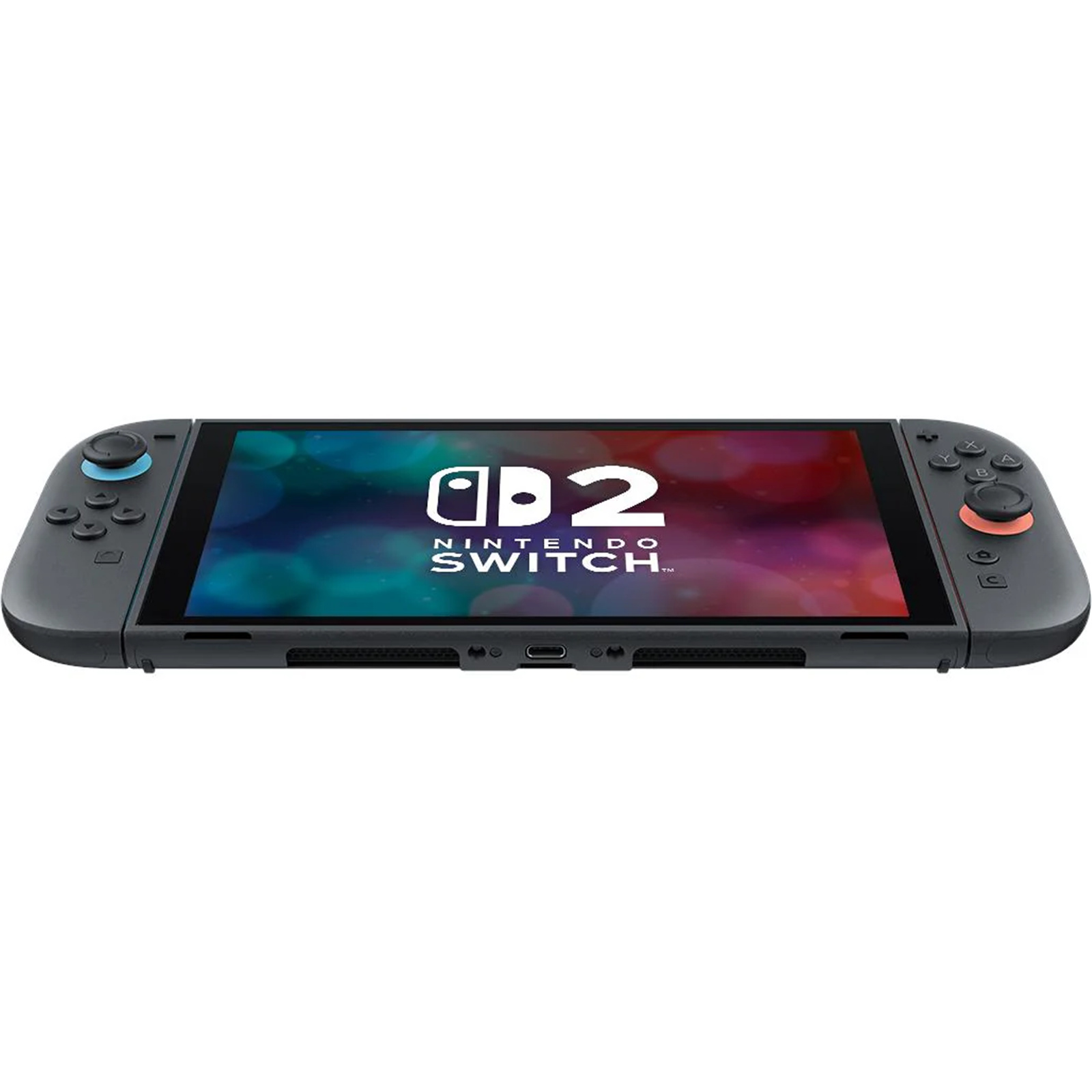
Nintendo Switch 2 Review 2026
This Nintendo Switch 2 review looks at the console that had the hardest job in gaming: following one of the best-selling systems ever made without breaking what made it work. Nintendo did not reinvent the hybrid console. It kept the same idea — a tablet you can lift from a dock and carry anywhere — and rebuilt almost every part of it to be bigger, faster and more comfortable to use.
The result is a familiar machine that feels new the moment you pick it up. The screen is larger and sharper, the controllers snap on with magnets instead of sliding on rails, games load faster, and older Switch games often run better than they ever did on the original hardware. The trade-offs are just as clear, and they matter: battery life is short in demanding games, the screen is LCD rather than OLED, and the launch library leaned heavily on ports and upgrades rather than brand-new exclusives.
So is the Switch 2 worth buying in 2026? For new buyers, and for owners of an ageing original Switch, the answer is mostly yes. For owners of a Switch OLED who mainly play in handheld mode, the answer is more careful — and this review explains exactly why, section by section.
Quick verdict
The Nintendo Switch 2 is the best hybrid console you can buy, and the clearest version yet of Nintendo’s original Switch idea. Its 7.9-inch 1080p display, custom Nvidia processor, 12 GB of RAM and 256 GB of storage turn a console that often felt underpowered into one that handles modern ports with confidence. Docked play reaches up to 4K on a compatible TV, while handheld play reaches 1080p with HDR10 and up to 120 Hz in supported games.
What holds it back is not power but stamina and price. Nintendo rates battery life at 2 to 6.5 hours, and reviewers consistently landed near the bottom of that range in demanding titles — Tom’s Guide measured just under two and a half hours in a Zelda Switch 2 Edition test, while TechRadar struggled to pass three hours even with older games. At $449 for the console alone, or $499 with Mario Kart World in the launch bundle, it is also no longer the cheap second console it once was. Buy it for the games, the portability and the long support life ahead; do not buy it expecting all-day handheld battery.
Design and build quality
Pick up the Switch 2 and the first thing you notice is scale. At 10.7 x 4.5 x 0.55 inches with Joy-Con 2 attached and 1.18 pounds (535 g) in weight, it is larger and heavier than the original Switch, yet it stays impressively slim — as thin as the first model, and far slimmer than a Steam Deck OLED. Reviewers repeatedly describe it as looking less toy-like than its predecessor: the neon red-and-blue Joy-Con look is gone, replaced by a more restrained, mature finish that still reads unmistakably as Nintendo.
That larger body is a practical gain as much as a visual one. There is more room for your hands, more room for the screen, and a kickstand that finally feels like a real feature rather than an afterthought. The original Switch kickstand was a thin, rigid flap; the OLED model widened it, but the Switch 2 goes further, with a full-width adjustable stand that props the console at a wide range of angles for tabletop play. If you play with friends around a table, or prop the console on a train tray, this is the kind of quiet improvement you notice every day.
Two USB-C ports — one on the bottom, one on the top — solve another everyday annoyance. You can charge while playing in tabletop mode without a cable sticking out of the bottom edge, and you can plug in a camera or accessory from the top. For a device meant to be carried, charged and shared, those small decisions add up. If you like pocketable hardware that changes shape to suit the moment, our Samsung Galaxy Z Flip 7 review covers a phone that folds for the same reason: a bigger screen that still travels well.
Comfort and ergonomics
Comfort is where reviewers disagree most, and that disagreement is worth hearing in full. The larger Joy-Con 2 controllers, with bigger sticks and buttons, are more comfortable for most adults than the cramped original Joy-Con. Several reviewers say longer sessions feel easier, and sharing a single Joy-Con 2 for two-player play is less of a compromise than it was.
At the same time, the console itself is flat. It has no built-in grips, so larger hands can find it tiring over hours, and Tom’s Guide notes that younger children may struggle with its size and weight. The Steam Deck OLED, with its sculpted grips, is more comfortable for long handheld sessions. The honest summary is this: the Switch 2 is comfortable for typical play, very comfortable with a grip case, and less comfortable than a dedicated PC handheld if you play for many hours without a break. A third-party grip case is the single best comfort upgrade you can buy for it.
The dock
The dock is bigger than before, but for a good reason: it now houses a cooling fan, an Ethernet port, two USB ports and HDMI output. Slide the console in and play moves to the TV in seconds, with no interruption. Docked play is also where the Switch 2 shows its biggest leap, with up to 4K output in supported games. The fan keeps long docked sessions stable, and wired Ethernet is a welcome upgrade for online play in a family room. It is still small enough for a TV stand or a desk, and it remains the simplest way to turn a handheld into a living-room console.
Display: bigger, sharper, but not OLED
The display is the upgrade you see first. The Switch 2 moves from a 6.2-inch 720p screen on the original Switch to a 7.9-inch 1080p LCD with HDR10 and variable refresh rate up to 120 Hz. Text is clearer, menus are sharper, and text-heavy games benefit most of all. Tom’s Guide describes scrolling the new interface on first boot as a moment that prompts genuine delight, and TechRadar calls the panel a monumental upgrade over the original’s 720p screen.
The obvious question is the OLED question. The Switch OLED model had deeper blacks and richer contrast, and moving back to LCD is, on paper, a step back. In practice, reviewers say the loss is smaller than feared. The larger size, higher resolution, HDR and higher refresh rate make games look vivid and crisp, and LCD avoids the risk of screen burn-in over a long life. Where the difference still shows is in dark scenes: blacks are greyer, and contrast is flatter than on an OLED panel. If you own a Switch OLED and play mostly in handheld mode, this is the one downgrade you will actually see.
There are two more display details worth knowing. First, variable refresh rate works in handheld mode but, at launch, not when docked — a quirk several reviewers flagged. Second, 120 Hz support depends on the game: few titles use it at launch, but supported games feel noticeably smoother. Neither point ruins the screen, but both explain why the display is best described as excellent rather than perfect.
Performance and games
Under the screen sits a custom Nvidia processor with 12 GB of LPDDR5X RAM and 256 GB of UFS storage — eight times the storage of the original Switch and four times that of the OLED model. That combination changes what the console can do. Loading times collapse: TechRadar timed a Switch game reaching its menu in around four seconds and a match loading in under three seconds, where the original hardware took far longer. The eShop, once famously slow, is now responsive and well organised.
In games, the leap is most visible in ports that struggled before. Cyberpunk 2077, Street Fighter 6, Hogwarts Legacy and Yakuza 0 all run on Switch 2 in forms reviewers call genuinely playable, and in some cases the best portable versions available. Mario Kart World, the flagship launch title, runs at a steady 60 frames per second in its open world, with 24 racers where its predecessor had 12. Zelda: Breath of the Wild and Tears of the Kingdom, in their Switch 2 Editions, lose the fuzzy textures and uneven frame rates that marked them on older hardware.
Sources disagree on how far to push the praise. Tom’s Guide says the Switch 2 is a portable powerhouse that finally feels primed to compete, while The Verge is cooler: it is markedly better than its predecessor, but still a step behind the latest PC handhelds in raw power and game choice. Both are right, in different frames. Compared with any previous Nintendo handheld, this is a huge jump. Compared with a PlayStation 5 or a high-end PC handheld, it is not trying to win the same race — it is trying to be the console you can take anywhere, and on that measure it succeeds.
Backward compatibility
Backward compatibility is one of the Switch 2’s strongest selling points, and reviewers are unusually united on it. Most physical and digital Switch games work on Switch 2, and many run better without any upgrade purchase at all: faster loading from the quicker storage, sharper handheld resolution, and steadier frame rates where the original game had an uncapped frame rate. Pokémon Scarlet and Violet, widely criticised at launch for choppy performance, are transformed on Switch 2, according to both TechRadar and Best Buy’s review, with a solid 60 frames per second and far cleaner image quality.
Paid Switch 2 Editions go further for selected titles, typically around $10, adding higher resolutions, smoother performance and, in some cases, mouse controls. Free upgrades help too, with games such as Fortnite and No Man’s Sky looking and playing like modern titles on the new hardware. Compatibility is not perfect — Nintendo continues to test and update support — but for anyone with a large Switch library, the upgrade does not start from zero. Your existing games keep their value, and that matters for families most of all.
The launch library problem
The honest weakness at launch was choice. Beyond Mario Kart World and the Welcome Tour, the early first-party line-up was thin, and much of the rest was ports or upgraded versions of games available elsewhere. CNET’s early verdict, as summarised in critics’ round-ups, argued against rushing to buy for exactly this reason. By 2026 that picture has improved, with Donkey Kong Bananza, Kirby Air Riders, Pokémon Legends: Z-A and Metroid Prime 4: Beyond joining the catalogue, but the lesson stands: the Switch 2 is a console to buy for the library it will have over years, not for a single launch weekend.
Joy-Con 2 controllers and mouse mode
Joy-Con 2 is the most satisfying hardware change on the console. The old rail system — fiddly to align, easy to jam with a strap fitted the wrong way — is gone. Powerful magnets now snap the controllers into place with a solid click, and a release button under the triggers pops them off just as easily. Reviewers describe the connection as sturdy, with only marginal give, and as one of those changes you appreciate every time you pick the console up.
The controllers themselves are larger, with bigger sticks and buttons and stronger, more precise HD Rumble 2 vibration. In Mario Kart World, reviewers say the rumble makes impacts feel detailed rather than generic. The new C button opens GameChat, covered below, and the right Joy-Con 2 can be laid on its side and used as a mouse. Mouse mode needs no menu and no setup: lay the controller down and it activates, on a table, a desk or even a lap, and it works surprisingly well for strategy games such as Civilization VII, where a pointer beats a stick for menus and map control.
Mouse mode has limits. It is less comfortable for long sessions, it lacks a scroll wheel, and it is unlikely to replace a stick for fast action games. But as an extra control option — especially for strategy, menu-heavy and pointer-style games — it is a genuinely useful addition, and one that no rival handheld offers in this form. One concern remains: the sticks do not use Hall effect sensors, so the drift problem that plagued the original Joy-Con cannot be ruled out long-term. Nintendo offers free repair for drifting Joy-Con 2 controllers, but reviewers note that a Hall effect design would have removed the worry entirely.
Audio
Built-in speakers are a quiet success. The Switch 2 places speakers at the top and bottom of the handheld, with a surround-sound system that reviewers call significantly less tinny than the original Switch. Zelda’s soundscapes and Splatoon’s music both come through clearly without headphones, which matters for tabletop and shared play.
Bluetooth audio is the weak spot. TechRadar measured around half a second of delay with multiple headsets and earbuds, in both docked and handheld modes, which is noticeable in rhythm and action games. The fix is simple — use the 3.5 mm headphone jack, where wired audio is crystal clear with no delay — but it is a fix buyers should know about before relying on wireless earbuds. The built-in microphone, by contrast, is a genuine improvement: it has noise reduction, it picks up voice clearly for GameChat, and it means voice chat no longer needs a separate phone app.
Battery life
Battery life is the Switch 2’s clearest compromise, and every major review says so. Nintendo rates it at 2 to 6.5 hours depending on the game. In practice, demanding games sit at the bottom of that range: around two to two and a half hours in Tom’s Guide’s Zelda test, and under three hours in TechRadar’s testing even with older titles. Less demanding games stretch further — TechRadar reached around five hours with side-scrollers and retro titles — but even idling on the home screen drains the battery noticeably, so standby discipline matters.
Why is it short? The answer is the same hardware that makes the console good: a larger, brighter, higher-refresh screen and a much faster processor draw more power than the original Switch did. Compared with the Switch OLED, which reviewers benchmarked at around five hours, this is a downgrade. Compared with a Steam Deck OLED, it is roughly in line. There is also a known meter issue to be aware of: Nintendo identified a bug where the battery indicator could show less charge than the console actually held, and recommends a system-software update followed by a meter reset through recovery mode if the reading looks wrong. That fixes the display, not the capacity — so treat the tested figures, not the meter, as the truth.
Practically, this means planning around power. For couch play, commuting and short trips, the Switch 2 is fine. For a long flight or a full day away from a socket, carry a power bank or a USB-C charger — the second USB-C port makes charging in tabletop mode easy. Charging itself takes around three hours in sleep mode, according to Best Buy’s review, so overnight charging is the sensible habit. Do not buy the Switch 2 expecting all-day handheld play; buy it knowing its sessions are shorter, but far better looking, than before.
GameChat, GameShare and online play
GameChat is Nintendo finally catching up with modern online play. Press the C button on the right Joy-Con 2 and you can voice-chat with friends, see what they are playing, and share your screen, all from the console itself. The built-in microphone works well, voices come through clearly, and video chat works with the separately sold Nintendo Switch 2 Camera. After years of a clumsy phone-app solution on the original Switch, this is a major step forward.
Execution is still uneven. Screen sharing at launch looked choppy and low-frame-rate, and the default layout shrank the game to make room for friends’ icons, with black borders that reviewers disliked. Later settings added Extend Main Screen and Fullscreen options that improve this, but GameChat remains less polished than Discord, and it sits behind a Nintendo Switch Online subscription after the first free year. GameShare is the more delightful idea: it lets nearby players join selected multiplayer games from a single copy, even on an original Switch, by streaming the game to the second player. Visual quality dips for the guest player, but as a way to play co-op with family without buying a second copy, reviewers found it genuinely fun.
The user interface around all of this is familiar to a fault. The home dashboard looks almost identical to the original Switch, with the same two themes and little customisation. What has improved is speed: navigation is snappy, and the eShop is far faster and better organised than before. The interface is not exciting, but it no longer gets in the way — and for a console, that is most of what matters.
Storage, accessories and hidden costs
Storage is generous by Nintendo standards and tight by modern gaming standards, both at once. The 256 GB inside the console is a huge improvement, but a single large game can take a big share of it — Cyberpunk 2077 takes around 59 GB on its own, according to The Verge. Expanding storage means a microSD Express card, not the older microSD cards from the original Switch, and those cards are more expensive. If you buy most games digitally, budget for one.
The same logic applies to the total cost. The console is $449, or $499 with Mario Kart World, and the real spend grows with games, a case, a screen protector, a Pro Controller for docked play, and possibly a microSD Express card. First-party games sit at premium new-release prices, and Switch 2 Edition upgrades add around $10 each for selected titles. None of this is hidden, but it is easy to underestimate. Travellers who plan to film their trips as well as play on them may also want to compare portable filming gear in our best action cameras guide before packing, since a console, a camera and their chargers compete for the same bag space.
Price and value
At launch the Switch 2 cost $449 / £395 / AU$699, with the Mario Kart World bundle at $499 / £429 / AU$769. That puts it at parity with a PS5 Slim in the United States and in the same range as a Steam Deck, which changes how to judge it. It is no longer clearly the cheap option; it is a mid-range handheld and a full-price home console in one body.
Value depends entirely on how you will use it. As a main console for a household, or as the only handheld for someone who travels, the price is easier to justify: one purchase covers TV play, handheld play, tabletop play and a library that spans two generations of Nintendo games. As a second console bought only for occasional Nintendo exclusives, it is harder to rush, especially while the exclusive library is still growing. Regional prices also vary — Best Buy’s Canadian review lists higher local pricing and a scheduled increase — so check current local pricing before buying, and do not treat a launch price quoted in another country as the price you will pay.
Where sources disagree on price is on comparison, not on the number itself. TechRadar places the Switch 2 as relatively affordable among gaming handhelds, cheaper than a Steam Deck OLED or ROG Ally X. Tom’s Guide stresses the opposite side of the same fact: at PS5 Slim parity, Nintendo hardware is no longer the budget choice. Both points are true, and the buyer who matters is you: if you compare with handheld PCs, the Switch 2 looks reasonable; if you compare with home consoles, it looks expensive for its power. The tie-breaker is Nintendo’s games, which no rival console can offer.
Who should buy it?
Buy the Nintendo Switch 2 if you are new to Switch, if your original Switch is ageing, or if you want a hybrid console for a household. You get a bigger, sharper screen, much faster performance, magnetic controllers, 4K docked play, a large backward-compatible library, and years of future Nintendo games ahead. For families, the shared-play options, GameShare and tabletop mode make it the easiest console to recommend as a living-room device that children and adults can both enjoy.
Wait if you own a Switch OLED, play almost entirely in handheld mode, and love its screen. You will gain power, storage and future games, but you will lose OLED contrast and some battery life, and you will pay a premium for games you can already play well. In that case, waiting for more Switch 2 exclusives — or for a future OLED revision, which reviewers already hope for — is a reasonable choice, not a missed opportunity.
Do not buy it if you need long handheld battery above all else, if you want the most powerful handheld available, or if you only play non-Nintendo games. A Steam Deck OLED or a Windows handheld will serve those buyers better, with larger game libraries outside Nintendo’s catalogue. The Switch 2 wins on Nintendo games, portability and simplicity; it does not win on raw power or battery alone.

FAQs
Is the Nintendo Switch 2 worth buying in 2026?
For most buyers, yes — especially if you are new to Switch or upgrading from an original model. You get a larger 1080p 120 Hz screen, faster performance, 256 GB of storage, magnetic Joy-Con 2 controllers and 4K docked output, plus backward compatibility with most Switch games. The main reasons to wait are short battery life, the LCD screen if you own a Switch OLED, and the still-growing exclusive library. Weigh those three against the upgrade, and the decision usually becomes clear.
How long does the Nintendo Switch 2 battery last?
Nintendo rates battery life at 2 to 6.5 hours, and real-world tests cluster at the lower end for demanding games — around two to three hours — and higher, up to around five hours, for less demanding titles. Screen brightness, HDR, online play and game intensity all affect the result. Carry a power bank for long trips, charge overnight, and check the battery meter if readings look wrong, since Nintendo identified a meter display bug that a software update and meter reset can correct.
Does the Nintendo Switch 2 play old Switch games?
Yes, in most cases. Most physical and digital Nintendo Switch games work on Switch 2, and many run better thanks to faster storage and higher performance, with sharper handheld resolution and steadier frame rates. Selected titles have paid Switch 2 Editions, typically around $10, with further improvements. Compatibility is not universal, and Nintendo continues to test and update support, so check a specific title if it is the main reason you are buying.
Is the Nintendo Switch 2 screen better than the Switch OLED screen?
It is bigger and sharper, but not better in every way. The Switch 2 screen is 7.9 inches at 1080p with HDR10 and up to 120 Hz, against 7 inches at 720p on the OLED model. For size, sharpness and smoothness, the Switch 2 wins. For contrast and black levels, the OLED model still wins, because LCD cannot match OLED’s deep blacks. If you play in handheld mode and value contrast above all, the OLED screen remains a reason to pause before upgrading.
Can you use old microSD cards in the Nintendo Switch 2?
No. The Switch 2 uses microSD Express cards for expansion, and older microSD cards from the original Switch do not work for Switch 2 storage expansion. The internal 256 GB covers a reasonable library to start with, but digital buyers should budget for a microSD Express card, especially since large games such as Cyberpunk 2077 take around 59 GB on their own.
What is Joy-Con 2 mouse mode?
Mouse mode turns a Joy-Con 2 controller on its side into a mouse for supported games. Lay the controller on a flat surface — or even on your lap — and it activates with no menu or setup. It works well for strategy and menu-heavy games such as Civilization VII, where pointing beats a stick, and it can also navigate the home screen and eShop. It is less comfortable for long sessions, has no scroll wheel, and is not a replacement for a stick in fast action games.
Does the Nintendo Switch 2 output 4K on a TV?
Yes, in supported games, when docked and connected to a compatible TV. Docked output reaches up to 4K at 60 frames per second, with 1440p and 120 Hz options in some titles. Not every game reaches 4K, and variable refresh rate at launch worked in handheld mode rather than docked mode. Check a game’s stated output if 4K is a deciding factor for you.
Is GameChat free on the Nintendo Switch 2?
GameChat was free for the console’s first year, after which it requires a Nintendo Switch Online subscription. It lets you voice-chat with friends, share screens and video-chat with the separately sold camera, using the console’s built-in microphone. Screen sharing quality and layout improved with later settings, but reviewers still rate dedicated chat apps such as Discord as more polished for serious group chat.
Final verdict
The Nintendo Switch 2 is not a revolution, and that is its strength. Nintendo took a winning idea — one console for the TV, the couch, the table and the road — and fixed almost everything that held the original back: a small, low-resolution screen, slow loading, cramped controllers, a flimsy kickstand and a weak dock. What remains is a polished, powerful hybrid that makes older games better and new games possible, in a body that still slips into a bag.
Its flaws are real and should not be minimised. Battery life is short, the screen trades OLED contrast for size and sharpness, comfort without a grip case is imperfect, and the total cost climbs quickly once games and accessories are added. Yet none of those flaws cancels the core achievement. For new buyers and original Switch owners, the Switch 2 is the best hybrid console available and an easy recommendation. For Switch OLED owners, it is a strong upgrade that is worth waiting to time well — but it is, without doubt, the future of Nintendo’s console line, and the longer you own it, the better that future looks.
