

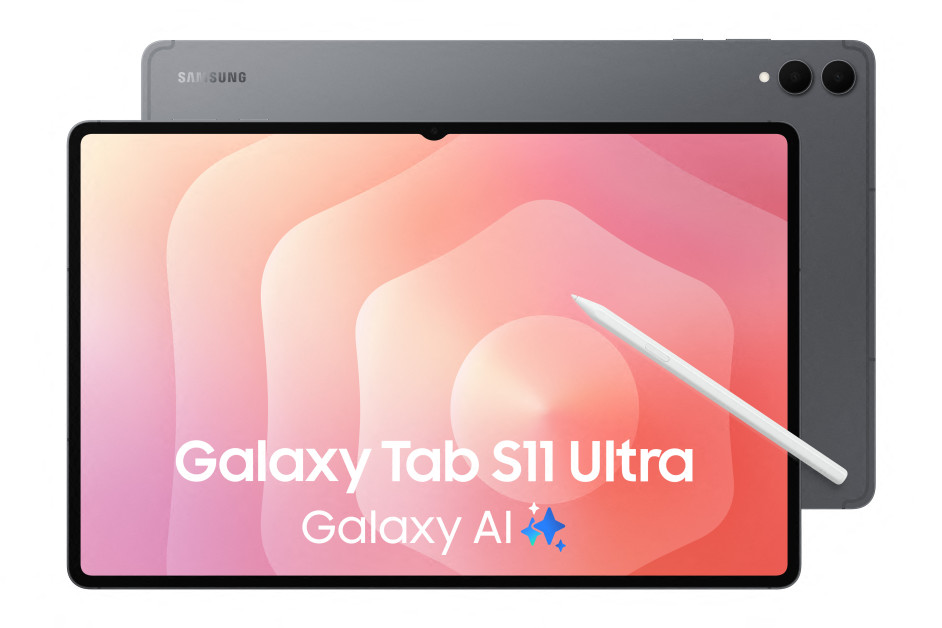
Finding the best Android tablets 2026 has to offer is no longer a compromise. Android now holds 45.53% of the global tablet OS market, and this year’s lineup includes giant AMOLED workhorses, dedicated drawing tablets, eye-friendly e-paper devices, and budget picks that genuinely perform.
We compared the leading contenders across displays, processors, battery life, stylus quality, and software support. Whether you need a laptop replacement, a study companion, or a tablet your kids can safely use, there is a clear winner for your needs below.
Best Android Tablets 2026: Our Top Picks at a Glance
The overall crown goes to the Samsung Galaxy Tab S12 Ultra, a 14.6-inch powerhouse with a 120Hz Dynamic AMOLED 2X display and an included S Pen. It is the most complete package for professionals, designers, and multitaskers.
Lenovo’s Tab Extreme 2026 is the strongest laptop alternative, pairing a 14-inch OLED with a huge 12,300mAh battery. The OnePlus Pad 4 delivers flagship speed and a 144Hz display at a friendlier price.
On a tight budget, the Samsung Galaxy Tab A9+ and Xiaomi Pad 8 Pro keep everyday tasks smooth without breaking the bank. Students should look at the Lenovo Idea Tab Pro Gen 2, while artists get a dedicated tool in the XPPen Magic Drawing Pad.
Best Overall Android Tablet: Samsung Galaxy Tab S12 Ultra
The Galaxy Tab S12 Ultra is the largest, most polished Android tablet you can buy right now. Its 14.6-inch Dynamic AMOLED 2X panel (2960 x 1848, 120Hz) is superb for split-screen notes, document review, and creative work.
It runs on the MediaTek Dimensity 9500 with 12GB of RAM and 256GB of storage, and Samsung’s included S Pen supports pressure sensitivity and tilt for precise writing. The 11,600mAh battery, 45W charging, Wi-Fi 7, and Android 17 with One UI 9 round out a flagship package priced around $1,399.99.
What seals the deal is support: seven generations of Android updates and seven years of security patches. For premium professionals, the Tab S12 Ultra justifies its price. Just note that the 45W charger is not included in the US box.
Best Android Tablet for Productivity: Lenovo Tab Extreme 2026
The Lenovo Tab Extreme 2026 is the closest an Android tablet gets to replacing a laptop. Its 14-inch OLED display renders rich, accurate colors, and the MediaTek Dimensity 9400 chip handles multi-app workflows without slowdown.
With 12GB of RAM, 512GB of storage, and a 12,300mAh battery that comfortably outlasts a full conference day, it is built for document-heavy professionals. Detachable keyboard compatibility turns it into a genuine portable workstation.
The Precision Pen adds handwriting and annotation support at a price around £799, which is strong value for this spec level. The trade-offs are size — it is less portable than an 11-inch tablet — and lower brand recognition than Samsung.
Best Android Tablet for Media and Presentations: OnePlus Pad 4
The OnePlus Pad 4 is a media powerhouse. Its 13.2-inch 3.4K LCD (3392 x 2400) runs at 144Hz, making presentations, video, and gaming look exceptionally smooth.
The Snapdragon 8 Elite Gen 5 delivers flagship performance, and the 13,380mAh battery with 80W SUPERVOOC charging means long days and fast top-ups. OxygenOS multitasking keeps several apps running efficiently side by side.
Priced around ₹59,999 (with bank offers bringing it lower), it undercuts Samsung flagships while matching them on speed. Stylus and keyboard accessories are supported, and the LCD is bright enough for serious document work.
Best Budget Android Tablet: Samsung Galaxy Tab A9+
The Galaxy Tab A9+ is the budget pick that does not feel like one. Its 11-inch LCD (1920 x 1200) runs at 90Hz, and the Snapdragon 695 with 4GB or 6GB of RAM handles streaming, browsing, study apps, and light multitasking smoothly.
Quad speakers with Dolby Atmos make it a great little media device, and microSD expansion up to 1TB plus One UI split-screen multitasking add real versatility. The 15W charging and modest battery are its main limits.
Starting around $169–$309 depending on the region and storage tier, it is ideal for students, families, and casual users. For a broader comparison that includes iPads as well, see our guide to the 10 best tablets in 2026.
Best Android Tablet for Students: Lenovo Idea Tab Pro Gen 2
The Lenovo Idea Tab Pro Gen 2 gives students a huge 13-inch 3.5K LTPS LCD with a 144Hz refresh rate — perfect for split-screen studying with notes on one side and a textbook on the other.
The Snapdragon 8s Gen 4 is more than adequate for academic workloads, and many configurations bundle a stylus for handwriting. The 10,200mAh battery with 45W charging lasts through full days of classes.
With microSD expansion and pricing from around ₹39,999, it is one of the best value-for-money study tablets available. Just be aware that Lenovo’s update policy — two major Android upgrades and four years of security fixes — is shorter than Samsung’s.
Best Android Tablet for Drawing and Creatives: XPPen Magic Drawing Pad
The XPPen Magic Drawing Pad is the only tablet here designed purely for artists. Its 12.2-inch paper-like display (3:2 ratio) pairs with the world’s first 16K pressure-level stylus, delivering pen-on-paper feel with 200% more pressure sensitivity than typical pens.
You draw directly on the device — no computer needed — and the X3 Pro chip keeps performance stable. The pen needs no Bluetooth pairing and no charging, so you can just pick up and draw.
At $499.99 and only 590 grams, it includes three months of Clip Studio Paint plus Ibis Paint X and supports microSD expansion up to 512GB. For digital illustrators, it is an outstanding specialized pick.
Best Android Tablet for Reading and Note-Taking
The BOOX Note Air4 C is the top choice for serious note-takers. Its 10.3-inch E Ink Kaleido 3 color display is easy on the eyes for hours of reading and writing, and the pressure-sensitive pen has near-zero latency.
E Ink’s ultra-low power consumption delivers weeks of battery life, and tools like layer-based sketching, handwriting-to-text search, and PDF markup with split-screen make it a genuine productivity device at $499.99.
If you prefer a conventional display, the XPPen Magic Note Pad ($439.99) offers a 10.3-inch paper-like LCD with TÜV SÜD low-blue-light certification, a 90Hz refresh rate, and a 16K pressure stylus with customizable shortcut buttons. Both are excellent for students and professionals.
Best Android Tablet for Kids: TCL TAB 10 NXTPAPER 5G
The TCL TAB 10 NXTPAPER 5G is built for young users. Its glare-free NXTPAPER paper-like display reduces blue light to protect developing eyes during long sessions.
A full parental control suite offers screen-time limits, app restrictions, and content filters, while a preloaded educational hub supports STEM learning and creativity. The 8000mAh battery keeps it running through homework and play.
5G connectivity, a shock-resistant kid-proof design, and a $239.99 price make it a parent-approved choice. For an even cheaper family option, the Fire HD 10 offers Amazon Kids parental controls and up to 13 hours of battery for around $179.99.
Best Android Tablet for Google Workspace Users: Google Pixel Tablet 3
The Google Pixel Tablet 3 is for teams and families already living in Google’s ecosystem. It offers the cleanest, fastest Android experience with no bloatware and seamless integration with Google Meet, Drive, Docs, and Sheets.
An 11-inch QHD LCD, Google Tensor G4 chip, and 12GB of RAM make everyday tasks feel instant, and the included charging dock with a speaker doubles as a smart-home display. Regular security updates arrive direct from Google.
At around £499, the compromises are a smaller screen for multitasking, no stylus support, and the weakest battery on this list at 8,500mAh. Still, for Google-first users, the frictionless software is worth it.
Best Android Tablets 2026: How to Choose the Right One
Choosing the right tablet starts with how you will actually use it. Heavy multitaskers need 12GB of RAM and a large display; readers and students should prioritize eye comfort and battery life; artists need pressure-sensitive stylus support.
Decide on your software ecosystem first. Samsung’s DeX mode turns a Galaxy tablet into a near-desktop experience, while Google’s clean Android suits Workspace users. Hardware variety is Android’s strength — match the screen size and price to your posture and budget.
Display Size and Quality
OLED panels, found on the Samsung Galaxy Tab S12 and Lenovo Tab Extreme models, produce deeper blacks and more vivid, accurate colors than LCD screens. They are worth the extra cost for brand presentations and design work.
For business presentations and split-screen demos, 12 inches or larger gives audiences a clear view. A 120Hz or 144Hz refresh rate makes scrolling, pen input, and video look smooth and professional rather than jerky.
Processor
The processor decides how quickly your tablet responds and how many tasks it juggles at once. In 2026, the Snapdragon 8 Elite / 8 Elite Gen 5 and MediaTek Dimensity 9400 series are excellent flagship choices.
They handle multiple apps, video calls, and large files without slowdown. For lighter use — surveys, document viewing, streaming — a Snapdragon 7 Gen 3 or Dimensity 7300-Ultra is more than enough and costs less.
RAM and Storage
8GB of RAM is the minimum for serious use. It runs a registration app, a browser, and a spreadsheet simultaneously. With 12GB or 16GB, you can run demanding workflows — video editing, multiple windows, real-time collaboration — without the tablet slowing down.
128GB suits streaming and light notes, but offline video, games, and drawing projects eat space fast. Many Android tablets support microSD expansion, a flexibility current iPads do not offer. In India, look out for bank discounts, no-cost EMI, and free stylus or charger promotions on official stores.
Battery Life and Charging
Charging points are rare on exhibition floors and in lecture halls. For all-day use, look for 10,000mAh or more — the Lenovo Tab Extreme 2026 leads the list at 12,300mAh, comfortably covering long conference days.
Fast charging changes the math too: 80W SUPERVOOC on the OnePlus Pad 4 refills a huge battery quickly, while the Samsung Tab S12 Ultra’s 45W support needs a compatible adapter, which is not included in the US box.
Stylus and Accessories
If your team annotates documents, takes handwritten notes, or collects signatures, stylus support is essential. Samsung’s S Pen is the best bundled stylus — pressure-sensitive, low-latency, and included free with Galaxy Tab S models.
A detachable keyboard transforms a tablet into a near-laptop for staff who type extensively. And the right extras matter too — a fast charger, durable case, and power bank are worth the investment. Our roundup of the best phone accessories in 2026 covers the essentials worth buying.
Software Update Commitment
Update support matters more than most buyers realize. Samsung leads with seven years of Android updates on its flagship tablets, meaning a device bought today stays supported until 2032 — significantly reducing total cost of ownership.
Google promises several years of updates for Pixel devices, while Lenovo and OnePlus typically commit to three to four years. Longer support means better security and fewer forced replacements, so always check the policy before buying.

Frequently Asked Questions
What is the best Android tablet in 2026?
The Samsung Galaxy Tab S12 Ultra is the strongest overall Android tablet in 2026. Its 14.6-inch Dynamic AMOLED 2X display, Dimensity 9500 processor, included S Pen, and seven-year software update commitment make it the most complete option available.
For business buyers in the UK market, the Galaxy Tab S11 Ultra remains the leading professional pick, with a 144Hz AMOLED screen, DeX desktop mode, IP68 durability, and the S Pen included in the box.
What is the fastest Android tablet available?
The fastest Android tablets are powered by flagship chips like the Snapdragon 8 Elite Gen 5 and MediaTek Dimensity 9500. The OnePlus Pad 4, Samsung Galaxy Tab S12 Ultra, and Galaxy Tab S10 series sit at the top of the speed rankings.
For pure performance per dollar, the OnePlus Pad 3 and Pad 4 stand out — they pair top-tier silicon with high-refresh 144Hz displays at prices well below Samsung’s flagships.
Which Android tablet is best for multitasking?
High-RAM tablets with split-screen support win here. The Galaxy Tab S12 Ultra (up to 16GB RAM) and OnePlus Pad 3 (12GB RAM with OxygenOS Open Canvas, running up to three apps in split view) are the best multitaskers.
Samsung’s DeX mode is a deciding factor for many buyers — it adds resizable windows, a taskbar, and external monitor support for a near-desktop workflow.
Which tablets include a pen in the box?
Samsung includes the S Pen with the Galaxy Tab S12 Ultra, S12+, and S10 series tablets at no extra cost. The Lenovo Idea Tab Pro bundles a stylus and folio case in many configurations.
Apple Pencil is always a separate purchase on iPads. OnePlus and Lenovo pen bundles vary by region and promotion, so check exact package contents before buying.
What is the difference between OLED and LCD on tablets?
OLED displays produce light on a per-pixel basis, so blacks are truly black and colors appear more vivid and accurate. LCD screens use a backlight behind the full display, so blacks look slightly grey and contrast is lower.
For professional presentations and design work where color accuracy matters, OLED — found on Samsung and Lenovo flagships — is the better choice. For everyday business use and document work, a high-quality 120Hz LCD is more than sufficient.
How much RAM do I need in a tablet?
For everyday tasks — email, document editing, video calls, browsing — 8GB of RAM is adequate. For heavier workflows like running multiple apps side by side, editing large files, or using Samsung DeX, 12GB is recommended.
For video production, complex multitasking, or resource-intensive applications, 16GB provides comfortable headroom. Look for at least 8GB RAM and 256GB storage as a general baseline.
How long do Android tablets receive software updates?
Update commitments vary significantly by brand. Samsung currently leads with a seven-year promise on its flagship Galaxy Tab S series — the longest commitment available on any Android tablet.
Google promises several years of updates for Pixel devices, while Lenovo and OnePlus typically commit to three to four years. Longer support reduces total cost of ownership and keeps the device secure for longer.
Which Android version is best for tablets?
Newer is better for tablets. Android 14 brought exclusive tablet features and remains a solid baseline, while the newest flagships ship with Android 16 and even Android 17 with manufacturer skins like One UI 9.
Newer versions deliver better multitasking, security improvements, and an optimized tablet UI. Always check that the model you buy is still within its update window rather than stuck on an old release.
What is the best Android browser for tablets?
Google Chrome is considered the best browser for searching online on tablets, thanks to its speed, sync with other devices, and wide extension support on Android.
If you use Samsung tablets heavily, Samsung Internet is a strong alternative with good tablet UI optimizations. For privacy-focused browsing, consider Firefox or Brave.
What is the best drawing app for Android tablets?
Sketchbook, ibisPaint, Krita, and ArtFlow are some of the best drawing apps for Android tablets. ibisPaint X pairs particularly well with pen-focused devices like the XPPen Magic Drawing Pad.
For note-taking with handwriting, Samsung Notes, XPPen Notes, and Nebo offer excellent handwriting recognition and conversion.
Do Android tablets support 5G?
Many do, but Wi-Fi and cellular models are different products. The TCL TAB 10 NXTPAPER 5G includes 5G connectivity, and Samsung sells selected regional 5G variants of its flagship tablets.
The exact configurations reviewed here — including the US Tab S12 models — are Wi-Fi versions. If you need mobile data on the go, verify a locally supported cellular SKU, SIM/eSIM provisioning, and carrier bands before purchase.
Does a tablet replace a laptop for college?
It can for reading, annotations, email, remote classes, and many writing tasks — especially with a keyboard accessory and desktop-like software such as Samsung DeX. But it cannot replace a laptop for CAD, specialized lab tools, software development, or complex spreadsheets.
Confirm your course requirements before purchasing. A tablet may be a better companion device than a single-device investment for some degree programs.
Is the Galaxy Tab S12 Ultra better than an iPad Pro?
Neither wins universally. The Samsung has a larger 14.6-inch OLED screen, an included S Pen, and Android/DeX workflows; the iPad Pro offers a more compact option, Thunderbolt connectivity, and an established creative-app ecosystem.
The choice comes down to software: if your essential apps run best on iPadOS, get the iPad; if you want hardware variety, an included pen, and desktop-style multitasking, the Galaxy Tab S12 Ultra is the better Android alternative.
Should I buy now or wait for holiday sales?
Check retailer return policies and compare prices against the first-party baseline — Samsung and Apple store prices are the anchor. Discounts change quickly, especially after early October launches like the Galaxy Tab S12.
Do not buy a higher-tier storage or cellular variant solely because a headline says “from” a lower price; verify the actual configuration at checkout.
Why is my Android tablet running slowly?
Slow performance is usually caused by low storage, too many background apps, outdated software, or heavy apps running simultaneously — not hardware failure. Freeing up storage, closing background apps, and updating the OS usually fixes it.
If the tablet is several years old and outside its update window, the slowdown may simply be aging software and an older chip struggling with modern apps.
What is the best mobile antivirus for Android tablets?
For protecting Android devices, Bitdefender Mobile Security is widely recommended as the best antivirus option. Keep Google Play Protect enabled as your baseline defense.
In practice, installing apps only from the Play Store, keeping Android updated, and avoiding sideloaded APKs prevents most threats before antivirus is needed.
Are Android tablets good for exhibitions and events?
Yes — Android tablets are now standard equipment at exhibitions and conferences. They are used for attendee registration, interactive product demonstrations, digital catalogs, lead capture, and live presentations.
Their portability, touchscreen interface, and long battery life make them well suited to active event environments, and Android’s open ecosystem supports a wide range of kiosk and registration apps.
Is renting tablets better than buying for events?
For most events and conferences, renting is more cost-effective than buying. Rental gives you access to the latest devices, pre-configured to your requirements, with technical support included.
You pay only for the duration of your event rather than the full purchase price, and you avoid ongoing maintenance and depreciation costs. Buying makes sense when tablets are daily working tools for your team.
Which Android tablet is best for business use?
For individual professionals, the Samsung Galaxy Tab S11 Ultra and Lenovo Tab Extreme 2026 are the top picks — both support keyboard accessories and handle complex multitasking workflows. Samsung Knox security adds enterprise-grade protection.
For team deployments at events, the Xiaomi Pad 8 Pro offers strong value when equipping multiple stations at once. The Google Pixel Tablet 3 is the natural choice for organizations running on Google Workspace.
The best Android tablets 2026 deliver have never been more diverse — from the powerhouse Galaxy Tab S12 Ultra to the student-friendly Lenovo Idea Tab Pro Gen 2 and the artist-focused XPPen Magic Drawing Pad. Start with your actual use case, match it to the strengths above, and you will land on the right tablet without overspending.
