

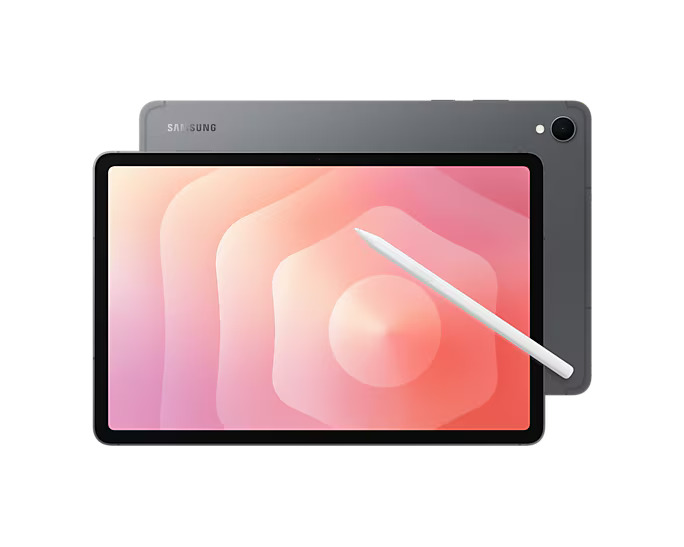
Samsung Galaxy Tab S11 Review: First Impressions
Samsung skipped the compact flagship tablet entirely in 2024, and it shows. After two years of choosing between the oversized Tab S10+ and the step-down FE range, Android fans finally get a proper 11-inch premium slate again — one with an AMOLED display, an included S Pen, IP68 water resistance, and seven years of software updates.
This Samsung Galaxy Tab S11 review pulls together full testing from five review outlets to answer the only question that matters: at $799, is this the best Android tablet of 2026, or does the competition offer more for less? Spoiler — it's superb hardware with a couple of genuinely annoying compromises, and the price is its biggest enemy.
Samsung Galaxy Tab S11 Review: Design & Build
Slim, Premium, and IP68 Rated
At 253.8 x 165.3 x 5.5mm and 469g, the Tab S11 is slimmer and lighter than the two-year-old Tab S9 it replaces, with the same all-aluminium unibody construction. The chassis is flat-edged and understated — Grey or Silver are your only choices, which says a lot about the general lack of inspiration on the design side. But pick it up and the build quality is first-class, with tight tolerances and a premium feel no rival matches at this price.
The standout spec is IP68 certification: full dust and water resistance, still a rarity among tablets. That makes the Tab S11 a genuinely usable bath-time or beach-side device, where even Apple's iPad Pro can't follow.
The Fingerprint Sensor Problem
Two design details frustrate. Samsung moved to an in-display fingerprint sensor, and across three separate reviews it was called slow and unreliable — one reviewer found it failed to recognise their thumbprint often enough to matter, and another noted it's harder to locate by feel than the old power-button sensor. Face unlock exists as a backup, but it's no faster. If you want to see how it stacks up against Samsung's bigger family members, our round-up of the best Samsung tablets puts the whole range side by side.
The other annoyance is the buttons. The power key and volume rocker sit almost flush with the thin chassis, low down one edge, with identical colour and texture. Reviewers repeatedly found themselves feeling around the frame and missing them — a small thing that gets irritating daily.
Display: 1,600 Nits of AMOLED Excellence
Brightness, Colour, and Outdoor Use
The 11-inch Dynamic AMOLED 2X panel (2560 x 1600, 274 PPI, 120Hz adaptive, HDR10+) is the Tab S11's crown jewel. Lab testing measured 1,575 cd/m² at APL18 and 1,648 cd/m² peak in HDR — a massive jump from the Tab S9's 750 nits — with a brightness distribution of 96% and response times of just 1.49ms, superb for gaming. Colours pop in the Vivid profile, viewing angles are stable, and it's genuinely usable in direct sunlight.
But the colour calibration isn't flawless. Lab tests found a DeltaE deviation of 3.5 against sRGB, worse than the iPad Air (1.13) and the Xiaomi Pad 7 Pro (1.6). One UI 8 still offers almost no colour customisation, and the panel dims via 480Hz PWM, which a small minority of flicker-sensitive users may notice.
Missing Anti-Reflective Coating
Samsung rolled back the anti-reflective coating that was such a welcome addition on the Tab S10+. In bright sunlight it still performs well, but TechRadar's reviewer found the touchscreen overly sensitive and noted dust collecting in the bezels — small niggles, but at this price they stand out.
Performance: Dimensity 9400+ Tested
Benchmarks vs the Snapdragon 8 Elite
This is the first Samsung tablet with MediaTek's Dimensity 9400+ — a 3nm chip with a Cortex-X925 prime core running at 3.7GHz, 12GB of LPDDR5X RAM, and 128GB, 256GB, or 512GB of storage. In Geekbench 6 it scored 2,478 single-core and 7,787 multi-core — behind the Apple M3 (3,019 / 11,773) and the Snapdragon 8 Elite in the OnePlus Pad 3 (3,194 / 9,302), but well ahead of any mid-range tablet. In 3DMark Wild Life Extreme it managed 6,388 points, beating the iPad Air's 5,611, and in GFXBench Aztec Ruins it hit 88fps on-screen versus 60fps for the iPad Air and 50fps for the OnePlus Pad 3.
Real-world gaming is excellent. GRID Legends with the high-resolution graphics pack barely dropped a frame, and Asphalt Legends: Unite looks brilliant on the big screen. Samsung's Game Booster mode helps with heavier titles.
Throttling, Storage, and Wi-Fi 6E
The caveat is thermals. Lab testing measured relatively high throttling behaviour under sustained load, and the 128GB model ships with UFS 3.1 storage rather than the faster UFS 4.x — meaningfully slower on paper, though you get microSD expansion up to 2TB, something Apple simply doesn't offer. Wi-Fi tops out at Wi-Fi 6E (no Wi-Fi 7), though real-world throughput peaked at over 1,800 Mbps on the 6GHz band, which is excellent.
Samsung Galaxy Tab S11 Review: Battery & Charging
Real-World Battery Tests
The 8,400mAh battery is the same size as the Tab S9's, and endurance is solid rather than spectacular. Lab websurfing tests managed 11 hours 14 minutes — better than the Tab S9 (9h) and the iPad Air (11.7h was measured on a different test, so treat that loosely), but well behind the OnePlus Pad 3's 23.9 hours. One reviewer recorded 10.5 hours of 1440p YouTube at full brightness, enough for any long-haul flight, and several days of standby between charges with light use.
Idle power consumption is higher than rivals though — 2.57W minimum versus 0.75W on the Xiaomi Pad 7 Pro — which explains the merely decent standby figures.
45W Charging, No Brick in the Box
Charging runs at 45W, hitting 49% in 30 minutes, with a full charge taking around 1.5 hours. That's not slow, but the 80W charging on the OnePlus Pad 3 embarrasses it. There's no charger in the box — just a USB-C cable and the S Pen — so budget for a 45W brick if you don't own one. If charging speed and battery life are your priorities, check our best tablets for work guide for the longest-lasting picks.
Software: One UI 8 and Seven Years of Updates
Android 16 with the Best Tablet Interface
The Tab S11 is the first tablet to ship Android 16 with One UI 8, and the software is a highlight. Split-screen multitasking is intuitive — drag an icon from the taskbar to open it, stack two or three windows easily — and the Settings app defaults to a wide side-by-side layout that's genuinely fast to navigate. One UI 8 is one of the best-looking, least intrusive Android interfaces available, and it's well suited to the big screen.
Seven years of OS and security updates (taking the tablet to 2032) is the longest commitment in the tablet world, arguably more valuable here than on a phone since tablets are kept for years.
DeX, Galaxy AI, and the App Problem
DeX desktop mode is genuinely impressive. Drag an app down from the top of the screen and it becomes a freely resizable window; connect to an external monitor and DeX now runs on both displays simultaneously with drag-and-drop between them. Paired with the optional Book Cover Keyboard Slim ($145), it can realistically replace a laptop for light work.
Galaxy AI runs throughout: Drawing Assist turns rough sketches into artwork, Writing Assist polishes notes, AI-Sketch to Notes converts doodles into presentations, and Google Gemini is a long-press away. The honest caveat is the Android tablet app scene, which still isn't as mature as the iPad's — you're more likely to hit apps that aren't optimised for the big screen.
Cameras: Fine, Because It's a Tablet
The camera hardware is identical to the Tab S9: a 13MP rear sensor with autofocus and 4K at 30fps, plus a 12MP ultra-wide front camera aimed squarely at video calls. Shots are passable in good light — decent for digitising documents — but the tiny sensor and lack of OIS mean low light is a write-off, and dynamic range doesn't impress. Samsung dropped the dedicated 8MP ultra-wide from the rear, which is a small step back.
The fair position, as every reviewer agreed: nobody buys a tablet for cameras, and mid-range phones outperform the best tablets. For video calls and document scans, these are perfectly adequate.
S Pen: Redesigned, But No Bluetooth
The S Pen remains the best stylus in the business — and it still comes in the box, unlike the Apple Pencil. The redesign brings a hexagonal, pencil-like grip with a cone-shaped tip for more natural writing and drawing, and it now snaps magnetically to the side of the frame rather than a strip on the back. Handwriting recognition is superb.
The trade-off: Bluetooth Low Energy is gone. No more Air Actions, no remote camera shutter, no presentation controls. If you never used those features, the lighter, more ergonomic pen is a win; if you did, this stings.
Speakers & Connectivity
Quad Speakers: Great Until Loud
The four-speaker setup is one of the best on a compact tablet — lab tests ranked the sound quality in the top 10% of all devices tested, with balanced highs and a nicely deep soundstage. But there's a split verdict: at moderate volumes it's excellent, while pushing past half-volume introduces a harsh, tinny edge. No Dolby, no Hi-Res Audio, no tuning options. For media consumption at normal volume, it's superb.
USB-C 3.2, microSD, and 5G
Connectivity is strong. The USB-C port runs at USB 3.2 Gen 1 speeds (measured at up to 351 MB/s) and doubles as a DisplayPort/HDMI output for external displays. The microSD slot accepts cards up to 2TB. Wi-Fi 6E, Bluetooth 5.4, and a full GNSS module (even in the Wi-Fi model) round out the package. A 5G variant exists — £150 extra in the UK, though there's no cellular option in the US.
Price, Availability, and the Competition
The Tab S11 starts at $799 / £799 for 128GB, rising to $859 / £899 for 256GB and $979 / £999 for 512GB. That's squarely between the £599 iPad Air and the £999 iPad Pro, and it's genuinely competitive there — AMOLED, IP68, and a bundled S Pen against the iPad Air's 60Hz LCD and £129 Apple Pencil.
The problem is Android. The OnePlus Pad 3 gives you a bigger, sharper 144Hz display, comparable Snapdragon 8 Elite performance, more storage, a much bigger battery, and 80W charging for £529 — £270 less. Samsung's own Tab S10 FE starts at $500. If the Tab S11's 11-inch screen is too small, the Tab S11 Ultra ($1,199) offers the same internals behind a 14.6-inch canvas.
Full Specs at a Glance
| Spec | Detail |
|---|---|
| Display | 11.0" Dynamic AMOLED 2X, 2560 x 1600, 120Hz, HDR10+, 1,600-nit peak |
| Chipset | MediaTek Dimensity 9400+ (3nm), Immortalis-G925 MC12 GPU |
| RAM / Storage | 12GB LPDDR5X / 128GB, 256GB, or 512GB (UFS 3.1), microSD up to 2TB |
| Rear camera | 13MP (f/2.0, AF), 4K@30fps video |
| Front camera | 12MP ultra-wide (f/2.2) |
| Speakers | Quad speakers |
| Battery | 8,400mAh; 45W wired charging (no charger in box) |
| Build | 469g, 5.5mm thin, aluminium unibody, IP68 |
| Connectivity | USB-C 3.2 Gen 1 (DP/HDMI out), Wi-Fi 6E, Bluetooth 5.4, optional 5G, GNSS |
| Security | In-display fingerprint sensor, 2D face unlock |
| Software | Android 16, One UI 8, 7 years of OS + security updates |
| In the box | S Pen (no Bluetooth), USB-C cable, no charger |
Pros & Cons
Pros
- Superb 11-inch AMOLED display — bright, fast, great for media and gaming
- Strong performance from the Dimensity 9400+, excellent gaming results
- S Pen included in the box with a comfortable new design
- IP68 dust and water resistance — rare among tablets
- Seven years of updates, taking it to 2032
- microSD expansion up to 2TB and USB-C video output
- DeX desktop mode is genuinely useful for work
Cons
- $799 feels expensive — the OnePlus Pad 3 does most of it for £270 less
- No anti-reflective coating (a step back from the Tab S10+)
- S Pen lost Bluetooth and Air Actions
- In-display fingerprint sensor is slow and unreliable
- No charger in the box, and only 45W charging
- No Wi-Fi 7, and the 128GB model gets slower UFS 3.1 storage
- Android's tablet app ecosystem still trails the iPad's
Should You Buy the Samsung Galaxy Tab S11?
If you want the best compact Android tablet and the price doesn't scare you, yes. The Tab S11 pairs a gorgeous, bright AMOLED display with flagship performance, the best stylus in the business included free, real water resistance, and the longest update promise of any tablet. It's the closest thing to an iPad Air that Android offers, and in several areas — the screen, the speakers, DeX — it wins.
The honest caveat is value. Rivals have responded to Samsung's premium pricing by offering more for less, and the Tab S11 doesn't do enough new to fully justify its premium. Wait for the inevitable discounts — at $699 or below, this becomes the easiest recommendation in the Android tablet world.

Frequently Asked Questions
How much does the Samsung Galaxy Tab S11 cost?
It starts at $799 / £799 for 128GB, with 256GB at $859 / £899 and 512GB at $979 / £999. Adding 5G costs £150 extra in the UK; there's no cellular model in the US. Street prices are often well below launch — Samsung runs frequent deals, so it's worth waiting.
Is the S Pen included with the Samsung Galaxy Tab S11?
Yes. The redesigned S Pen — with a hexagonal grip and cone-shaped tip — comes in the box. It magnetically attaches to the side of the tablet. Unlike older S Pens, it has no Bluetooth, so Air Actions and the remote camera shutter are gone.
How many years of updates does the Samsung Galaxy Tab S11 get?
Samsung promises seven major OS updates and seven years of security patches, taking the tablet to 2032. That's the longest software commitment of any tablet currently on sale.
Is the Samsung Galaxy Tab S11 good for gaming?
Yes. The Dimensity 9400+ scored 6,388 in 3DMark Wild Life Extreme and 88fps in GFXBench Aztec Ruins — beating the iPad Air in both — and demanding games like GRID Legends run with barely a dropped frame. Sustained loads do cause some throttling, but casual and serious mobile gaming are both excellent.
Does the Samsung Galaxy Tab S11 have a headphone jack?
No. Like every recent premium tablet, there's no 3.5mm jack. You connect wired headphones via the USB-C port or use Bluetooth 5.4, which supports aptX, LDAC, and Samsung's own SSC codecs.
Can you expand the Samsung Galaxy Tab S11's storage?
Yes. A microSD slot accepts cards up to 2TB, a rare feature on premium tablets. Note the 128GB base model uses slower UFS 3.1 storage; 256GB and 512GB models use faster flash.
Does the Samsung Galaxy Tab S11 come with a charger?
No. The box contains the tablet, the S Pen, and a USB-C cable — but no charger. It supports 45W charging, reaching 49% in 30 minutes, so any decent 45W Power Delivery brick will do.
Is the Samsung Galaxy Tab S11 better than the iPad Air?
It depends on your ecosystem. The Tab S11 wins on display (120Hz AMOLED vs 60Hz LCD), includes the S Pen, has IP68 water resistance, and gets longer updates. The iPad Air wins on app quality and has a more powerful chip for sustained workloads. Android fans should pick the Tab S11; iPhone owners will be happier with the iPad Air.
Does the Samsung Galaxy Tab S11 support Wi-Fi 7?
No — it supports Wi-Fi 6E, including the 6GHz band. Lab tests measured over 1,800 Mbps on 6GHz, which is excellent in practice, but Wi-Fi 7 future-proofing isn't there.
Is the Samsung Galaxy Tab S11 waterproof?
It's IP68 rated, meaning it's protected against dust and submersion in fresh water. You can use it by the pool or in the bath without worry — though I'd still avoid dropping it in the sea.
