

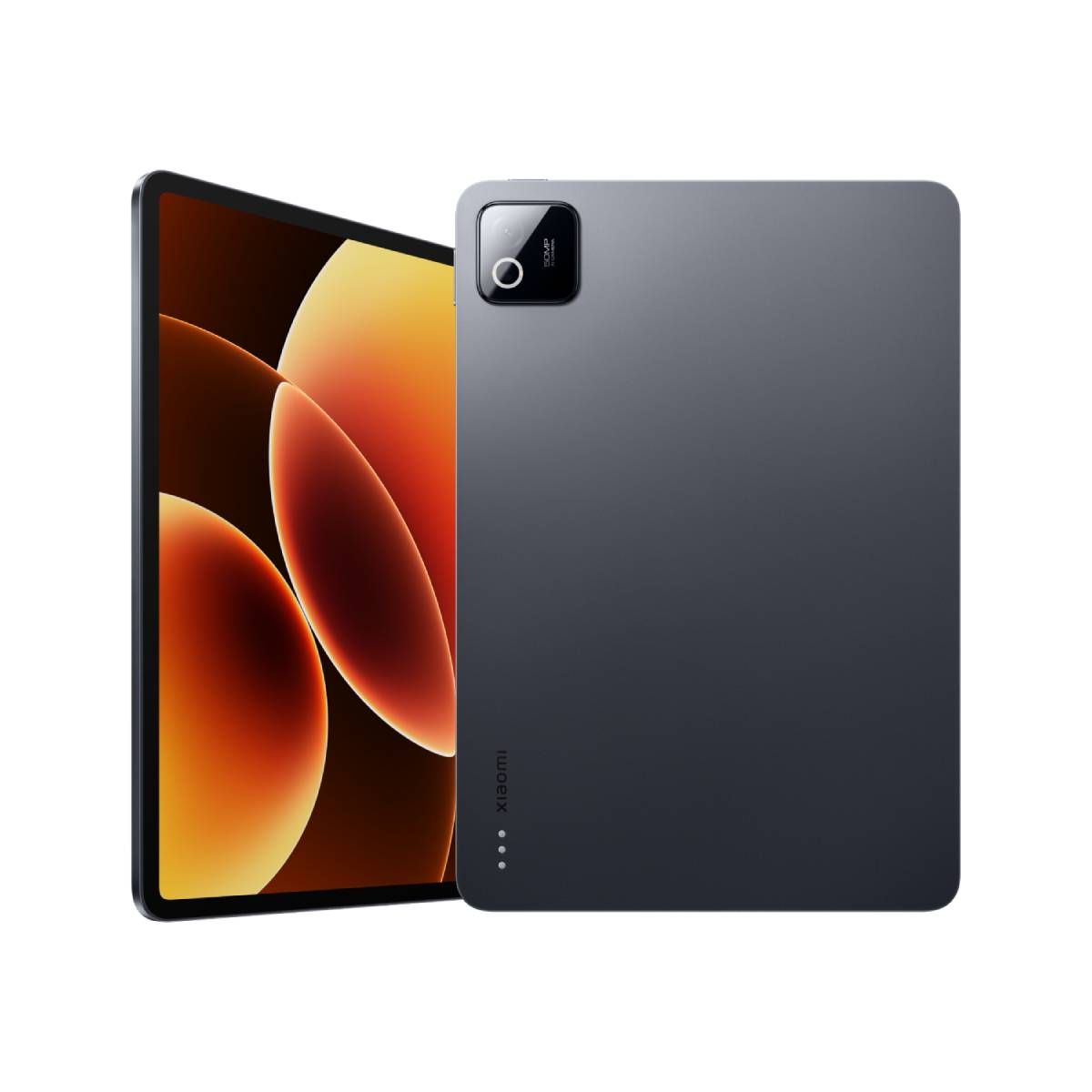
Xiaomi Pad 8 Pro Review: First Impressions
Flagship tablets are getting expensive. An 11-inch iPad Pro costs well over a grand, and Samsung's Galaxy Tab S11 isn't far behind. The Xiaomi Pad 8 Pro asks a simple question: what if you could get the same flagship silicon — Qualcomm's Snapdragon 8 Elite — a sharp 3.2K 144Hz display and a 9,200mAh battery for roughly half the money?
This Xiaomi Pad 8 Pro review pulls together full lab and hands-on testing from five major review outlets to give you the complete picture: what's genuinely brilliant, what's merely good enough, and whether the sacrifices are ones you can live with. Spoiler — for pure power-per-pound, almost nothing else touches it. But you should know exactly where Xiaomi cut corners.
Xiaomi Pad 8 Pro Review: Design That Feels Expensive
Metal Unibody, 485 Grams of It
The Pad 8 Pro wears an all-metal unibody that looks and feels properly flagship. It's just 5.75mm thin (5.8mm on the matte glass edition) and weighs 485g — 15g lighter than its predecessor — which lands squarely in the comfortable zone for an 11-inch slab. The rear panel has a matte metallic finish that shrugs off fingerprints and smudges, so it stays presentable after a full day of handling. Colour options are grown-up and understated: Gray, Black, Pine Green and Light Blue.
The design language is minimalist to a fault, with flat edges, uniform bezels and an 86% screen-to-body ratio. One design decision splits opinion: the rear camera module. It houses the 50MP sensor in a square bump that's larger and prouder than a tablet really needs, and it makes the tablet wobble slightly when lying flat on a desk without a case. A minor sin, but a noticeable one.
Ports, Buttons and Missing Bits
The power button sits on the top-left edge in landscape and hides a fingerprint scanner — one quick tap and you're in, every time. The volume rocker is parked on the top edge, easy to reach in either orientation. Connectivity comes via a USB-C port that meets the USB 3.2 standard, so you get 5Gbps data transfers and video output to an external monitor with the right adapter — the sort of thing that usually gets quietly cut at this price. There's also an infrared blaster, Wi-Fi 7 with 2×2 MIMO, and Miracast support.
The trade-off list is short but worth knowing: no cellular or 5G version, no GPS, no headphone jack, and no microSD expansion. Xiaomi's own fingerprint trick is a nice touch, though — one of your fingerprints can be set to open HyperOS's Second Space directly, giving a second person a completely separate app setup.
Xiaomi Pad 8 Pro Review: Display & Speakers
The Best LCD You'll Find on a Tablet
The 11.2-inch display runs at a sharp 3.2K resolution (3200 x 2136, 3:2 aspect ratio, roughly 345ppi) with a 144Hz refresh rate and a 1,080Hz touch sampling rate. It supports HDR10, HDR Vivid and Dolby Vision, covers the DCI-P3 colour space, and shows 68 billion colours. Peak brightness hits around 800 nits with HDR content — more than enough for a home-bound tablet — and it carries TÜV Rheinland certifications for low blue light, flicker-free and circadian-friendly viewing.
Here's the honest caveat: it's an IPS LCD, not an OLED. Because it relies on a single universal backlight rather than millions of individually lit pixels, you'll catch a faint backlight glow in the black bars when watching widescreen content in a dark room, and you won't get the inky blacks Samsung's OLED panels serve up. Colour depth is merely good rather than great — one lab measured 69% DCI-P3 coverage, well below the 90%-plus of the OLED crowd.
The silver lining is real, though. If OLED screens give you eye strain or headaches at night, this panel is a flicker-free oasis — the PWM-free display has zero flickering even at low brightness, which is a big plus for sensitive users. And if reflections are your nemesis, the pricier matte glass edition adds a genuine anti-glare finish. The whole LCD decision reframes from compromise to deliberate choice, depending on your eyes.
Sound That Fills a Room
Audio is a genuine strength. A quad-speaker array — two on each side in landscape — tuned with Dolby Atmos and Hi-Res certifications delivers surprisingly full sound for a 5.75mm chassis. There's a claimed 200% volume boost mode, good clarity with airy treble, and bass depth that rivals a small dedicated Bluetooth speaker. The highs and mids can get slightly wavy at the very top of the volume range, but for films, games and video calls it's one of the better-sounding tablets in its class.
Performance: Snapdragon 8 Elite Muscle
Chart-Topping Silicon
The Snapdragon 8 Elite is a 3nm powerhouse: an octa-core CPU with two Oryon V2 cores at 4.32GHz and six at 3.53GHz, plus an Adreno 830 GPU. Memory tops out at 12GB of LPDDR5T RAM (8GB LPDDR5X on base models) and storage reaches 512GB of UFS 4.1 — although the 128GB base tier still uses slower UFS 3.1, which is worth knowing before you buy.
Benchmarks are emphatic: Geekbench 6 scores of 3055 single-core and 8934 multi-core, AnTuTu past 3.1 million points, and a 3DMark stress stability of 93.1%. It beats everything running a MediaTek Dimensity 9400 and trades blows with Apple's M-series silicon. In real use, apps have virtually no load times, RAW photo exports in Lightroom fly, and heavy CapCut timelines render in minutes — genuine desktop-grade muscle.
Gaming, Thermals, and the One Disagreement
Gaming is where the chip earns its keep. Genshin Impact holds a smooth 60fps on the highest settings, shooters and demanding titles like Zenless Zone Zero and Call of Duty Mobile run at peak graphics without complaint, and even Fortnite maxes out comfortably.
The one genuine disagreement among reviewers is thermals. One outlet found the tablet kept closing apps during a 20-minute stress test, citing overheating, with peak temperatures just under 50 degrees. Another failed to finish 3DMark's Wildlife Extreme Stress Test mid-run. Yet GSMArena's lab reported the tablet never got hot with minimal thermal throttling under prolonged load, and multiple testers encountered zero heat issues in real gaming sessions. The fair reading: synthetic stress tests can push it past its limits, but real-world workloads — even long gaming sessions — stay cool and stable. If raw performance on Android is your priority, our best Android tablets roundup shows just how far ahead this chip puts the Pad 8 Pro of its mid-range rivals.
Software: HyperOS 3 Grows Up
Tablet-First Features
The Pad 8 Pro boots HyperOS 3 on top of Android 16. Xiaomi hasn't confirmed the official update policy, but GSMArena estimates it's likely four major OS upgrades and six years of security patches. Visually, HyperOS 3 is a refinement rather than a reinvention — smoother animations, flatter redesigned icons, and iOS-inspired lockscreen customisation with different effects, fonts and widgets.
For tablets specifically, there's a dedicated Features for Tablets menu in Settings with multi-tasking gestures, PC-level split-screen options (50:50 vertical split and a 9:1 horizontal split), pop-up windows that can be resized freely, and an optimised task manager for the large screen. HyperAI features include writing assistance, transcription, translation, live subtitles on YouTube, AI Art and Canvas tools, AI Search and an AI editor for photos and video — plus Google's Gemini is available too.
Workstation Mode: Close, Not Quite There
Workstation Mode is Xiaomi's answer to Samsung DeX: a Windows-like desktop where apps launch in resizable pop-up windows instead of full-screen, toggled from the control centre in either orientation. It works, and it's genuinely useful for multi-tasking — but reviewers found it needs polish. Window controls still hide behind three-dot menus, and the desktop doesn't feel flexible enough because it inherits the regular tablet's icon spacing.
The bigger software caveats: HyperOS carries noticeable bloat, the imported Chinese ROM only supports an English language pack ex-works with no Play Store pre-installed, update promises are vague, and Android's tablet app ecosystem still occasionally stretches phone apps awkwardly across the big screen. If you want a tablet that needs zero fiddling, our best iPads guide covers the fuss-free alternative.
Xiaomi Pad 8 Pro Review: Cameras
Better Than Tablets Usually Manage
The 50MP rear camera (f/1.8, PDAF, Samsung JN1 sensor) captures decent photos in good light with solid detail and a quick shutter — genuinely useful for scanning documents, copying whiteboards and the occasional snapshot. It shoots 4K video at up to 60fps, which is more than most tablets offer. The 32MP ultra-wide front camera (f/2.2) delivers detailed selfies with good texture for video calls, though its video tops out at 1080p/30fps.
It's still a tablet camera. Images can look flat or overly contrasty at times, and zoom past 3x degrades quickly. No phone buyer would pick a tablet for its camera, but for a tablet, this is surprisingly respectable.
Battery & Charging: Two-Day Territory
9,200mAh Goes the Distance
The 9,200mAh battery is one of the tablet's strongest traits. Lab testing showed 3 hours 17 minutes of video streaming consuming just 17% of the battery — extrapolating to roughly 19–20 hours of video playback off a charge. In mixed real-world use (Spotify streaming, YouTube, local video, occasional gaming), testers comfortably got two days between charges, with some stretching past 15–16 hours of screen-on time.
Charging is quick for a battery this size: the bundled 67W charger fills it from 10% to full in just over an hour, reaching 50% in about 32 minutes and 29% in just 15 minutes. There's also 22.5W reverse wired charging for topping up accessories.
Accessories: The Keyboard and Stylus Question
Focus Keyboard Pro
To earn the "Pro" name, Xiaomi sells two accessories — and they're not cheap. The Focus keyboard case (£189) uses a floating hinge design in the style of Apple's Magic Keyboard, attaches magnetically with pogo-pin contacts (no Bluetooth pairing), and offers chiclet keys with genuinely good travel, a small but useful touchpad and a backlight powered by the tablet itself. Reviewers wrote full articles on it happily. The catches: the hinge doesn't tilt far back, and the heavy base makes the whole setup top-heavy — fantastic on a desk, prone to tipping on a lap or soft bed.
Focus Pen Pro
The Focus Pen Pro (£89) weighs just 18g, snaps magnetically to the top edge to charge, and ditches physical buttons for pressure-sensitive areas and squeeze gestures — squeeze to grab a screenshot or open a canvas. It offers over 16,000 pressure levels, 1ms latency and haptic feedback that makes writing and drawing feel satisfyingly tactile, plus wireless on-barrel controls and a remote-control mode for presentations. It's genuinely one of the best styluses on any Android tablet.
Price, Availability & the Competition
The Xiaomi Pad 8 Pro retails at £529 for 8GB/256GB, £599 for 12GB/512GB, and £629 for the matte glass edition — with a £89 stylus and £189 keyboard on top if you want the full workstation kit. The global MSRP sits around $600, and it launched in China in September 2025 before going global at MWC 2026. Two important availability notes: it is not officially sold in the US, and the Chinese import version ships without the Play Store pre-installed.
Competition is fierce but flattering. The Honor MagicPad 4 (OLED, similar money) is the better pure media-consumption tablet. The Galaxy Tab S11 costs significantly more, offers an OLED display and stronger brand polish, but falls behind on raw performance. Apple's iPad Air 11 — also LCD, at a higher price — is the default fuss-free alternative. And the OnePlus Pad Go 2 undercuts everyone if your budget is tighter. None of them, however, combine flagship silicon, a 144Hz display, quad speakers and two-day battery life at £529. That value equation is the entire story of this tablet.
Full Specs at a Glance
| Spec | Detail |
|---|---|
| Display | 11.2" IPS LCD, 3200 x 2136 (3.2K), 3:2, 144Hz, HDR10/Dolby Vision, 800-nit peak, PWM-free |
| Chipset | Snapdragon 8 Elite (3nm): 2×4.32GHz + 6×3.53GHz Oryon, Adreno 830 |
| RAM / Storage | 8GB LPDDR5X or 12GB LPDDR5T / 128GB UFS 3.1 or 256–512GB UFS 4.1 (no microSD) |
| Rear camera | 50MP (f/1.8, PDAF), 4K@60fps video |
| Front camera | 32MP ultra-wide (f/2.2), 1080p@30fps video |
| Battery | 9,200mAh; 67W wired, 22.5W reverse wired |
| Build | 485g, 5.75mm, aluminium unibody, no IP rating, no cellular |
| Audio | Quad speakers, Dolby Atmos, Hi-Res, 200% volume boost mode |
| Connectivity | Wi-Fi 7, Bluetooth 5.4, USB-C 3.2 (5Gbps, DP out), IR blaster, Miracast |
| Security | Side-mounted fingerprint sensor, AI face unlock |
| Software | HyperOS 3 on Android 16, Workstation Mode, HyperAI features |
| Extras | Focus Pen Pro (£89) and Focus keyboard case (£189) sold separately |
Pros & Cons
Pros
- Snapdragon 8 Elite performance that beats tablets costing twice as much
- Sharp, smooth 3.2K 144Hz display that's flicker-free for sensitive eyes
- Outstanding two-day battery life with fast 67W charging
- Excellent quad speakers with real bass depth
- Slim, premium aluminium build at 485g
- Superb keyboard case and stylus accessories
- Half the price of an iPad Pro with better raw performance
Cons
- LCD panel — no inky OLED blacks, some backlight glow in dark rooms
- No cellular/5G, no GPS, no microSD, no headphone jack
- Not officially sold in the US; Chinese imports need Play Store side-loading
- Workstation mode needs more polish to rival Samsung DeX
- Keyboard and stylus are pricey add-ons
- Synthetic stress tests can trigger thermal throttling
Should You Buy the Xiaomi Pad 8 Pro?
If you want flagship performance without the flagship price, yes. The Xiaomi Pad 8 Pro delivers laptop-grade silicon, a superb high-refresh display, two-day battery life and genuinely good speakers for roughly half what Apple and Samsung charge for their 11-inch flagships. For gamers, students and anyone doing creative work on the go, it's arguably the best value-for-money tablet you can buy right now.
The honest caveats: it's LCD not OLED, the full keyboard-and-stylus workstation kit adds £280 to the price, and US buyers are out of luck. If you want the absolute best screen for films in a dark room, the OLED rivals win. But for power, stamina and everyday polish per pound, the Pad 8 Pro is almost impossible to beat.
Frequently Asked Questions
Is the Xiaomi Pad 8 Pro waterproof?
No. The tablet has no official water resistance or IP rating, so keep it away from sinks and rain — unlike some of Samsung's higher-end tablets, there's no dust or water protection here.
Does the Xiaomi Pad 8 Pro have expandable memory?
No, there's no microSD slot. You choose 128GB, 256GB or 512GB at purchase, so think carefully about your storage needs — the 256GB and 512GB models also get the faster UFS 4.1 storage.
Is a stylus included with the Xiaomi Pad 8 Pro?
No. The Focus Pen Pro is sold separately for around £89. The basic package includes the tablet, a 67W charger, a USB-C cable, a quick start guide and a warranty card.
Does the Xiaomi Pad 8 Pro support 5G or GPS?
Neither. There is no cellular version of the Pad 8 Pro — it's Wi-Fi only (Wi-Fi 7) — and it has no satellite positioning, so it can't be used for turn-by-turn navigation.
How many software updates will the Xiaomi Pad 8 Pro get?
Xiaomi hasn't confirmed the official policy, but estimates based on the Pad 8 series suggest around four major OS upgrades and six years of security patches. That's competitive for an Android tablet, though Samsung offers longer.
Can the Xiaomi Pad 8 Pro replace a laptop?
Almost, for light and medium work. The Focus keyboard case plus Workstation Mode gives you a desktop-like environment with resizable app windows, and the Snapdragon 8 Elite handles documents, spreadsheets and creative apps with ease. But Android app scaling, the keyboard's limited tilt and a slightly top-heavy setup mean it's still not a like-for-like laptop replacement.
What's the difference between the Xiaomi Pad 8 Pro storage versions?
The 128GB base model uses slower UFS 3.1 storage and 8GB of LPDDR5X RAM. The 256GB and 512GB models step up to faster UFS 4.1 storage, and the top tier adds 12GB of faster LPDDR5T RAM. The matte glass edition is 12GB/512GB only.
Is the Xiaomi Pad 8 Pro good for drawing?
Yes — particularly with the Focus Pen Pro (£89). With over 16,000 pressure levels, 1ms latency and haptic feedback, reviewers who aren't even artists found themselves sketching far longer than planned. The 3:2 display gives you more vertical room for canvas work than 16:10 rivals.
Does the Xiaomi Pad 8 Pro have an OLED screen?
No. It uses an 11.2-inch IPS LCD panel. While it can't match the perfect blacks of OLED rivals like the Galaxy Tab S11, it's one of the sharpest, smoothest LCDs on any tablet — and its flicker-free, PWM-free panel is easier on sensitive eyes.
What accessories work with the Xiaomi Pad 8 Pro?
The Focus keyboard case (£189) with its floating hinge, the Focus Pen Pro stylus (£89), and a Cover with an origami-style kickstand. The keyboard and pen are the meaningful upgrades; the keyboard case also fits the standard Xiaomi Pad 8.
