

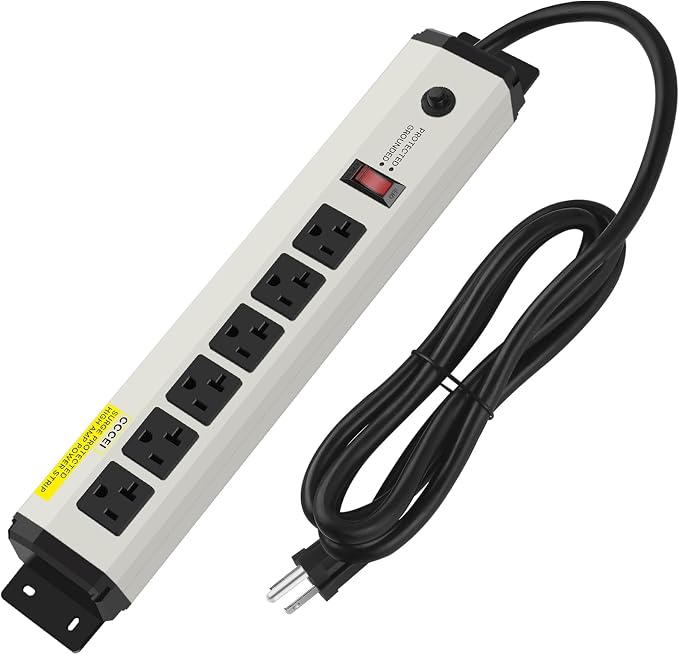
Best Surge Protectors 2026
The best surge protectors 2026 buyers can choose are not the cheapest strips on the shelf. A surge protector is cheap insurance for a television, a computer, a games console, a router and every charger plugged in around them, and the difference between a real protector and a plain power strip is hidden inside the housing. One simply adds outlets. The other is built to divert a voltage spike away from your equipment before it can do damage.
That distinction matters because most surge protectors fail quietly. They do not spark, smoke or announce themselves when their protection wears out. A strip can keep passing power long after it has stopped protecting anything, which is why the buying decision should rest on specifications and safety behaviour rather than on outlet count alone. This guide brings together the findings of the leading 2026 buying guides, including Wirecutter’s long-running surge protector testing, and explains what each number on the box actually means, which models reviewers keep recommending, and where those reviewers disagree.
One important note before the picks: most of the detailed test data in this guide comes from the United States market, where household current is 120 volts and the UL 1449 standard applies. If you live elsewhere, check your local voltage, plug type and equivalent safety standard before ordering a US-style strip, because a protector designed for one system is not automatically correct for another.
Quick picks: the best surge protectors 2026 at a glance
- Best overall: Eaton Tripp Lite Protect It 12-Outlet Surge Protector (TLP1208SAT / TLP1208TELTV family) — the most recommended balance of protection, outlets and fail-safe shutoff.
- Best for bulky plugs: Belkin 12-Outlet Pivot-Plug Surge Protector (BP112230-08) — eight pivoting outlets, 4,320 joules and a low let-through rating.
- Best compact wall unit: Tripp Lite Protect It 3-Outlet SK30USB — a wall-mounted unit with USB charging and auto-shutoff for kitchens, bedrooms and nightstands.
- Best premium protection: Furman Power Station 8 (PST-8) — the strongest measured surge suppression in the guides, for expensive home theatre and studio gear.
- Best value with USB: Anker 351 Power Strip — 12 AC outlets plus USB-A and USB-C, backed by a large connected-equipment warranty.
- Best budget pick: Tripp Lite 6-Outlet TLP606 — a genuinely protective budget model, not just a cheap strip with a light.
- Best looking: Austere VII Series — brushed aluminium and USB-C Power Delivery for a protector that stays visible.
How a surge protector actually works
Inside most surge protectors sit components called metal oxide varistors, usually shortened to MOVs. When voltage rises above a safe level, the MOVs divert the excess current into the ground wire of your home, keeping it away from the devices plugged into the strip. That is also why a surge protector needs a properly grounded three-prong outlet to do its job. Plugged into a two-prong outlet through an adapter, it loses the very path it relies on to shunt a surge away.
Surges do not only come from lightning. Reviewers consistently point to more ordinary causes: power returning after an outage, utility switching, brownouts and large appliances such as air conditioners and microwaves cycling on and off. A single large surge can kill a device outright, but smaller repeated spikes can also degrade electronics slowly over time, shortening their life without any single dramatic event. This is why reviewers treat surge protection as a necessity for most homes rather than a luxury, and why they warn that manufacturer warranties on the damaged device itself usually exclude surge damage.
Two different jobs are often confused here. A surge protector clamps spikes. A UPS, an uninterruptible power supply, also keeps a computer or network device running through a brief outage on battery power. Most guides recommend the same split: put a PC or NAS that must survive outages on a UPS, and put televisions, speakers, consoles and chargers on a quality surge strip. Do not plug a UPS into a surge strip unless the UPS maker says that arrangement is acceptable.
Joule rating: how much surge energy a protector can absorb
The joule rating is the number printed largest on most boxes, and it measures how much surge energy the MOVs can absorb over the protector’s lifetime. As MOVs divert surges, they wear out, so a higher joule rating generally means a longer useful life before the protection is spent. Reviewers broadly agree on the bands: at least 1,000 joules is a sensible starting point for a home, and 2,000 to 4,000 joules is the range to aim for when protecting expensive equipment or living in an area with frequent outages or overhead power lines.
But every serious guide adds the same warning: joules alone do not define protection. There is no single testing standard for joule ratings in the way there is for let-through voltage, so a joule figure is best treated as a rough comparison between models rather than a precise measurement. A strip that never publishes a joule rating at all should be assumed to be a plain power strip with a light, not a protector. The budget Tripp Lite TLP606 illustrates the point from the other side: at only 790 joules it looks weak on the box, yet reviewers still recommend it because its let-through rating and auto-shutoff behaviour are sound. Joules matter, but they are only one leg of the decision.
Clamping voltage: the number that decides what reaches your devices
If joules measure endurance, clamping voltage — also called let-through voltage or Voltage Protection Rating (VPR) — measures what actually gets through to your equipment during a surge. It is the voltage level at which the protector starts diverting the spike. Lower is better. Under UL 1449, VPR is reported in steps including 330, 400, 500 and higher, and there are separate ratings for each of the three household wires: line to neutral, line to ground and neutral to ground, although many manufacturers publish only one figure.
The guides converge on a clear threshold: look for 400 volts or lower across all three lines, with 330 volts offering extra margin for sensitive audio and video gear. The reason is blunt. Sensitive devices should generally withstand short spikes under 400 volts without damage, so a protector rated at 500 or 800 volts may let damaging voltage through before its protection even begins. One guide found many popular models rated at 800 volts or higher, and another warns that if a manufacturer will not publish a let-through figure at all, shoppers should assume the worst, especially among cheap or no-name strips.
There is a genuine trade-off here, and the guides are honest about it. A protector with a very low let-through voltage subjects its MOVs to more small hits, which can wear them out faster. That is part of why the best protectors pair a low clamping voltage with an auto-shutoff feature: when the protection is spent, you find out, rather than carrying on unprotected. Where sources disagree on exact let-through test results for the same model family — for example, different test runs reporting around 183 volts and around 207 volts for Tripp Lite 12-outlet models — the direction of the conclusion is the same: these are strong performers, well under the 400-volt safety threshold, and the precise laboratory figure depends on the test setup and the exact variant.
Auto-shutoff and the protection light: how you know it still works
Sooner or later every MOV-based protector wears out. The minimum every guide demands is an indicator light that shows protection is still active. The problem, repeated across the guides, is that these strips usually live behind furniture or under desks, where a dead light is easy to miss. The stronger solution is auto-shutoff: when the protection components are exhausted, the strip permanently cuts power to its outlets, so there is no way to keep using unprotected equipment by accident.
Wirecutter’s long-standing top pick earned its position largely on this feature. Its 12-outlet Tripp Lite model shuts off entirely when worn out, and it carries two small LEDs: one confirming surge protection is active, the other warning of a wiring fault, a blown fuse or a short circuit. Belkin calls the same idea Power Safety Shut Down. Reviewers recommend auto-shutoff strongly, with one sensible exception: for a refrigerator, a security router or another device that must never lose power unexpectedly, losing power while you are away can be worse than running unprotected for a while. For those cases, a whole-home protector at the electrical panel may be the better answer.
UL and ETL certification: the safety baseline
Every guide insists on the same baseline: buy only a surge protector certified by Underwriters Laboratories (UL) or Intertek (ETL) to the UL 1449 standard. The certification confirms the product meets US safety standards and will operate without undue risk of shock or fire, and a genuine product carries the UL or ETL mark on its underside. A major-brand product should always be certified; if the mark is missing, that is cause for concern, and if a listing mentions only fire safety rather than surge protection, it has not met the bar.
Connected-equipment warranties sit in a different category, and here the guides genuinely disagree. Some roundups headline warranties of $150,000, $200,000, $250,000 or even $300,000 as a selling point. The more sceptical guides advise treating them as a bonus at most. Claims can require returning the surge protector and sometimes the damaged equipment at your own expense, and a claim can be refused if the surge passed through below the protector’s let-through rating — in other words, if the protector was working as specified. The practical advice that survives the disagreement is simple: register the product after purchase so a claim is possible, but do not let a big warranty number override weak specifications.
Outlets, spacing, cord length and wall warts
Outlet count is where many buyers start, and it is where many buyers go wrong. Twelve outlets sound generous until two bulky laptop chargers land on a strip and block their neighbours. Reviewers therefore pay as much attention to spacing as to count. Belkin’s pivoting outlets are the most praised solution: eight of its twelve outlets rotate sideways so large adapters can sit at an angle without covering adjacent sockets. Tripp Lite’s 12-outlet models take a simpler approach, with four widely spaced outlets among eight close-spaced ones, and the HANYCONY and TROND strips use wider 2.2-inch spacing for the same reason.
Cord length is the other practical detail that decides whether a strip works in a real room. Eight feet is the standard on the leading 12-outlet models, and it is repeatedly praised for reaching from a wall outlet behind furniture to a TV stand or desk. Shorter cords suit nightstands and travel, while garages and workshops may need longer, heavier-gauge cords. A flat or right-angle plug is a small feature with a large payoff: it lets furniture sit close to the wall and leaves the second wall outlet free. Wall-mount keyholes, found on several Tripp Lite and TROND models, keep a strip off the floor behind a media unit.
USB ports, coax, telephone and Ethernet protection
Built-in USB ports are convenient, but the guides warn against judging them by count alone. The Tripp Lite SK30USB offers two USB-A ports at 2.1 amps combined, enough for phones and tablets, while the Anker 351 adds a 20-watt USB-C port alongside two USB-A ports. The Austere VII goes further, with a 45-watt USB-C Power Delivery port and a 20-watt USB-C port, making it one of the few surge protectors that can usefully charge a laptop. Shared USB power is the catch: charging several devices at once splits the available current, so each device charges more slowly, and for a laptop it is often better to use a dedicated charger plugged into an AC outlet on the strip.
Surges do not only travel through power cables. A cable TV line, a telephone line or an Ethernet cable can carry a spike into a modem, a cable box or a TV just as effectively. The leading Tripp Lite and Belkin 12-outlet models therefore include coaxial and telephone protection, and the Tripp Lite 12-outlet family adds Ethernet protection on some variants. If your setup has no landline and no roof antenna feeding the TV directly, you do not need to pay for those connections — but if a modem and cable box share the TV cabinet, they are worth having. One gap to note: the Belkin Pivot-Plug and the Anker 351 both omit coaxial and telephone protection in the configurations reviewers tested, so check the exact SKU before buying.
Noise filtering, circuit breakers and build quality
Electromagnetic and radio-frequency interference on power lines — from vacuum cleaners, large appliances and, increasingly, neighbours’ solar equipment — is less likely to destroy equipment than a surge, but reviewers note it can cause computers to make data errors and audio and video gear to misbehave. EMI and RFI filtering is therefore a welcome extra on a protector for a PC or home theatre, and Tripp Lite’s Isobar range goes furthest, with isolated filter banks that keep noise from one device’s power supply leaking into another’s. For a phone-charging nightstand, it is unnecessary.
A circuit breaker is a separate safety feature from surge protection: it cuts power if too many devices overload the strip or a short circuit occurs, reducing fire risk. Most brand-name protectors include one, and reviewers treat it as worth looking for. Build quality follows a similar pattern. The Tripp Lite 12-outlet models and the Furman PST-8 use sturdy housings — metal in the Furman’s case — with thick rubberised cords, while budget strips use plastic housings that are fine behind furniture but less suited to a workshop. The Austere VII is the exception that proves the rule: a brushed aluminium case designed to be seen, rather than hidden.
The best surge protectors 2026, in detail
Best overall: Eaton Tripp Lite Protect It 12-Outlet (TLP1208SAT / TLP1208TELTV)
Wirecutter’s pick, and the top pick of the most detailed 2026 comparison, is Tripp Lite’s 12-outlet Protect It strip. It offers 12 AC outlets, coaxial and telephone protection (with Ethernet on some variants), an 8-foot cord with a right-angle plug, diagnostic LEDs and a lifetime warranty. Its 2,880-joule rating sits comfortably in the recommended range, and in Wirecutter’s testing its let-through performance was far below the 400-volt threshold. Its defining feature remains the auto-shutoff: when protection wears out, it cuts power permanently rather than silently passing unprotected current. Its weaknesses are modest: no USB ports, a utilitarian design best kept out of sight, and an outlet row that can get crowded with very large adapters. Note that reviewers cite closely related model numbers — TLP1208SAT, TLP1208TELTV and TLP1208TEL — for what is essentially the same 12-outlet family, so confirm the exact variant’s line protection before ordering.
Best for bulky plugs: Belkin 12-Outlet Pivot-Plug (BP112230-08)
Belkin’s Pivot-Plug is the pick for anyone whose strip is half-blocked by wall warts. Eight of its twelve outlets pivot sideways, so oversized laptop chargers and transformer blocks can sit at an angle instead of covering neighbouring sockets. Its headline specifications are among the strongest in any guide: 4,320 joules and a let-through rating of 330 volts on the line-to-neutral leg (400 volts on the other two legs), plus a circuit breaker, auto-shutoff and coaxial and telephone protection. Reviewers put its price around $45, making it competitive with the Tripp Lite. Its omissions are USB ports and, in some configurations, the line protection found on the Tripp Lite, and one guide records a lower 3,940-joule figure for a different Belkin 12-outlet SKU — a reminder to check the exact model number rather than the brand alone. Like the Tripp Lite, it is a function-first design that belongs behind furniture.
Best compact wall unit: Tripp Lite Protect It 3-Outlet SK30USB
For a kitchen counter, a bedroom nightstand or the wall behind a mounted TV, a full 12-outlet strip is overkill. The SK30USB mounts directly to a wall outlet with a stabilising peg and a screw into the outlet plate, so it cannot sag or fall out, and it adds three AC outlets plus two USB-A charging ports to a single outlet. Its tested let-through voltage of around 292 volts rivals much larger models, and it keeps the crucial auto-shutoff feature, with a clearly illuminated strip showing protection is active. The trade-offs are inherent to the size: the ports are tightly spaced, very large plugs can be a squeeze, the always-on indicator light may bother light sleepers, and its fixed wall-mount design makes it a poor travel companion.
Best premium protection: Furman Power Station 8 (PST-8)
The Furman PST-8 is the specialist pick, and reviewers are unanimous that it is overkill for ordinary equipment. In testing it reduced a 5,000-volt surge to just 40 volts reaching connected equipment — the lowest let-through figure in any guide, far below even the best MOV-only strips. That performance comes from a hybrid design: a fast shutdown circuit that cuts power on a major surge, combined with capacitors and an inductor that filter noise and residual voltage, an approach closer to expensive series-mode protectors. It adds a sturdy aluminium chassis, an 8-foot cord and coaxial and telephone protection. The costs are real: a premium price around $165–$175, only eight outlets with limited spacing for large adapters, and a three-year warranty rather than the lifetime cover on cheaper rivals. For a home theatre, recording studio or gaming rig worth thousands, reviewers judge it worth it; for a bedroom TV, it is not.
Best value with USB: Anker 351 Power Strip
The Anker 351 is the pick for a modern desk that needs both outlets and charging. It packs 12 AC outlets, two USB-A ports and a 20-watt USB-C port into a slim body with a flat plug, and its outlets alternate direction to help with larger plugs. Its 2,100-joule rating is respectable, and Anker backs it with a connected-equipment warranty of up to $200,000. The compromise, flagged by the most detailed comparison, is that its surge suppression in specialised let-through tests has been reported as less consistent than the protection-first models, and it lacks both auto-shutoff and coaxial or telephone protection. If outlet and USB variety matter more than absolute peak suppression, it is excellent value; if you are protecting a single expensive system, the Tripp Lite or Belkin is the safer buy.
Best budget: Tripp Lite 6-Outlet TLP606 and the wider budget field
Budget surge protection is the category where reviewers find the most dangerous products — many with let-through ratings of 800 volts or higher. The Tripp Lite TLP606, at around $17, is the exception they keep returning to: a UL rating of 400 volts across all three legs, a circuit breaker, a protection-failure light and auto-shutoff, in a six-outlet strip suited to a dorm room or a secondary desk. Its 790 joules will not last as long as a 12-outlet model’s rating, but for modest gear in a normal home it should last years. Around it sit other budget options reviewers mention with qualifications: the Amazon Basics surge strip is acceptable for lamps, chargers and modest TVs provided the listing shows a clear joule rating and UL or ETL marks, while the GE 6-outlet strip offers a 10-foot cord and a circuit breaker at a low price but only 600 joules, and the Philips 6-outlet wall tap offers 900 joules in a slim design. The rule for the whole budget tier is the same: a published joule rating and a UL or ETL surge listing, or walk away.
Best looking and best smart options: Austere VII and TP-Link Kasa
The Austere VII Series, at around $139.99, is the only surge protector reviewers recommend partly for how it looks. Its brushed aluminium case and direct outlet mounting suit a visible spot, and it offers 3,500 joules plus a 45-watt USB-C Power Delivery port and a 20-watt USB-C port. Its weaknesses are worth stating plainly: it has no auto-shutoff, relying on a protection light instead, and its official ETL let-through rating is 500 volts, above the 400-volt threshold the guides recommend — although the company told one reviewer its products begin clamping at 280 volts under most typical household surges. That disagreement is exactly why reviewers advise checking the official rating rather than a verbal assurance.
Smart strips are a separate niche. The TP-Link Kasa smart surge protector combines individual outlet control, app schedules and energy monitoring with surge protection, so a TV wall can be switched off remotely or on a schedule to cut standby power. Reviewers add two cautions: smart features need Wi-Fi, and critical always-on gear such as a modem or smart-home hub should not sit on an outlet that a schedule might switch off. The APC P11U2, named best overall by one 2026 guide, is the mainstream alternative here: typically 11 outlets with USB for phones, a solid joule rating and a long cord, though its USB ports suit phones and tablets rather than high-wattage laptop charging.
Garage, workshop and travel: heavy-duty and compact strips
For a garage or workbench, reviewers point to metal or reinforced strips with heavier cord gauges, lighted switches and mounting brackets — GE or Iron Forge-style models and the Tripp Lite Isobar range, whose metal housing and isolated filter banks suit studios and workshops as well. The same warning applies as in the budget tier: “heavy duty” marketing without a joule rating or a UL or ETL surge listing is not protection. For travel, a short-cord strip with three to six outlets and USB ports beats packing a full 12-outlet brick, but it must still be a genuine surge protector with a joule rating and listing, not a passive travel adapter — and a US 120-volt strip is not a voltage converter for international trips. The compact Tripp Lite SK30USB covers the home side of this niche, while a dedicated travel strip covers the road.
How to choose in five minutes
Start by counting what you actually plug in, including the bulky chargers, then add two spare outlets — a strip that is full on day one will be overcrowded within a year. Match the joule rating to the value of what you are protecting: 1,000 joules or more for ordinary rooms, 2,000 to 4,000 for a home theatre, a gaming PC or a studio. Insist on a let-through rating of 400 volts or lower, a UL or ETL surge listing, a protection light and, ideally, auto-shutoff. Then let the room decide the rest: pivoting outlets for a wall-wart-heavy desk, USB-C Power Delivery for a laptop desk, coaxial and telephone protection for a TV cabinet with a modem, and a wall-mount compact unit for a nightstand.
One rule from every guide deserves repeating because it is also the easiest to get wrong: never daisy-chain surge protectors, and never overload a single wall receptacle. Plug one protector into a properly grounded wall outlet, keep space heaters and other high-draw heating appliances off multi-outlet strips entirely, and put them directly into a wall receptacle rated for the load. A surge protector guards the power side of your setup; for the glass side, our guide to the best screen protectors covers the equivalent protection for phones and tablets, and if your priority is charging on the move rather than protection at a desk, our best power banks guide covers portable power instead.
Setup tips that actually matter
Plug the protector into a grounded three-prong outlet and check the protection light on the day you install it, so you know what “healthy” looks like. Label the cords behind the TV stand so a reset does not turn into unplugging the wrong device. Note the installation date somewhere you will see it, because a protector’s age is part of its condition. For a desktop PC you care about, keep the tower on a UPS and the monitors and speakers on the surge strip if outlets allow. And if your home has old or suspect wiring, fix the wiring first: no plug-in protector can compensate for a missing ground, and the wiring-fault light on a good strip exists precisely to tell you about that problem.
When to replace a surge protector
Reviewers differ slightly on the interval — some say every two to three years, others three to five — but they agree on the principle: MOVs wear out whether or not a dramatic surge ever arrives, because small everyday spikes degrade them continuously. Replace a protector immediately after a lightning strike or a major outage, when its protection light goes out, or when its auto-shutoff trips. Age alone is a reason to replace a protector guarding expensive gear, even if the light is still on, because the light shows that some protection remains, not how much. Whole-home protection at the electrical panel is the best complement to point-of-use strips: it handles the first, largest share of a surge, while the strip at each device handles what remains and provides the outlets and USB ports a panel device cannot.

FAQs about the best surge protectors 2026
What is the difference between a power strip and a surge protector?
A power strip only multiplies outlets. A surge protector adds components, usually MOVs, that divert voltage spikes away from connected devices. If the box never mentions joules, clamping voltage or a UL 1449-style surge listing, assume it is just a power strip, however many outlets it has.
How many joules do I need?
For most homes, at least 1,000 joules is a reasonable starting point. For expensive electronics or a home in an area with frequent outages, aim for 2,000 to 4,000 joules. For a whole-home protector at the electrical panel, figures of 50,000 joules and above are normal, because it faces the full surge before any point-of-use strip. Joules should be combined with a low clamping voltage and a UL or ETL listing, never judged alone.
What do 330V and 400V mean on a surge protector?
Those figures are the Voltage Protection Rating, also called let-through or clamping voltage: how much voltage is allowed to pass through to your devices before the protector diverts the excess. Lower is better. A 330-volt or 400-volt rating gives stronger protection than an 800-volt rating, and many popular models have surprisingly high ratings that could let damaging voltage through before protection activates.
Do surge protectors expire?
Yes, in practice. MOV-based protectors wear out as they absorb surges, and small everyday spikes degrade them even without a major event. Many last years in a quiet electrical environment and fail faster in storm-heavy areas or on dirty power. Replace the strip when the protection light goes out, after a major event, or every few years if it guards expensive gear.
Can a surge protector protect against lightning?
A quality surge protector can reduce damage from distant lightning strikes and large utility surges, but a direct strike to your home or nearby power lines can exceed the capacity of most plug-in protectors. For maximum protection, combine whole-home surge protection at the electrical panel with point-of-use protectors at sensitive electronics.
Can I daisy-chain surge protectors?
No. Plug one surge protector into a properly grounded wall outlet. Daisy-chaining increases fire and trip risk and can void warranties, and it does not add protection in any useful way.
Do I need a UPS or a surge protector?
Most televisions, consoles and chargers need only a quality surge protector. Computers, NAS boxes and networking gear that must survive brief outages benefit from a UPS, which usually includes surge protection of its own. Many homes sensibly use both, with the computer on the UPS and the rest of the entertainment setup on a surge strip.
Is a whole-home surge protector enough on its own?
A panel-mounted whole-home suppressor is excellent first-line defence, but point-of-use strips still help with residual spikes and provide outlet expansion and USB charging. The ideal setup is both: whole-home protection plus quality strips at expensive electronics.
Should I trust a surge protector’s connected-equipment warranty?
Treat it as a bonus, not a buying reason. Claims can require returning the protector and sometimes the damaged equipment at your own expense, and a claim can be refused if the surge passed through below the protector’s let-through rating. Register the product after purchase, but choose on specifications — joules, clamping voltage, auto-shutoff and certification — first.
Can I use a surge protector for a refrigerator or other large appliance?
Large appliances are generally less sensitive than computers or audio gear, but they can still be damaged by major surges. The complication is auto-shutoff: a protector that cuts power when spent could leave a refrigerator off while you are away. For critical appliances, whole-home protection at the panel is usually the better solution.
How do I know if my surge protector needs replacing?
Watch the protection indicator: when it goes out, protection is gone even though the outlets may still pass power. Also replace a protector after a lightning strike or major outage, when auto-shutoff trips, or simply when it reaches a few years old while guarding valuable equipment. If the outlets still work but the light is dead, the unit is a power strip now, not a protector.
Verdict: which surge protector should you buy?
For most homes and home offices, the answer is the Tripp Lite 12-outlet Protect It strip: strong measured protection, a full set of outlets and line protection, and the fail-safe auto-shutoff that stops a worn-out protector from silently pretending to protect your gear. If your desk is crowded with bulky chargers, the Belkin Pivot-Plug’s rotating outlets and 4,320 joules make it the better fit, and if you need a compact unit for a nightstand or kitchen counter, the Tripp Lite SK30USB gives you real protection in a wall-mounted package. Spend the Furman PST-8 premium only when the equipment behind it justifies it, and spend the Austere VII premium only when the protector will be seen. Whatever you choose, check three things before you buy: a joule rating you can read, a let-through rating of 400 volts or lower, and a UL or ETL surge listing. A strip that cannot show you those three things is not a surge protector worth your money.
