

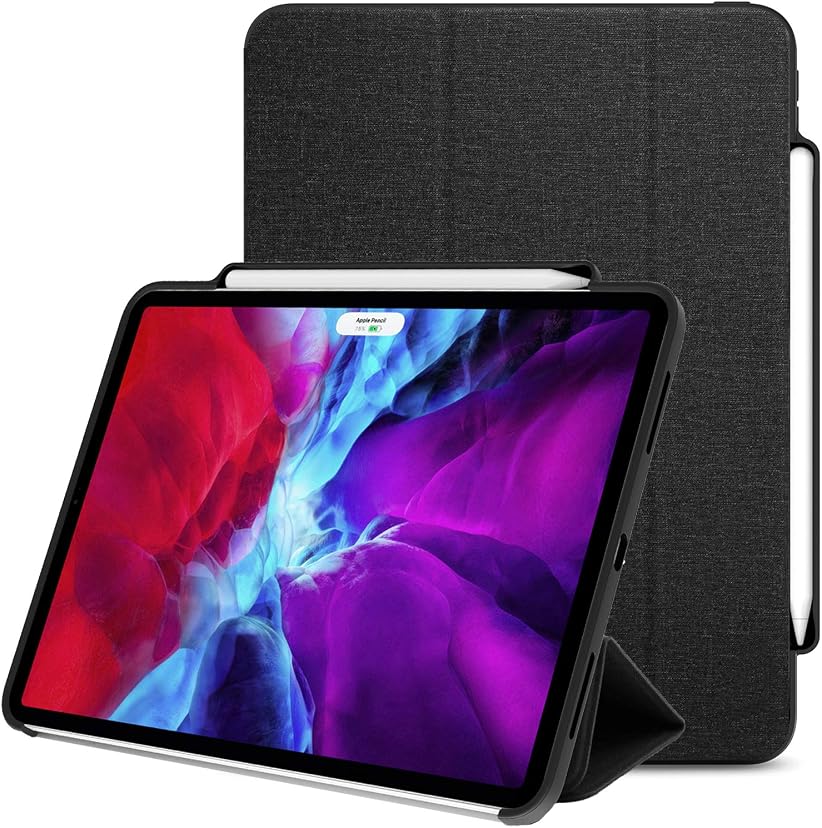
Finding the best iPad cases in 2026 comes down to matching the case to how you actually use your tablet. An iPad that travels in a backpack needs different protection than one that lives on a desk, and a case that works for sketching may not be the one you want for typing. This guide pulls together what reviewers consistently recommend this year — slim everyday folios, heavy-duty rugged shells, and keyboard cases that turn your iPad into a work machine — so you can pick with confidence.
Best iPad Cases Overall: Our Top Picks
Start by thinking about where your iPad spends its time. Everyday lifestyle protection in a slim, durable profile is typically enough for home, school, and commuting, while harsher environments call for something more serious. Either way, even the most affordable iPad costs around $300, so protecting that investment with a case that fits properly is money well spent.
For most people, a slim folio with everyday protection hits the sweet spot. Look for designs with long-lasting printed finishes that resist fading and surface scuffs — they keep the case looking new far longer than cheap coatings. Apple Pencil compatibility matters too, and not every case supports magnetic charging, so confirm it for your specific model before buying.
If you want one case that does the basics well, the affordable Smart Cover–style folios are hard to beat: thin hard-shell backs, a magnetic front flap, and a cutout so the Pencil stays put. They fit all current iPad models and even several older generations, which makes them a safe gift pick. Before you commit, check the return policy and warranty — straightforward returns and clear warranty coverage are a good sign the brand stands behind its build quality, and it’s worth confirming your exact model number (found on the back of the device or under Settings > General > About) so camera cutouts and button placement line up.
Best Rugged iPad Case for Maximum Protection
When drops are a real risk — classrooms, fieldwork, construction sites, or kids — a slim folio won’t cut it. The heavy-duty picks this year share a formula: multi-layer construction, reinforced corners, and high drop-test performance that absorbs serious impact.
The standout in this class passes more than two dozen shock, abrasion, and drop tests. It adds a built-in screen protector and port covers that seal the single port on current iPad models against dust, plus a detachable shield stand that props the tablet up four ways for viewing or typing. That level of armor comes with a real tradeoff: these cases are noticeably bulky and heavier than slim alternatives, and for everyday commuting that extra weight can get old fast. But if your iPad faces concrete, tools, or curious toddlers, the bulk is worth it.
One practical note: rugged cases wear out like anything else. Plan on replacing your case every one to two years, or sooner if you spot cracks, weakened magnets, or peeling materials — a worn case quietly stops protecting.
Best iPad Keyboard Cases for Productivity
A keyboard case turns the iPad from a consumption device into a laptop replacement, and the best ones this year nail three things: comfortable typing, a solid trackpad, and an easy way to switch back to tablet mode.
Apple’s own Magic Keyboard remains the premium pick. The iPad floats above the keys on a cantilevered hinge, tilting from 90 to 130 degrees, with backlit keys and a glass trackpad that handles gestures well. It’s luxurious — and expensive at $300 to $350 depending on size — with two honest drawbacks: the edges don’t wrap around the iPad, so drop protection is minimal, and it costs as much as a budget tablet. A cheaper first-party alternative is the Smart Keyboard Folio at $179.
For most buyers, the smarter value is a third-party keyboard case with a Smart Connector, which powers the keyboard directly — no Bluetooth pairing, no charging cable. The best of these wraps securely around the iPad, adds an adjustable kickstand for typing, watching, or sketching, and includes a backlit multi-touch trackpad plus a dedicated spot for the Apple Pencil. Adjustable stand angles make a genuine difference to posture and comfort during long sessions, whether you’re typing emails or sketching. The main compromise is lapability: these are harder to balance on your knees than the Magic Keyboard, but for desk and table work they’re excellent. Students and remote workers who type for hours will feel the difference most — and if most of your coursework is typing-heavy, a keyboard case is the single best upgrade you can buy for an iPad.
Folio Cases vs Standard Covers: What’s the Difference?
The terms get mixed up, but the distinction is simple. A folio case folds around both the front and back of the iPad: a thin layer of hard plastic or a snug shell grips the back while a hinged front flap shields the screen. A standard back-only cover skips the flap entirely — it’s marginally thinner and lighter and gives the iPad a sleeker profile, but it leaves the display exposed.
The folio’s front flap is what makes it versatile. Fold it along its creases and it becomes a stand for typing, drawing, or watching video, and setting the screen at a comfortable angle reduces neck strain during long sessions. Many folios pack in extras: magnetic closures, auto sleep/wake when you open or close the flap, and slots or loops for the Apple Pencil. Some even add small pockets for cards or documents, which is handy for meetings and travel.
There’s one catch worth knowing: not all cases support Apple Pencil charging, even within the same brand’s lineup. Always confirm charging compatibility against your exact iPad model. When you first fit a folio, align the iPad with the frame or magnetic attachment without forcing it, and close the flap fully so the magnets trigger sleep/wake properly.
Key Features to Look For in the Best iPad Cases
Before you buy, run through this checklist — it separates cases you’ll love from cases you’ll replace in three months.
Model-specific fit. Not every case fits every iPad. Screen size alone isn’t enough: different generations have different dimensions, camera placements, and button positions. Match the case to your exact model number.
Protection where it counts. A clear, scratch-resistant back keeps the iPad looking new without adding much weight, while substantial edge protection guards against the accidental bumps every tablet takes. Raised bezels around the screen and camera add cheap insurance. For maximum defense, look for a dedicated sleeve or flap that keeps the screen cover closed and the Pencil secured.
Stand and viewing angles. Whether it’s a simple two-angle fold or a multi-position design, a good stand removes the need for a separate accessory. Look for stable folding that holds its position while you sketch or type.
Sleep/wake and magnets. Auto sleep/wake support — the iPad sleeping when you close the flap and waking when you open it — is one of those small features you miss immediately when it’s gone. Strong, well-aligned magnets make it work reliably.
Slim but genuinely protective. The best folios provide full front-and-back coverage without unnecessary bulk, using durable yet lightweight materials like polyurethane, vegan leather, or fabric blends. Standard covers that protect only the back leave the display vulnerable, so weigh thinness against real coverage.
Design that lasts. If you care about looks, choose finishes built to resist fading and scuffs. Trend-driven collections offer more visual variety, but only if the prints survive daily handling.
Getting the Fit Right and Keeping Your Case in Good Shape
A case only protects when it fits, so measure correctly: find the model number on the back of the iPad or in Settings > General > About, and match it to the case listing. Don’t rely on screen size alone.
Keep the case clean and it will last longer. Remove it from the iPad first, then wipe the surface with a soft cloth and mild soap and water — never harsh chemicals, which can damage prints and finishes. Let it dry fully before reinstalling. And remember the replacement rule: every one to two years, or sooner if you notice cracks, weakened magnets, peeling materials, or reduced structural support.

Why Your iPad Needs a Case
It’s tempting to run an iPad naked — it looks great — but it’s almost always a mistake. Beyond the obvious protection against drops and accidents, a good case changes how you use the device: the built-in stand makes video calls and sketching sessions comfortable, a keyboard option makes it a genuine laptop alternative, and a secure Pencil holder means the stylus is there when you need it instead of lost in a bag.
There’s also a portability tradeoff to think about honestly. Thicker cases add structural reinforcement but make the iPad heavier and less comfortable to carry; slimmer cases are easier to live with daily but give up some impact resistance. The right answer depends on your routine, not on a spec sheet. And if you’re still deciding which iPad to buy in the first place, our guide to choosing the right iPad model will help you match the tablet to your needs before you shop for its case. A case guards the body and edges, but the display itself deserves its own layer of defense — pairing your case with one of the best screen protectors covers the one surface a case can’t fully protect.
iPad Case FAQs
What brand of iPad case is the best?
It depends on your priorities. Rugged-first brands serve high-impact environments, keyboard-focused brands serve productivity, and minimalist brands serve ecosystem purists. For most everyday users, the best brand is the one offering reliable protection, consistent build quality, and a positive customer experience in a profile you’ll actually carry.
Is an expensive iPad case worth it?
It can be. A higher-priced case often brings better materials, a more precise fit, improved durability, or integrated features like a keyboard or trackpad. The value depends on how you use the device and how much protection you need — a $13 folio that fits well beats a $100 case that doesn’t.
How often should you replace an iPad case?
Every one to two years is the standard guidance, or sooner if you notice cracks, weakened magnets, peeling materials, or reduced structural support. A worn case looks fine while quietly protecting less, so inspect the corners and closures periodically.
What is the best iPad case for students?
Students need portability, everyday drop protection, and Apple Pencil compatibility for note-taking. A slim folio with a secure magnetic closure and stand functionality handles lectures and commuting well, while a keyboard case is the better pick if your coursework is typing-heavy.
Do all iPad cases support Apple Pencil charging?
No — this varies by case and by iPad model, and even cases from the same brand differ. Always confirm Pencil charging support against your exact model number before buying, and make sure the case leaves the charging edge accessible or includes a proper holder.
Are rugged iPad cases too bulky for daily use?
They add noticeable weight and thickness compared to slim folios. For commuting and travel, that bulk can get tiring — but if your iPad faces real drop risk, the tradeoff is worth it. Match the protection level to your actual environment.
What is the difference between an iPad case and an iPad cover?
All iPad covers are cases, but not all cases are covers. Most covers surround the back and add a flap over the screen, protecting body and display. A back-only case hugs the tablet with no flap — thinner, lighter, and sleeker, but with an exposed screen.
