

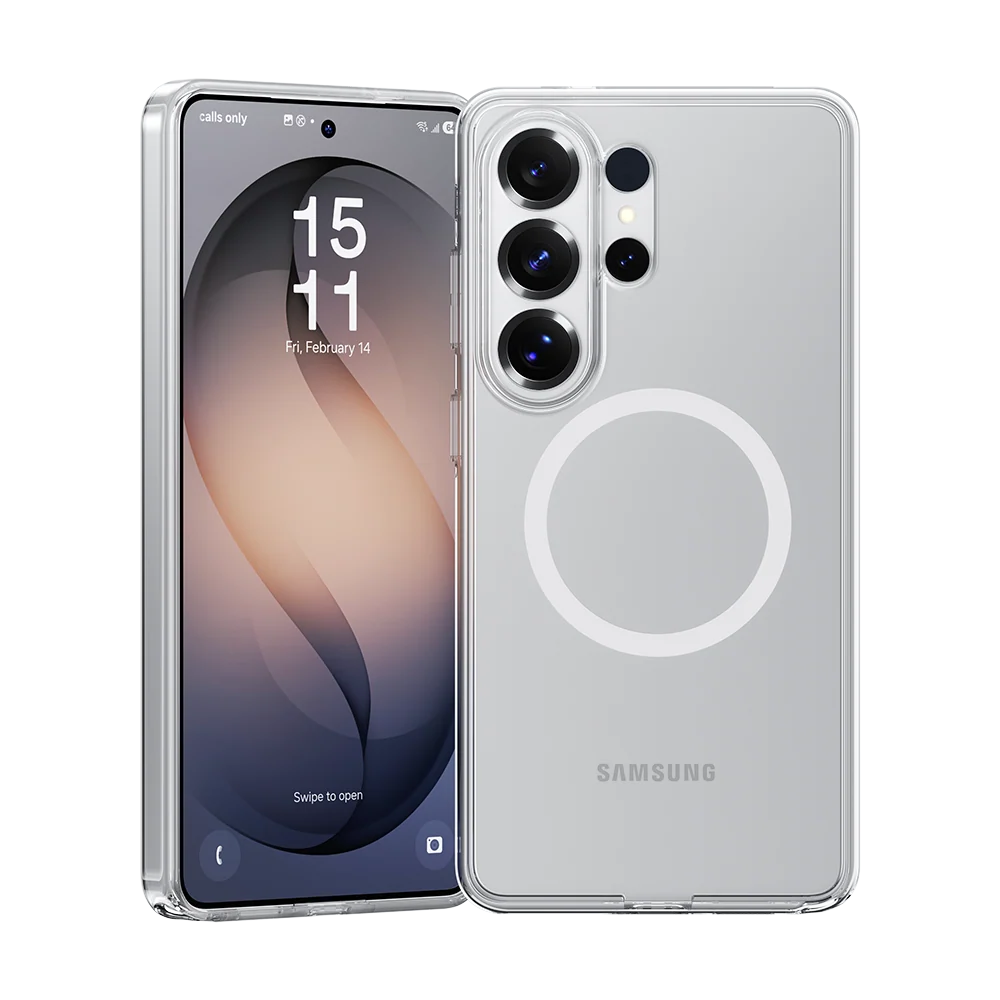
The best Galaxy S26 accessories aren’t just nice extras — this year, one of them is practically mandatory. Samsung’s Galaxy S26, S26+, and S26 Ultra ship without built-in Qi2 magnets, which means the magnetic ring that enables snap-on wireless charging lives inside the case you choose, not the phone. Get the case right and a whole ecosystem of chargers, wallets, and mounts opens up. Get it wrong and you’re charging the slow way. Here’s what to buy, in priority order.
The Five Galaxy S26 Accessories Worth Buying First
If you buy nothing else, buy these five: a magnetic case, a screen protector, a PPS-capable power bank, a proper wall charger, and ecosystem earbuds. That list isn’t arbitrary — each one either protects a four-figure investment or unlocks a feature the phone advertises but can’t fully deliver on its own.
Judge every accessory on four things: price against real-world value (not spec-sheet value), whether it works across multiple Galaxy devices rather than one model, whether it unlocks something you’d otherwise miss — like magnetic charging — and whether it survives daily use past the first month. The S26 lineup also changed dimensions slightly from the S25, so don’t assume old cases fit; they don’t.
Best Cases: Why the Magnet Lives in the Case
This is the single most important buying decision for S26 owners. The phones support Qi2 wireless charging — 15W on the S26, 20W on the S26+, 25W on the Ultra — but with no magnets in the phone itself, you need a magnetic case for chargers, wallets, and mounts to snap on cleanly. Samsung’s official lineup covers the basics: a rugged multi-layer case with raised lips and a padded interior, a clear magnetic case that shows off the finish, a soft-touch silicone magnetic case in several colors, plus carbon and slim magnetic variants that add almost zero bulk while providing the magnetic interface.
Third-party options go further in specific directions. Rugged picks bring military-grade drop ratings with twist-lock mounting systems for bikes and cars. Ultra-thin aramid fiber cases protect against scratches and light drops while staying barely-there. Leather bumper cases develop a rich patina over time at a fraction of premium prices. And one particularly clever design adds magnets strong enough to stick the phone to gym equipment, fridges, and metal surfaces, with a built-in kickstand, a finger loop, and a port cover for extra water protection — the kind of case that changes how you use the phone, not just how it survives drops.
Whatever you choose, make sure it’s actually designed for the S26 series. The dimensional changes from the S25 generation mean old cases won’t fit properly, and a misaligned magnetic ring defeats the entire point.
Best Chargers for the Galaxy S26: Wired, Wireless, and On the Go
Charging is where the S26’s spec sheet gets serious: up to 60W wired on the Ultra (about 75% in 30 minutes) and 45W on the S26 and S26+, plus 25W wireless on the Ultra via Qi2. But Samsung stopped including a charging brick in the box years ago, so those speeds are features you buy separately.
For wired charging, the spec that matters is PPS — programmable power supply. Only a PPS charger delivers the phone’s full Super Fast Charging speeds; a generic 65W brick without it will charge noticeably slower. Samsung’s own 60W adapter guarantees it with zero guesswork, while multi-port GaN chargers let you top up the phone, watch, and earbuds from one brick — if you want a deep dive on multi-device bricks, our GaN charger picks break down the best options for every setup.
Wireless is where the magnetic case pays off. A puck-style Qi2 magnetic charger snaps to the case and drives the Ultra at its full 25W — roughly 50% in 33 minutes, a huge step up from last generation’s 15W cap. Foldable 3-in-1 stations charge the phone, buds, and watch simultaneously and pack flat for travel; look for ones with a cooling fan, since the phone can throttle charging speed when heat builds up at full 25W. For the car, a wireless charging mount with cooling makes even more sense under direct sunlight. And for travel days, a high-capacity power bank with PPS output and retractable cables covers the phone plus everything else in your bag — Samsung also sells a slim magnetic battery pack that snaps to the case for cable-free top-ups, though wired remains faster and more efficient.
Best Audio: Galaxy Buds4 Pro and Smart Alternatives
Earbuds are where staying inside the Samsung ecosystem pays off most. The Galaxy Buds4 Pro, launched at $249, pair instantly, support 24-bit/96kHz audio through Samsung’s Seamless Codec, and pack Adaptive ANC that analyzes your ear shape in real time rather than switching between fixed presets. Call quality gets a genuine upgrade through wider-band voice capture, Live Translate handles 20+ languages through the buds during in-person conversations, and you can trigger your chosen AI assistant directly from them. Six hours with ANC on (20 hours with the case) and an IP57 rating round out a strong flagship package.
That said, one pair rarely covers everything. The Buds4 Pro aren’t ideal for workouts — in-ear fit during movement is a known weak spot — so many people keep a second sport-focused pair with ear hooks for the gym; a five-minute charge delivering an hour of playback is all you need there. And if $249 stings, the previous-generation Buds3 Pro now sells at a regular discount with most of the flagship experience, while the Buds Core covers solid ANC and long battery life well below flagship pricing. Weak iOS support across the range means these make the most sense paired with Android.
Best Screen Protectors for the S26
A screen protector is the cheapest insurance you’ll ever buy against a repair bill in the hundreds — but on a modern Galaxy, there’s one spec to check before anything else: ultrasonic fingerprint compatibility. A protector that blocks the in-display sensor isn’t a bargain at any price.
The S26 adds a wrinkle: an anti-glare coating on the glass. Third-party protectors affect that coating somewhat, so if glare reduction matters to you, Samsung’s own protector — which includes the same coating — is the one to get despite costing more. Otherwise, liquid-install glass protectors keep the fingerprint reader fully responsive on flat models, multipack tempered glass gives you a spare if the first install goes sideways, and flexible film options with alignment jigs make installation far less painful. Premium rigid glass with anti-dust adhesive delivers the clearest, hardest protection if you want the best.
Best Extras: SmartTag 2, Wallets, and Watch Gear
A few more accessories earn their place. The Galaxy SmartTag 2 is the one I’d call genuinely essential for travelers — Samsung’s answer to the AirTag, with Ultra-Wideband directional finding and a physical button you can configure to ring your phone or trigger smart home actions. Being able to show airport staff exactly where your bag is on a map has saved more than one trip.
Magnetic wallets snap to your magnetic case and hold two to three cards without bulking up a pocket; some double as a second kickstand. If you wear a Galaxy Watch 8, budget for bands: the Watch 8 series switched to a proprietary lug system, so old 20mm bands won’t fit — but the new ones click on in seconds. The same connect-everything logic extends to charging stands that top off your phone, watch, and buds together on one pad.

What to Check Before You Buy Galaxy S26 Accessories
A short checklist that applies to everything above:
- Model fit first. The S26, S26+, and S26 Ultra have different dimensions — and all three differ slightly from the S25 series. Match every case and protector to your exact model.
- Magnetic ring required. If you want Qi2 magnetic charging, snap-on wallets, or magnetic mounts, the case must include the magnetic ring. The phone doesn’t have one. For more on magnetic charging gear in general, see our magnetic charger roundup.
- PPS for full wired speed. Only chargers with programmable power supply deliver Samsung’s fastest wired charging. Check the spec, not just the wattage.
- Ultrasonic fingerprint compatibility. Non-negotiable for screen protectors on the S26.
- Cable ratings. Many chargers ship without a cable, and you’ll need a USB-C to USB-C cable rated for the wattage to hit top speed — a braided 60W two-pack is cheap insurance against the dog, the desk thief, and the family member who “borrows” yours.
- Ecosystem fit. Buds, watches, and tags all work best inside Samsung’s ecosystem. Buying them for mixed-platform households means giving up features.
Galaxy S26 Accessory FAQs
Does the Galaxy S26 have built-in magnets for wireless charging?
No. The S26 series is Qi2 Ready, which means it supports the Qi2 standard but has no magnetic ring in the phone itself. The magnets live in Samsung’s official magnetic cases and third-party magnetic cases — that’s what lets chargers, wallets, and mounts snap on.
What charging speeds does the Galaxy S26 support?
Wired: up to 60W on the S26 Ultra and 45W on the S26 and S26+, using Super Fast Charging with PPS. Wireless: 25W on the Ultra, 20W on the S26+, and 15W on the base S26 via Qi2. You’ll need a PPS charger to hit the fastest wired speeds.
Will my Galaxy S25 case fit the S26?
No. The S26 lineup has slight dimensional changes from the S25 series, so old cases won’t fit properly. Buy cases designed specifically for the S26, S26+, or S26 Ultra.
Which screen protector works with the S26’s fingerprint sensor?
Any protector explicitly rated for ultrasonic fingerprint compatibility. Avoid cheap generic glass that doesn’t mention it. Also note the S26’s anti-glare coating: third-party protectors diminish it, so Samsung’s own protector is the pick if you want to preserve glare reduction.
Are the Galaxy Buds4 Pro worth it over the Buds3 Pro?
If you want the latest ANC, 24-bit audio, Live Translate, and AI assistant triggering, yes. But the Buds3 Pro delivers most of the flagship experience at a regular discount now, making it the smarter value pick for most buyers.
What’s the best power bank for the Galaxy S26?
One with PPS support so it can push Samsung’s full charging speed — 45W-class banks recharge an Ultra from empty to about 70% in half an hour. Samsung’s magnetic battery pack is the convenient snap-on option, but a wired PPS bank charges faster and more efficiently.
