

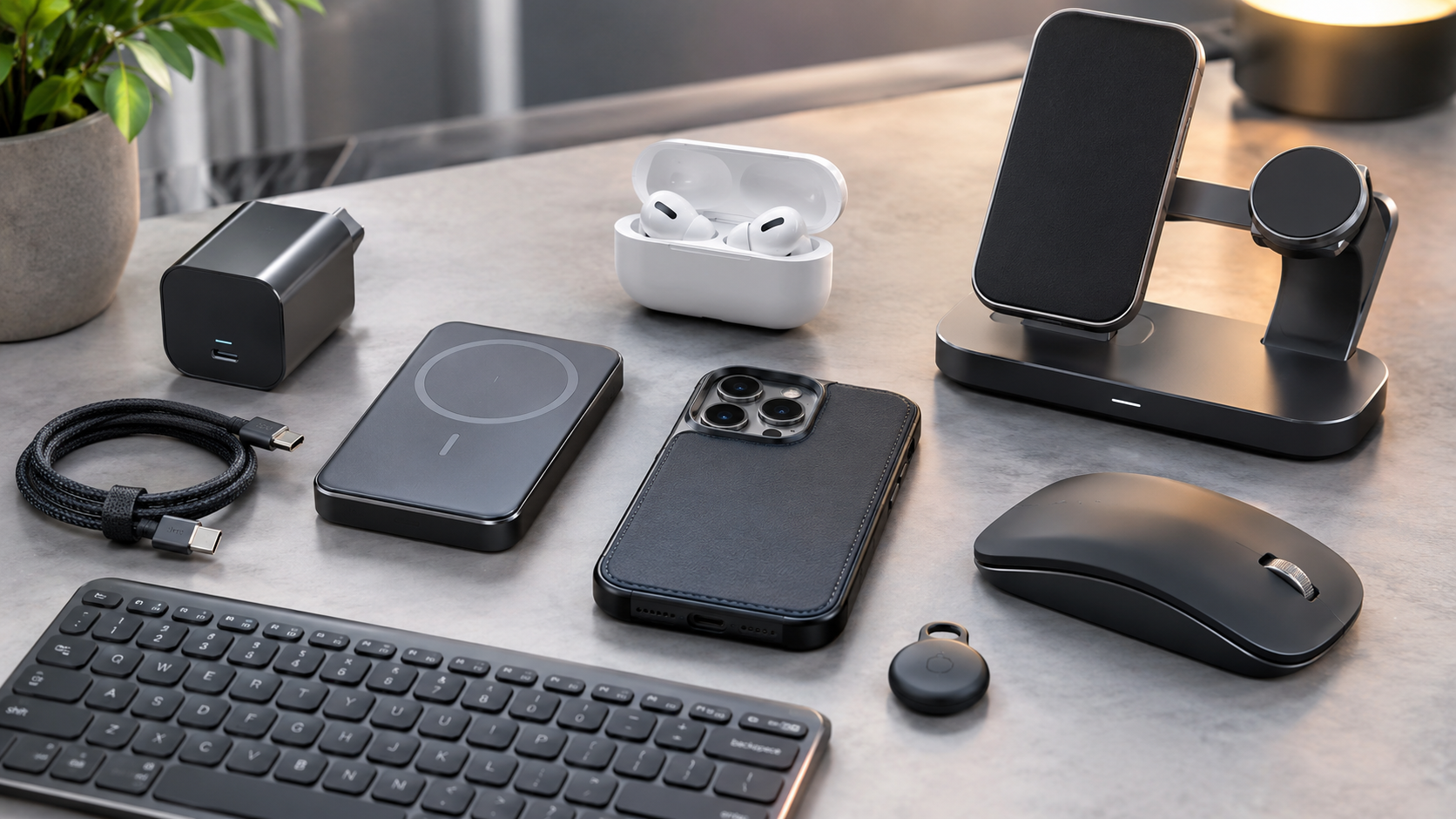
The best Top 10 Accessories in 2026 are no longer simple add-ons. A good charger can reduce the number of adapters in your bag, a magnetic power bank can make mobile charging easier, and quality earbuds can transform calls, music, commuting, and gaming. The challenge is knowing which accessories genuinely improve everyday use and which are mostly marketing.
Current buying guides and reviews show strong interest in USB-C charging, Qi2 and magnetic accessories, wireless earbuds, compact power solutions, ergonomic peripherals, and practical mobile gear.
This guide focuses on 10 accessory categories and standout examples worth considering in 2026, with attention to useful features, limitations, compatibility, and overall value. Instead of treating every expensive product as automatically better, the goal is to identify accessories that solve real problems.
What Makes an Accessory Worth Buying?
A useful accessory should accomplish at least one of three things: make a device easier to use, protect an expensive device, or add functionality that the original product lacks.
Before buying, consider:
- Compatibility: Check your phone, laptop, tablet, or operating system first.
- Build quality: Cables, chargers, stands, and cases experience daily wear.
- Safety: Charging accessories should come from reputable manufacturers and meet appropriate standards.
- Portability: A technically excellent accessory is less useful if it is too large to carry.
- Actual need: Avoid paying for features you will never use.
- Long-term value: A slightly more expensive accessory can be worthwhile if it replaces several cheaper items.
The strongest accessory trends in 2026 are particularly visible around magnetic charging, USB-C, compact power banks, and wireless audio.
Top Accessories Worth Considering in 2026
1. Qi2 or MagSafe Magnetic Charger
Magnetic wireless charging has become one of the most convenient accessory categories for compatible phones. Apple’s MagSafe system uses magnets to align the charger with the phone’s charging coil, while Qi2 extends magnetic wireless charging to compatible devices beyond Apple’s ecosystem.
Why it stands out: You can place the phone on a charger without carefully positioning it on a traditional charging pad. Stands can also keep the screen visible while charging.
What to look for: Verify whether your phone supports MagSafe or Qi2 natively or requires a compatible case. Charging speed also varies between devices and chargers.
Best for: Desk, bedside, and car charging.
2. Compact GaN USB-C Charger
A quality GaN charger is one of the most practical upgrades for people carrying multiple devices. Gallium nitride technology allows manufacturers to produce relatively compact chargers capable of delivering substantial power.
A single multi-port charger can potentially handle a phone, tablet, earbuds, and compatible laptop, reducing the number of adapters in your bag.
Why it stands out: Portability and versatility.
What to look for: Check total wattage, USB-C Power Delivery support, the number of ports, and how power is divided when multiple devices are connected.
Best for: Travelers, students, remote workers, and people with several USB-C devices.
3. Magnetic Power Bank
Magnetic power banks combine portable battery capacity with wireless charging convenience. WIRED’s current 2026 testing includes Qi2/MagSafe power banks, with the Anker MagGo Power Bank highlighted as a practical 10,000mAh option with Qi2 support and a built-in kickstand.
The biggest advantage is convenience: the battery attaches to a compatible phone rather than requiring you to manage a separate cable while using the device.
The downside: Wireless charging can generate more heat and may be less efficient than wired charging.
Best for: Travel, commuting, photography, navigation, and long days away from an outlet.
4. High-Quality Wireless Earbuds
Wireless earbuds remain one of the most useful everyday accessories because they combine portability with audio, calls, noise control, and hands-free convenience.
Current 2026 reviews place different models at the top depending on priorities. TechRadar’s testing highlights the Technics EAH-AZ100 for overall performance, Bose QuietComfort Ultra Earbuds (2nd Gen) for noise cancellation, AirPods Pro 3 for Apple ecosystem integration, and Nothing Ear (a) as a lower-cost option.
What to prioritize: Comfort comes first. Then consider microphone quality, ANC, battery life, codec support, multipoint connectivity, and device compatibility.
Best for: Calls, commuting, travel, entertainment, and focused work.
5. Durable USB-C Cable
A cable is easy to overlook until a cheap one becomes unreliable. A good USB-C cable can be one of the least expensive but most useful accessories in your setup.
However, not every USB-C cable offers the same performance. Some are designed mainly for charging, while others support high-speed data and video.
What to look for: Charging wattage, data-transfer speed, USB standard, connector quality, length, and whether it supports the capabilities of your devices.
Avoid choosing solely by appearance. A braided exterior can improve durability, but the internal specifications matter more.
Best for: Everyone with USB-C devices.
6. Protective Phone Case
A phone case is still one of the easiest ways to reduce the financial risk associated with accidental drops and scratches.
The best case depends on how you use your phone. Slim cases prioritize portability, rugged cases emphasize impact protection, and magnetic-compatible cases add compatibility with MagSafe or Qi2 accessories.
Current accessory testing continues to recommend cases that balance protection with usability rather than simply maximizing thickness.
What to look for: Raised edges around the display and cameras, reliable buttons, good grip, and compatibility with your charging accessories.
Best for: Every smartphone owner, especially people who frequently carry their phones outdoors.
7. Ergonomic Wireless Mouse
A mouse can have a surprisingly large impact on a laptop or desktop setup. Touchpads are excellent for portability, but a dedicated mouse can provide greater precision and comfort for extended work.
A good model should have comfortable dimensions, reliable wireless connectivity, accurate tracking, and buttons that suit your workflow.
Budget models can be perfectly adequate for basic browsing, while professionals may benefit from programmable buttons, multiple-device switching, or higher-end sensors.
Best for: Office work, design, spreadsheets, editing, and extended computer use.
8. Compact Bluetooth Keyboard
A compact keyboard can turn a tablet or laptop into a more comfortable productivity machine. Wireless models are particularly useful for people who switch between workspaces.
When choosing one, consider keyboard layout, key feel, battery life, device switching, and operating-system compatibility.
For mobile workers, a compact keyboard with reliable Bluetooth can be more useful than a large mechanical keyboard that is difficult to transport.
Best for: Writers, students, remote workers, and tablet users.
Read More: Best Tech Accessories in 2026
9. Smart Tracker
Small Bluetooth trackers are useful for keeping tabs on bags, keys, luggage, and other frequently misplaced belongings.
Their value is not really about advanced technology; it is about reducing everyday frustration. Apple’s AirTag ecosystem remains one of the better-known examples, and current 2026 accessory coverage continues to include AirTags among useful everyday gadgets.
Before purchasing, check compatibility with your phone and the tracking network available to that platform.
Best for: Travelers, commuters, students, and anyone who frequently misplaces essentials.
10. Multi-Device Charging Stand
A charging stand can reduce cable clutter while keeping frequently used devices organized. Depending on the model, one stand may charge a phone, earbuds, and smartwatch.
Current Qi2/MagSafe charging guides include multi-device stands from brands such as Belkin and Nomad among notable options.
The important point is compatibility. A three-device charger is not automatically better if your devices use different standards or require different charging speeds.
Best for: Nightstands, offices, and users with several compatible devices.
How to Choose the Right Accessories
The best accessory is not necessarily the one with the longest feature list. Start with the device you already own and identify the inconvenience you want to solve.
For example, someone who travels frequently may benefit more from a compact GaN charger and magnetic power bank than from an expensive desktop charging station. A home-office worker may get more value from a quality mouse, keyboard, and charging setup.
Compatibility deserves particular attention in 2026 because USB-C, Qi2, MagSafe, and proprietary ecosystems can overlap without being identical. A product that physically connects to your device may not necessarily deliver its advertised maximum performance.
Pros and Cons of Buying Premium Accessories
| Category | Main Advantage | Potential Drawback | Best For |
|---|---|---|---|
| GaN charger | Compact, versatile | Higher upfront cost | Travel |
| Qi2/MagSafe charger | Easy alignment | Compatibility limits | Daily charging |
| Magnetic power bank | Convenient portability | Wireless heat/losses | Travel |
| Wireless earbuds | Portable audio | Battery eventually degrades | Everyday use |
| USB-C cable | Affordable essential | Specs vary greatly | All users |
| Phone case | Device protection | Adds bulk | Smartphone owners |
| Wireless mouse | Better control | Another device to charge | Work |
| Bluetooth keyboard | Better typing | Less portable than touch input | Productivity |
| Smart tracker | Helps locate items | Platform dependency | Travel |
| Multi-device stand | Reduces cable clutter | Can be expensive | Desk/bedside |
Common Buying Mistakes to Avoid
One of the biggest mistakes is buying an accessory based only on its advertised headline specification.
A power bank with a huge capacity may be inconveniently heavy. A wireless charger with high theoretical output may not provide that speed to your particular phone. Similarly, inexpensive earbuds can appear impressive on a product page but fall short in microphone quality, comfort, software support, or reliability.
Another mistake is ignoring authenticity. The accessory market contains products that imitate established brands or make unrealistic performance claims. Current consumer guides repeatedly emphasize purchasing charging products from trustworthy sources and checking compatibility before buying.
For chargers and batteries, safety should take priority over saving a small amount of money.
Which Accessories Offer the Best Overall Value?
If you only want to buy a few accessories, prioritize the ones you will use every day.
A practical 2026 setup could begin with a reliable USB-C charger, quality cable, protective case, and wireless earbuds. Add a power bank if you travel frequently. If your phone supports magnetic charging, a Qi2 or MagSafe charger can make daily charging considerably more convenient.
For a work setup, a wireless mouse and compact keyboard may provide more noticeable benefits than decorative accessories. For travelers, portability should be weighted heavily when comparing products.
The key is to build an accessory collection around your actual habits rather than buying every new gadget that appears on a trending list.
FAQ’s About Top 10 Accessories in 2026
What are the most useful accessories in 2026?
The most broadly useful categories include USB-C chargers and cables, wireless earbuds, phone cases, power banks, magnetic chargers, and smart trackers. The best combination depends on your devices and daily routine.
Are Qi2 accessories worth buying?
Yes, if your phone supports Qi2 or works with a compatible magnetic case. Qi2 can provide convenient magnetic alignment and a growing ecosystem of chargers, stands, and power banks.
Is a GaN charger better than a normal charger?
GaN chargers can provide high power in a compact form, making them particularly useful for travel and multi-device setups. However, the actual benefit depends on your devices and charging requirements.
How do I choose a wireless power bank?
Check battery capacity, wireless charging compatibility, wired output, dimensions, weight, heat management, and whether the magnetic connection is compatible with your phone or case.
Are expensive wireless earbuds always better?
No. Premium earbuds can offer better ANC, sound, microphones, comfort, and software, but a less expensive model may provide better value if you do not need those features.
Should I buy a multi-device charging stand?
It can be worthwhile if you regularly charge several compatible devices. Otherwise, a simple charger may be cheaper, smaller, and more flexible.
What should I check before buying a phone accessory?
Check exact device compatibility, charging standards, power requirements, dimensions, warranty or return terms, and the credibility of the seller. For charging products, safety and authenticity should be major priorities.
Conclusion
The best accessories in 2026 are the ones that solve everyday problems without creating new ones. Magnetic charging makes placement easier, GaN chargers reduce the size of travel kits, wireless earbuds improve mobile audio, and quality cables and cases provide essential reliability and protection.
There is no single accessory setup that works for everyone. Instead, match each purchase to your devices, habits, and budget. Prioritize compatibility and safety, then look at convenience and extra features.
For most users, starting with a dependable charger, cable, protective case, and audio accessory is more sensible than buying a large collection of gadgets. From there, a magnetic charger, power bank, tracker, or ergonomic peripheral can be added when it solves a specific need.
