

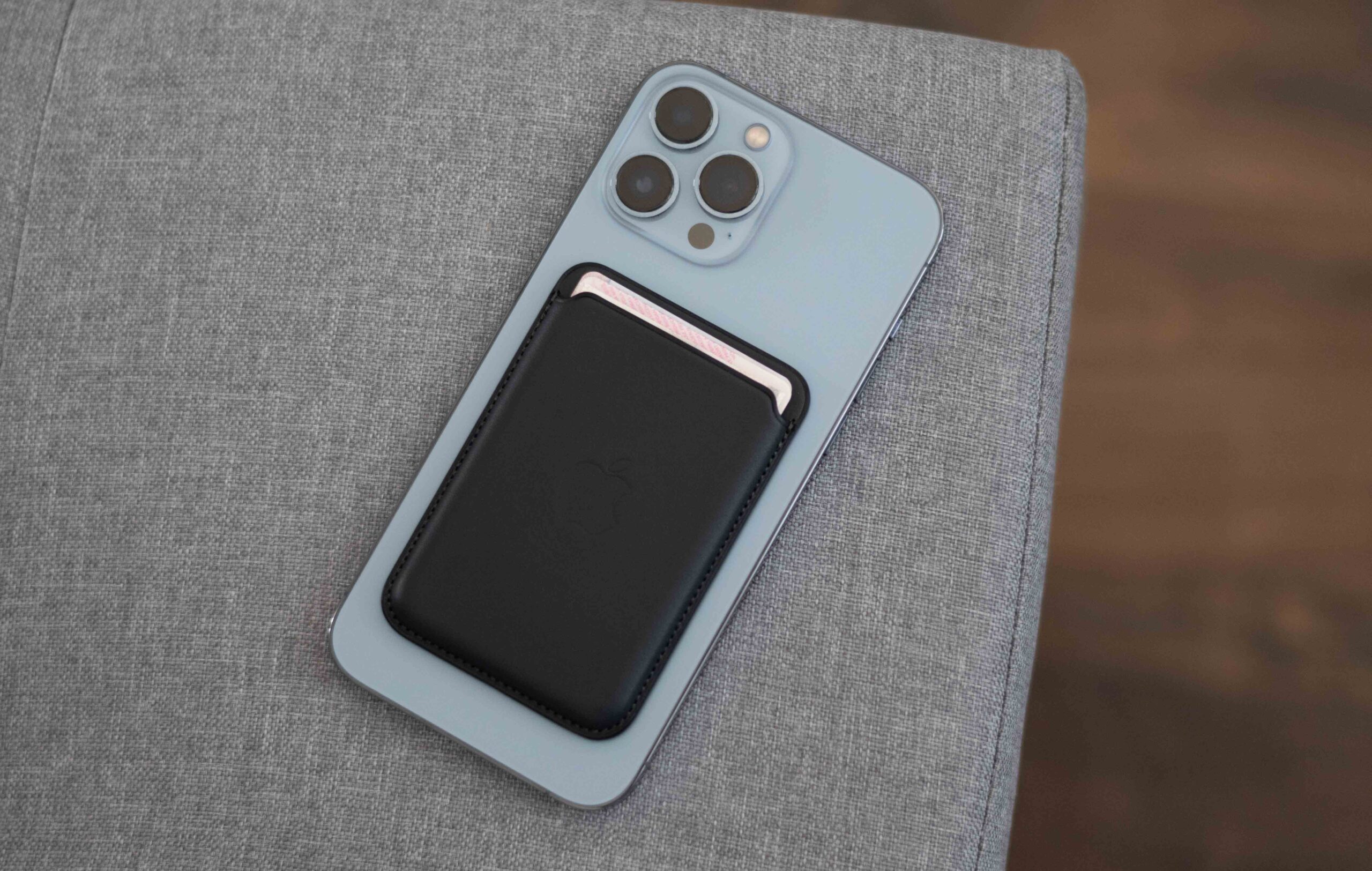
Best MagSafe Wallets 2026: Why Two Pockets Become One
The best MagSafe wallets in 2026 solve a simple everyday problem: your phone is always in your hand, but your cards are somewhere in another pocket, bag, or the car door. Snap a slim magnetic wallet onto the back of your iPhone and the juggle collapses into a single object. Less fumbling at the till, less patting yourself down before you leave the house.
But not every magnetic card holder earns its place. Across five major 2026 roundups and independent testing, the same demands surface again and again: a magnet that survives a bag toss, card slots that release cleanly instead of requiring a fingernail fight, and a profile slim enough that the phone still fits comfortably in a pocket. Pair the right one with the rest of your iPhone accessories and your carry genuinely gets simpler.
The Best MagSafe Wallets at a Glance
| Wallet | Best for | Price | Cards | Find My | Stand |
|---|---|---|---|---|---|
| UAG Metropolis Kevlar | Best overall | ~$60 | Up to 6 | No | Portrait + landscape |
| Apple FineWoven Wallet | Minimalist Apple users | $59 | Up to 3 | Yes | No |
| Smartish Side Hustle | Easiest card access | ~$30 | 3 + cash | No | No |
| Nomad Leather Mag Wallet | Premium leather + tracking | ~$99 | 1–4 | Yes | No |
| ESR MagSafe Wallet | Best budget | ~$20 | Up to 5 | No | Kickstand |
| MOFT Trackable Snap-on | Slim trackable stand | ~$50 | 2 | Yes | 3 modes + grip |
| Peak Design Mobile Wallet Stand | 5–7 cards + stand | ~$60 | Up to 7 | No | Portrait + landscape |
| Ridge Wallet for MagSafe | Maximum capacity | $125–150 | Up to 12 | No | No |
| Pelican MagSafe Wallet | Rugged + RFID security | ~$30–60 | 4–5 | No | Varies |
| Journey LOC8 | Tracker + stand combo | ~$90 | 5 | Yes | Adjustable |
| Casetify MagSafe Wallet | Personalised style | ~$38 | 3 | No | No |
| Supcase MagFlip | Rugged stand wallet | ~$42 | 5 | No | 2-height stand |
The Best MagSafe Wallets in Detail
Apple iPhone FineWoven Wallet with MagSafe — Best Minimalist Apple Option
The official wallet costs $59, holds up to three cards, and remains the only MagSafe wallet with Apple’s deep Find My integration: detach it and your iPhone alerts you with the last known location. The FineWoven micro-twill is made from 100% post-consumer recycled content, giving it a lighter environmental footprint than leather.
Three cards is the practical reality — an ID, one payment card, and perhaps a backup. Independent testing did flag that a two-card load can loosen if shaken hard, so test your own combination before trusting it. What you get instead is the slimmest possible profile and perfect colour matching with Apple’s own cases, plus the reassurance that a detachment triggers an alert within seconds. It lacks RFID shielding and any stand function, but for Apple-ecosystem loyalists who travel light, nothing feels as integrated.
UAG Metropolis Kevlar MagSafe Wallet — Best Overall
Named the overall winner by WIRED’s testing, the UAG Metropolis pairs a Kevlar inlay with RFID blocking, a claimed 2.5mm magnet assembly, and a stand that props your phone in portrait or landscape. Urban Armor Gear rates it for up to six cards or bills, split across interior and exterior sections — enough to genuinely replace a small traditional wallet.
The stand makes it more useful on a desk or aeroplane tray table than a basic card sleeve, and the Kevlar build keeps it light while feeling far tougher than plastic or fabric. The trade-offs are bulk and the absence of Find My: six cards and cash make it noticeably thicker than a two-card minimalist, and you get no location tracking. If you want one wallet that does most things well, this is the strongest default pick.
Smartish Side Hustle — Easiest Card Access
The Side Hustle’s defining trick is side loading: cards slide out with a thumb push while the wallet stays snapped to your phone. At around $30 with a hard shell and extra-strength magnets, it is the value pick for anyone who pays in person daily and hates detaching a wallet at every checkout.
It holds three cards plus some cash comfortably, uses vegan leather with a clean finish, and the design is deliberately simple — no tracker, no stand, nothing to charge. The limitation is capacity: if your carry includes a transit card, an ID, and two bank cards, you will need to edit. For the three-card lifestyle it is nearly perfect.
Nomad Leather Mag Wallet — Best Premium Leather with Find My
Nomad combines vegetable-tanned Horween leather with a spring-loaded card mechanism for one to four cards, Apple Find My support, and wireless recharging — a full charge lasts around five months. At roughly $99, it targets buyers who want traditional leather to age beautifully without giving up magnetic convenience.
The Find My here is location-based, not Precision Finding: Nomad explicitly says the wallet lacks UWB, so close-range directional finding like an AirTag is not available. It also skips RFID blocking, which Nomad argues is unnecessary for everyday use. Buy it for the leather, the build, and the peace of mind of tracking; expect premium pricing in return.
ESR MagSafe Wallet — Best Budget Pick
Around $20 buys five-card capacity, a kickstand, a clear ID window, and 20 N52 magnets rated for 3,200g of holding force — plus an RFID-blocking card included in the box. It is the recommendation for anyone who wants the core MagSafe wallet experience without premium pricing.
The polyurethane leather exterior will not develop a patina, and there is no tracking, but the utility-per-dollar ratio is unmatched. Make sure you are buying the basic ESR wallet rather than its pricier Geo variants, and note it is not compatible with the smaller iPhone 13 and 12 mini bodies.
MOFT Trackable Snap-on Stand & Wallet — Best Slim Trackable Stand
At $49.99, MOFT packs Apple Find My, three viewing modes, and a grip function into one of the slimmest trackable designs available. The battery runs about six months on a wireless charge, and the whole thing feels barely there on the back of the phone.
The price is the two-card limit — a licence and one payment card, realistically. Add a third card and you will need a different wallet. For the committed minimalist who also wants hands-free video and tracking, few products pack this much function into so little thickness.
Peak Design Mobile Wallet Stand — Best Stand for Five to Seven Cards
Peak Design rates this for up to seven cards, uses a friction hinge for genuinely stable viewing, and supports both portrait and landscape. The empty wallet measures about 6mm, and the recycled nylon construction is weatherproof — though independent testing noted the fabric can pick up grime over time.
A magnetic flap keeps cards secure and a pull tab makes retrieval easy. There is no Find My and the nylon is less wipe-clean than leather, but if you want to replace a small wallet and gain a reliable stand in one accessory, this is the category’s best-executed example.
Ridge Wallet for MagSafe — Best for High Capacity
The Ridge is the capacity specialist: one to 12 cards via interchangeable plates, N52 neodymium magnets, RFID blocking, and an optional strengthening tray for extra hold. The metal construction feels indestructible and the expandable format suits people who genuinely need a dozen cards.
Access is naturally slower than a side-loading design, and independent testing found the magnets could feel weaker than expected for the $125–150 price — the optional tray addresses that. Buy it only if you truly need the capacity; two-card carriers pay for space they will never use.
Pelican MagSafe Wallet — Best Rugged and Secure
Pelican brings its protective-equipment DNA: a flip-open hardshell composite design, MIL-GRADE drop protection, IPX4 splash resistance, RFID blocking, and magnets rated to support three times the phone’s weight. One version holds four cards plus cash in two compartments; another adds five-card capacity with a carbon and Kevlar finish.
Travel + Leisure selected the Pelican as its overall winner for durability, security, and card access. The trade-off is aesthetic — this is utility gear, not a fashion piece — and there is no Find My. For active users, it is the toughest MagSafe wallet money can buy.
Journey LOC8 — Best Tracker-and-Stand Combination
The LOC8 combines Find My tracking, RFID protection, five-card capacity, and an adjustable portrait/landscape stand at around $89.99. Hands-on coverage found it practical for people who want more storage than the Apple or MOFT wallets offer without surrendering tracking.
Journey sells several similar-looking models (LOC8, EZMO, VERSA), so verify the exact variant before buying — capacity, stand design, and tracking support are not shared across the family. This is the pick for the buyer who wants everything in one thicker package.
Casetify MagSafe Wallet — Best for Personalised Style
Casetify applies its customisation strengths to the MagSafe wallet: dozens of colours and patterns, with monogram or artwork options on a vegan-leather body. It holds three cards with magnetic shielding and costs around $38.
Card access can be slightly fiddly depending on the load, and there is no tracking or stand. But if you want your phone’s back to match your personal style rather than anyone’s idea of “premium minimal,” Casetify is unmatched for variety.
Supcase MagFlip — Best Rugged Stand Wallet
The Supcase MagFlip is the chunky Swiss-army option: aluminium and silicone construction, five-card capacity, large magnets, an RFID-blocking card, and a folding two-height stand. Tom’s Guide fit seven cards in its test, well above the rated five.
It is built for utility, not pocketability — this is the thickest wallet on this list. If your setup needs to survive frequent handling while still doubling as a video stand, the MagFlip earns its bulk.
Worthwhile Alternatives
Bellroy Mag Wallet — a premium three-card option in leather or Bellroy’s INNOVERA material with a microfiber lining. Pack Hacker found it secure and well made; treat its stand function as a bonus rather than the reason to buy.
PopSockets PopWallet+ for MagSafe — the grip-first choice: three cards plus an integrated PopSocket for one-handed use of large phones. Testing noted finish wear after about six months, so buy for grip and convenience.
MOFT Snap Field Wallet — a folding design with room for around seven cards, cash, coins, a SIM slot and ejector, plus a kickstand. Thicker than minimalists will tolerate, but the most storage outside the Ridge.
Satechi Vegan-Leather Magnetic Wallet Stand — the thin-and-slim pick at roughly 0.35 inches with two cards inside, transforming into a stand with an adjustable viewing angle rather than one fixed position.
How to Choose the Best MagSafe Wallet
Magnet strength. The single most important spec. A weak magnet is a dealbreaker — it detaches in a bag or slips off in a pocket. Look for N52 magnet counts or tested holding-force figures, and check reviews for real-world retention before buying.
Card capacity. Audit your actual carry: most people need two to four cards. Slim wallets hold 2–3; five is the sweet spot for a wallet replacement; beyond seven you are into Ridge territory. Every extra card adds thickness.
Material and leather quality. Full-grain or top-grain leather ages beautifully and develops a patina; Kevlar and aluminium add durability; vegan leather and polyurethane keep prices down. Match the material to how long you expect to keep the wallet.
RFID blocking. Included on UAG, Ridge, Journey, Pelican, ESR, and some others; Nomad and Apple skip it. Independent analysis notes contactless cards are hard to skim at distance anyway, so treat it as a bonus, not the deciding factor.
Find My tracking. Only Apple, Nomad, MOFT, Journey LOC8, and ESR Geo variants offer it. It gives separation alerts and last-known locations — not AirTag-level Precision Finding unless UWB is specified. Skip it if you never lose things.
Stand function. If you watch video or take calls hands-free, a built-in stand replaces a separate accessory. Check whether it supports both portrait and landscape, and whether the angle is fixed or adjustable.
Case pairing and compatibility. A MagSafe wallet is only as good as the case beneath it: a case without proper magnetic alignment means weak hold and frustrating detachments. Native MagSafe support starts with the iPhone 12 family; for wireless charging, remember to remove the wallet first, since most card wallets should not sit between the phone and the charger — a quick look at our MagSafe chargers guide covers the charging side properly.
How Much Should You Spend
Budget tier ($20–40). Functional wallets that hold a few cards securely, with simple materials and no tracking. The ESR MagSafe Wallet is the standout here — five cards, a kickstand, and an ID window for the price of a takeaway dinner.
Mid-range ($40–80). The sweet spot: better leather, stronger magnets, stands, and the first appearance of Find My. UAG, Peak Design, and MOFT live here, combining quality materials with genuinely useful features.
Premium ($80–150). Full-grain leather, superior construction, and tracking built in. Nomad’s Horween leather and Journey’s everything-in-one design justify the cost for buyers who treat the wallet as a long-term accessory.
Frequently Asked Questions
Which MagSafe wallet is the best?
The best MagSafe wallet depends on your carry. For the strongest all-round pick, the UAG Metropolis Kevlar wins independent testing with six-card capacity and a stand. Minimalists should choose the Apple FineWoven Wallet for Find My integration; quick-access fans should pick the Smartish Side Hustle; budget buyers get the most from the ESR MagSafe Wallet.
How many cards can a MagSafe wallet hold?
Capacity ranges widely. Slim designs hold 2–3 cards, the common five-card designs suit wallet replacement, and the Ridge Wallet stretches to 12 cards. The sweet spot for most people is three to five cards — enough for an ID, payment card, and a backup without defeating the point of going slim.
Do MagSafe wallets work with all iPhones?
Native MagSafe support starts with the iPhone 12 family. iPhone 11 and older need a MagSafe-compatible case with an embedded magnetic ring. Even on supported phones, verify fit: smaller models like the iPhone 13 mini and 12 mini can have overhang or clearance issues with some wallets.
Can I use a MagSafe wallet without a MagSafe case?
Yes, if your iPhone itself supports MagSafe — the magnets are in the phone. But a case without proper magnetic alignment weakens the hold and causes detachments. Many manufacturers also sell stick-on magnetic rings for non-MagSafe phones and cases, though hold strength varies.
How well do MagSafe wallets stay on?
Well, provided the magnets are strong and the case is properly aligned — surviving bag tosses and active days in most cases. The Apple FineWoven and MOFT models add Find My alerts as insurance. Test the hold on your actual case before committing, and wipe magnetic surfaces occasionally since debris weakens the connection.
Is a MagSafe wallet worth buying?
If you carry three or fewer essential cards and want to merge phone and wallet into one object, yes. It cuts pocket clutter, speeds up checkout, and forces a useful edit of your card collection. If you carry six-plus cards, cash, and receipts, a traditional wallet or a high-capacity MagSafe wallet like the Ridge is the better fit.
Will a MagSafe wallet damage or demagnetise my cards?
Properly designed wallets are shielded: Apple says its wallet is safe for credit cards, and Nomad says its magnet array will not affect cards. The exceptions are hotel key cards, magnetic access badges, and some gift cards, which are more vulnerable — keep those separate unless the manufacturer confirms safety.
Can I wirelessly charge my iPhone with the wallet attached?
Generally no — most card wallets should be removed before wireless charging, and loose cards must never sit between the phone and the charger. Some trackable wallets (Nomad, MOFT, ESR Geo) recharge their own batteries on a Qi or MagSafe pad, but that charges the wallet, not the phone through it.
What should I look for when buying a MagSafe wallet?
Prioritise magnet strength, card capacity matched to your real carry, material quality, and card access that does not require removing the wallet. Then weigh the extras: Find My tracking if you misplace things, a stand if you watch video hands-free, and RFID blocking for peace of mind.
What is the difference between slim and tough MagSafe wallets?
Slim wallets hold 2–3 cards with clean alignment and fast access, often with a pull tab — best for minimalists. Tough options use stronger magnets, textured grips, and harder shells for active days, usually with RFID blocking as standard — best for commuters, travellers, and anyone hard on their gear.
