

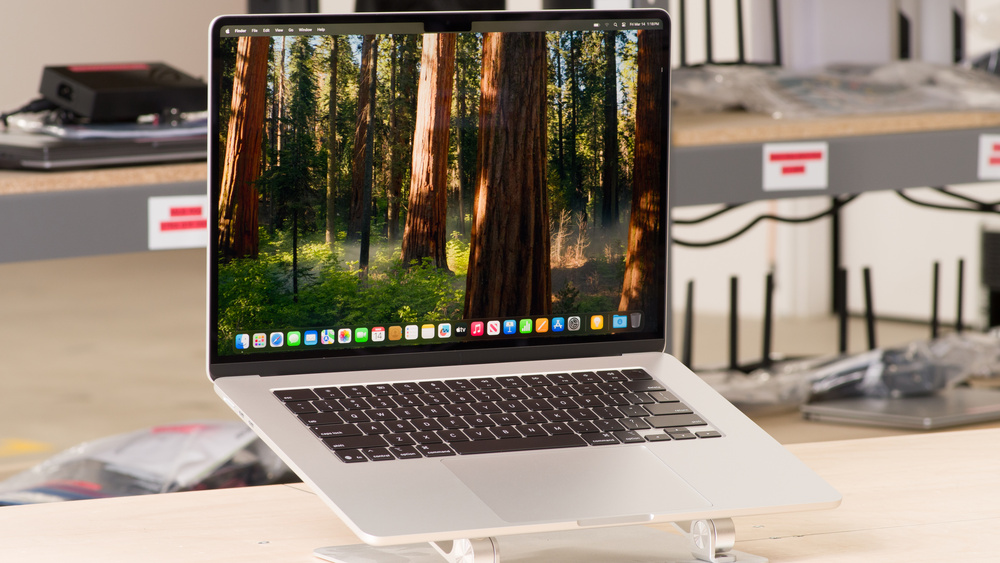
This MacBook Air M4 review has a simple answer at the end: for the vast majority of buyers, this is still the laptop to buy. Five major review outlets, thousands of owner ratings, and independent lab tests all land in the same place. Apple’s fanless M4 machine delivers desktop-class speed, genuinely all-day battery life, and a premium aluminum build at a starting price of $999 for the 13-inch and $1,199 for the 15-inch — $100 less than the models it replaced.
It is not a radical redesign. The ports are still sparse, the display still runs at 60Hz, and the base model still ships with only 256GB of storage. But the things Apple improved — M4 performance, dual external-display support with the lid open, a better webcam, and 16GB of base memory — are exactly the things that matter for everyday use.
MacBook Air M4 Review Verdict: Still the Default Recommendation
Reviewers from WIRED to The Verge describe the same machine: fast, light, quiet, and dependable. The 13-inch is the pick for students and frequent travelers; the 15-inch is the default for anyone who wants more workspace and fuller six-speaker sound without paying MacBook Pro prices.
The value story is what tips it. At $999, the base configuration now includes 16GB of unified memory — a meaningful upgrade over the 8GB base of earlier generations. Lab tests show the fanless M4 staying faster than Intel’s latest chips even under constant load, in complete silence. That combination is why the Air earned a spot among our top gadgets of 2026.
MacBook Air M4 Specs at a Glance
| Spec | 13-inch | 15-inch |
|---|---|---|
| Chip | Apple M4, 10-core CPU (4 performance + 6 efficiency cores) | Apple M4, 10-core CPU |
| Graphics | 8-core GPU | 10-core GPU |
| Memory | 16GB unified memory (configurable to 24GB / 32GB) | |
| Storage | 256GB – 2TB SSD (not user-upgradeable) | |
| Display | 13.6-inch, 2560×1664 | 15.3-inch, 2880×1864 |
| Display type | IPS Liquid Retina, 500 nits, P3 wide color, True Tone, 60Hz | |
| Camera | 12MP Center Stage webcam with Desk View, 1080p video | |
| Ports | MagSafe 3, 2× Thunderbolt 4 / USB4 (40Gb/s), 3.5mm headphone jack | |
| Wireless | Wi-Fi 6E, Bluetooth 5.3 | |
| Battery | 53.8Wh, up to 18 hours video | 66.5Wh, up to 18 hours video |
| Weight | 1.24kg / 2.7lb | 1.51kg / 3.3lb |
| Thickness | 11.3mm | 11.5mm |
| Starting price | $999 | $1,199 |
Design and Build: Thin, Light, and Completely Silent
The slim aluminum unibody is unchanged in shape — 11.3mm thin on the 13-inch — and it still feels remarkable to pick up. The 13-inch model weighs just 1.24kg, light enough to disappear into any backpack. Space Gray is gone; Sky Blue takes its place, and dark finishes like Midnight still show fingerprints.
There is no fan at all, which owners praise more than almost anything else. It stays dead quiet and cool to the touch during normal work — no spin-up noise on video calls, no heat soaking into your lap. The device is built from 55% recycled materials, and build quality is described across reviews as best-in-class.
The backlit Magic Keyboard is comfortable for long writing sessions, though key travel is shallow. Touch ID handles logins and purchases, and the large Force Touch trackpad remains one of the best in the business — especially when you don’t carry a mouse.
Display: Bright and Color-Accurate, but Stuck at 60Hz
The Liquid Retina panel earns consistent praise for everyday quality. Independent lab testing measured over 500 nits of brightness, 98.7% P3 coverage, and 100% sRGB, with excellent factory calibration and no PWM flickering — easy on the eyes during long sessions.
It is sharp at 224 pixels per inch, and colors are consistent across the panel with practically no backlight bleed. Owners call it vibrant and crisp for both work and video.
The compromises are real, though. It is still a glossy 60Hz panel with no nano-texture or matte option, so reflections are visible near windows and motion is less fluid than 90/120Hz Windows rivals. Blacks look gray next to OLED screens. If deep blacks or high refresh matter to you, only the MacBook Pro offers them — at a higher price and weight.
Performance: M4 Muscle Without a Fan
The M4 brings a clear step up from the M3: The Verge measured CPU and GPU results around 20 percent higher, with its Blender test finishing nearly twice as fast. Single-core performance is described as at least two generations ahead of the Windows competition, and the chip carries hardware ray tracing plus a 16-core Neural Engine with 120GB/s of memory bandwidth.
Brief tasks fly — compiling code, batch photo edits, and light-to-moderate 4K video work all run smoothly. But the fanless chassis has limits. In a ten-run Cinebench 2024 sequence, one test unit fell from 844 points to the mid-600s, with the SoC dropping from roughly 29W to 9W under combined load. Surface temperatures reached 39°C between the G and H keys and 42.2°C at the hottest point underneath.
In practice, that means hours of rendering, large builds, or sustained 3D work belong on an actively cooled machine like the MacBook Pro. For browser tabs, Office, Zoom, coding, and creative work in bursts, the Air’s speed is more than enough — and it never makes a sound doing it.
Battery Life: Leave the Charger at Home
Apple claims up to 18 hours of streamed video and 15 hours of wireless web use. Independent tests come close: TechRadar recorded 14 hours 51 minutes of web browsing on the 13-inch, PCMag measured 18 hours 31 minutes on the 15-inch, and one mixed-use test at 150 nits lasted 15 hours 14 minutes.
A full day of classes or office work — browsing, notes, documents, video calls at sensible brightness — is comfortably covered. Heavier mixed use can drop closer to eight hours, and max brightness, long Zoom calls, or video exports shorten runtime further. Charging supports 70W fast charge, though the in-box 35W dual-port adapter is slower than some reviewers would like.
Ports, Webcam, and Connectivity
This is the Air’s persistent weak spot. You get MagSafe 3 charging plus two Thunderbolt 4 ports — both on the left side — and a 3.5mm jack. There is no USB-A, HDMI, SD card slot, or Ethernet, and no way to add them later. Most buyers will want one reputable USB-C hub; photographers and anyone on dorm Ethernet should budget for adapters — check our roundup of the top tech accessories of 2026 for options.
One genuine upgrade: the M4 Air now drives the built-in display plus two external 6K/60Hz monitors simultaneously, fixing the M3’s lid-closed limitation. That makes a proper three-screen desk setup possible. Wireless stays at Wi-Fi 6E and Bluetooth 5.3 — no Wi-Fi 7.
The webcam is another real improvement. The 12MP Center Stage camera keeps you framed on calls, Desk View can show your workspace during presentations, and 1080p output is a major step up from older Air cameras. The 15-inch adds a six-speaker system with force-cancelling woofers that reviewers call notably fuller for movies and calls.
Memory and Storage: Choose Carefully at Checkout
Neither memory nor storage can be upgraded after purchase, so the configuration screen matters. The good news: 16GB of unified memory is now standard, and it is enough for most coursework, coding, multitasking, and moderate creative work.
Step up to 24GB if you run Docker containers, virtual machines, large projects, or heavier creative multitasking. The 32GB option is justified only by a known workload — at that price you are nearing MacBook Pro territory. For storage, 512GB is the sensible mainstream pick; 256GB fills fast with macOS, apps, photos, and offline work, and Apple’s $200 charge for the 512GB upgrade is widely criticized.
MacBook Air M4 vs the Competition
Against Windows thin-and-lights, the Air’s efficiency is the headline. The M4 matches or beats Intel Core Ultra in single-core benchmarks while drawing roughly half the power — which is why it lasts 18 hours to rivals’ 10–12 and stays silent without a fan. Comparable machines like the Dell XPS 16 ($1,499) and ThinkPad X1 Carbon ($1,549) start several hundred dollars higher.
Against the 14-inch MacBook Pro, the trade is clear: the Pro wins on sustained performance, optional nano-texture display, and 120Hz, but it is bulkier and pricier. Against the older M3 Air, the M4 is about 20 percent faster and adds lid-open dual-display support — worth it if prices are close.
Who Should Buy It — and Who Should Skip It
Buy it if you want a light, silent Mac with all-day battery life and strong everyday performance. It suits students, professionals, content creators, and everyday users — essays, research, Office work, web development, photo editing, and light-to-moderate 4K video.
Skip it if you need lots of built-in ports, sustained workstation performance, or a matte high-refresh display. Gamers face a limited macOS library, CUDA and serious local ML work need NVIDIA hardware, and anyone running Windows-only course software should check compatibility first.

FAQs
Who is the MacBook Air M4 best for?
It is best for the broadest range of buyers: students, professionals, content creators, and everyday users who want a silent, fast, long-lasting laptop with best-in-class build quality. Heavy gamers and anyone who needs more than two external displays should look elsewhere.
Is the MacBook Air M4 worth the price?
Yes — at $999/$1,199 it is exceptional value when you factor in 18-hour-class battery life, the silent fanless design, and Apple’s typical 5–7 years of software support. The M4 alone outperforms many Windows laptops costing hundreds more. Just configure memory and storage carefully at purchase, since neither can be upgraded later.
Can the MacBook Air M4 drive multiple external displays?
Yes. Unlike the M3 generation, the M4 Air supports the built-in display plus two external displays up to 6K/60Hz at the same time, with the lid open. If you need three or more external monitors, step up to a MacBook Pro with M4 Pro or M4 Max.
How does the M4 chip compare to Intel Core Ultra?
In benchmarks, the M4 generally matches or exceeds Intel Core Ultra in single-core performance while drawing roughly half the power. The practical result is a laptop that feels just as fast but lasts dramatically longer on battery — and never needs a fan to do it.
The Bottom Line
The MacBook Air M4 is not exciting, and that is the point. It takes an already excellent laptop and fixes the parts that mattered: meaningful M4 performance gains, 16GB of base memory, a better webcam, proper dual-monitor support, and a lower starting price. The trade-offs — sparse ports, a glossy 60Hz display, and pricey storage upgrades — are familiar and narrow.
For most people shopping for a laptop, this MacBook Air M4 review ends where most reviews do: it remains the best laptop for most people, and the default recommendation until proven otherwise.
